The meeting management
platform for Microsoft 365
A booked room is not a ready meeting. AskCody connects the room, the catering, the room setup and the guests to the meeting itself, in Outlook and Exchange, so every team works from the same plan and the meeting actually takes place.
Built on, with, and for tech you trust
Microsoft Azure, Microsoft 365 and modern add-ins for Outlook.
Recognized by analysts
Named a market-leading vendor in the Meeting Management category.
A meeting is a promise. Many teams keep it.
The invite says Thursday at 10:00 in the Board Room, with lunch for twelve and two guests from a client. Behind that one line, a room calendar, a kitchen, a facilities team and a reception each hold a piece of the meeting. When they work from separate tools, emails and spreadsheets, the gaps are where meetings fail quietly: the lunch that arrives at the old time, the guest nobody expected, the room nobody gave back.
AskCody is the meeting management platform for Microsoft 365 that closes those gaps. Everything a meeting needs is booked in the meeting itself, and every team works from that one record. When the calendar says a meeting will happen, it happens: in the right room, with the right setup, and with the right people expected.
For employees and assistants
One Outlook invite for the room, the catering and the guests. Nothing new to learn outside Outlook.
For the teams behind the meeting
Kitchens, facilities, reception and meeting coordinators see what to deliver, where and when, and every change reaches them.
For IT
Native to Microsoft Exchange, with users from Microsoft Entra ID. No second calendar to keep in sync.
Everything around the meeting, in one platform
Six parts of one platform, all sharing the same booking in Microsoft. Book the room, order the lunch, welcome the guest, and see what it all adds up to.
The right room, every time.
Book rooms in Outlook, see what is free, and let the rooms nobody uses go back to the people who need them.
Explore Meeting Room BookingLunch that follows the meeting.
Order catering on the invite. When the meeting moves or is canceled, the kitchen already knows.
Explore Meeting CateringRooms ready before anyone arrives.
Request room setup and AV with the booking, so facilities and AV teams get the job with every detail.
Explore Facilities ServicesFind your way, and your desk.
Book desks and rooms on interactive floor plans, so people know where to go before they get there.
Explore Maps and Desk BookingGuests who feel expected.
Register guests on the invite, check them in at reception, and let the host know they have arrived.
Explore Visitor ManagementPlan your space on facts.
See which rooms are busiest, which are booked but rarely used, and what services cost, and decide on data instead of gut feel.
Explore Workplace InsightsThe features that make it work
The tools your people use every day, and the rules and integrations underneath them.
Bookings, Services and Visitors.
Book the room, the catering and the guests in Outlook for Windows, Outlook for Mac and Outlook on the web.
See the Outlook add-ins Workplace CentralEvery meeting in one view.
See every meeting, room and service. Drag a meeting to a new time or room, and the catering, AV and guests follow.
See Workplace Central AskCody MapsFind it on the floor plan.
Interactive floor plans show what is free and what is booked, and you book a room or a desk straight from the map.
See Maps Room displaysCheck in, or give the room back.
The display at the door shows who has the room. If nobody confirms the meeting in time, the room is released for others.
See room displays Meeting dashboardsThe day at a glance.
Screens in the reception, the entrance or near meeting room clusters show current and upcoming meetings and availability.
See meeting dashboards Booking rules and policiesRules that hold in plain Outlook.
Decide who sees which rooms and desks with Entra ID groups, and set deadlines and opening days per provider.
See booking rules and policies Native Microsoft integrationsExchange, Graph and Entra ID.
Exchange Online through Microsoft Graph, Exchange Server through EWS, and users from Entra ID with single sign-on.
See the Microsoft integrations AskCody AssistantAnswers where you work.
Ask a question in the Management Portal and get answers from the AskCody Help Center, with help to find the right page.
See the Assistant Product updatesRaising the bar, release by release.
See what is new in AskCody, with every improvement explained on the Product Updates blog.
See the latest product updatesIf the meeting changes, everything changes with it
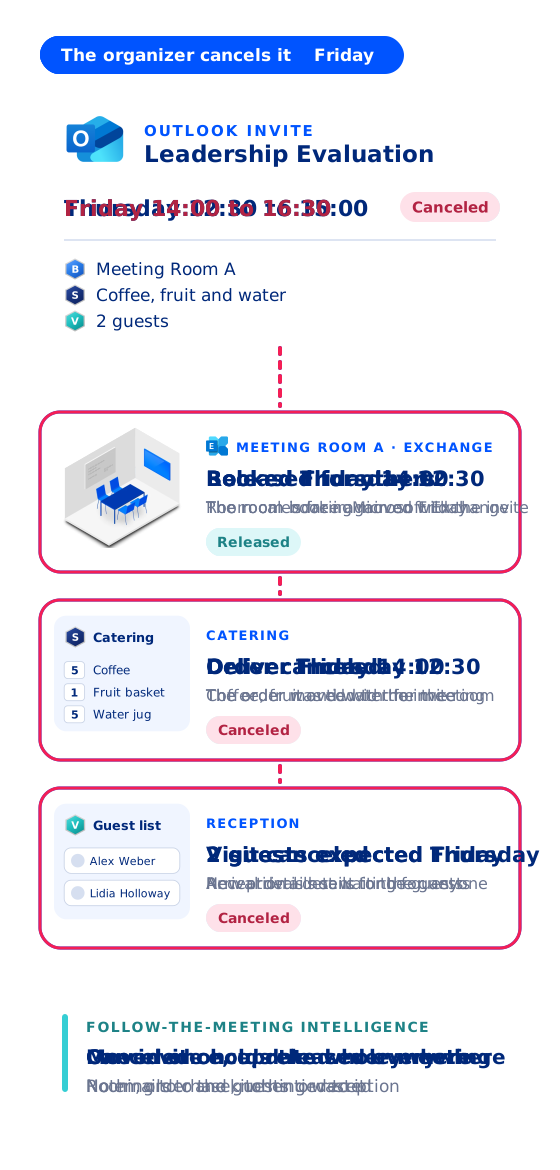
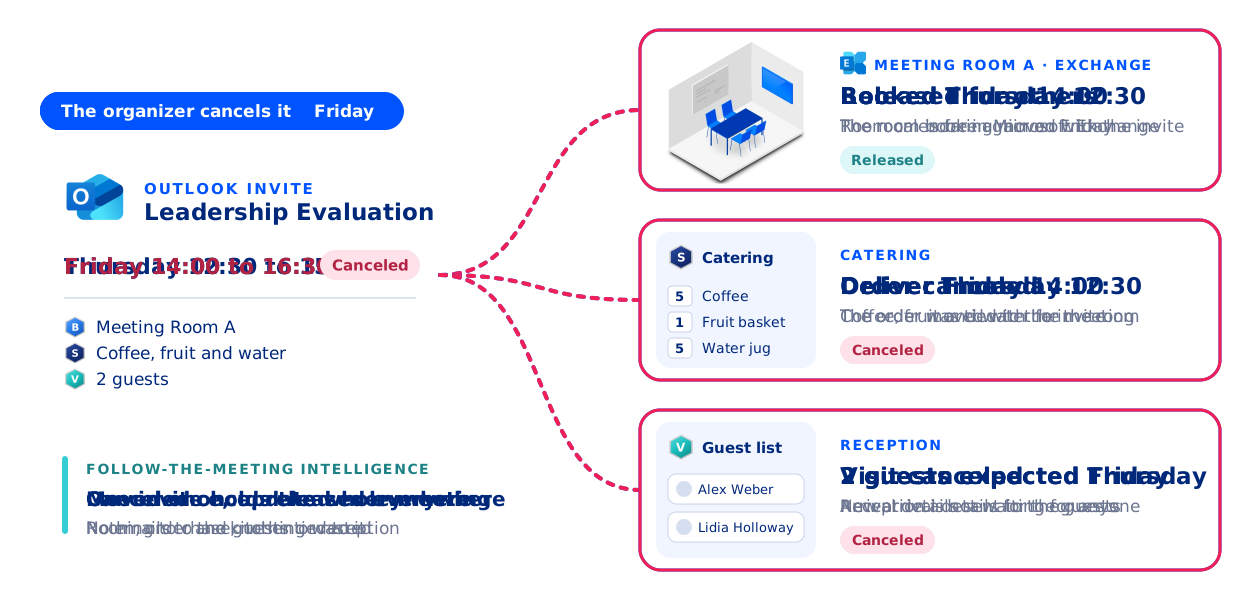
Follow-the-Meeting Intelligence is the principle AskCody is built on. The meeting is the anchor for everything attached to it: the room, the catering, the room setup and AV, and the guests. Move the meeting in Outlook or in Workplace Central, and the room booking, the orders and the visitor registration move with it, to the new time and room. Cancel it, and the room is free again and the orders are canceled.
If an order can no longer change, for example because the kitchen has already prepared it, it is not changed silently: the organizer is told, so a person decides.
Read about Follow-the-Meeting Intelligence
No middle layer, no second calendar
AskCody is built into Microsoft 365, not bolted on. Every meeting room is a room mailbox in Microsoft Exchange, and every booking lives in its calendar: the same calendar Outlook already uses. AskCody does not copy meetings into a separate database and sync them back later, so the calendar your people see is the calendar your teams deliver from.
That is why AskCody starts with the meeting: the invite is sent and Exchange accepts the room, and then the catering, the room setup and the guests are attached to a meeting AskCody knows exists. It may cost a click today, and it saves a lot of trouble tomorrow: no orders for a meeting that never existed, and no booking that only one system believes in.
See how AskCody integrates with Microsoft
Exchange Online and Exchange Server
AskCody connects to Exchange Online through Microsoft Graph, and to on-premises Exchange Server through EWS. For Exchange Online, your administrator grants consent once.
Room calendars only
AskCody reads and updates the room, desk and resource calendars you connect. It does not access personal mailboxes, emails or attachments.
Users, sign-in and Teams
Users and groups come from Microsoft Entra ID, people sign in with Microsoft single sign-on, and the add-ins are deployed from the Microsoft 365 admin center. Every Microsoft Teams meeting booked in Outlook gets the right room, services and visitors.
Security and data protection
AskCody runs on Microsoft Azure. Our ISAE 3000 Type 2 report gives independent assurance on how we protect personal data under the GDPR. Read about ISAE 3000.
Built for every team behind the meeting
Everyone who books, prepares, welcomes or pays for a meeting works from the same plan.
One invite for everything.
Book the room, the lunch and the guests in one Outlook invite, and change it in one place.
For employees Personal assistantsMany calendars, one plan.
Book meetings with catering and guests for the people you support, all from Outlook.
For personal assistants ReceptionistsEvery guest expected.
Every expected guest with host, meeting and room in one real-time overview, and badges from the invite.
For receptionists Catering managersOrders with every detail.
Every order with its meeting, room, time and cost center, accepted or rejected in one place.
For catering managers Facilities managersRooms ready on time.
Room setup and AV requests arrive with the booking, and move when the meeting moves.
For facilities managers AV and meeting room specialistsKnow where you are needed.
See which meetings need AV and room setup, and when, before anyone calls.
For AV specialists Conference service managersThe whole day in one view.
Every meeting, room and service in Workplace Central, with the right to move what needs moving.
For conference service managers IT managersNative to Exchange.
Users from Entra ID, add-ins deployed from the Microsoft 365 admin center, nothing to keep in sync.
For IT managers Finance leadersCosts on every order.
Cost centers and VAT travel with every order, with reports for finance as CSV.
For finance leadersHow every team stays connected with AskCody
Take one client workshop: Thursday at 10:00 in the Board Room, with lunch for twelve and two guests. The assistant books it in one Outlook invite. The kitchen and the facilities team see their part and accept it, reception expects the guests, meeting coordinators see it in Workplace Central, and finance gets a cost center on the order. Underneath, IT keeps it native to Exchange.
Nobody forwards an email and nothing is entered twice. Every team works from the same meeting, so the meeting actually takes place.
Every feature, from the first license
AskCody is one platform, not a set of modules to buy one at a time. All features are included from the first license: room and desk booking, meeting catering and facilities services, visitor management, AskCody Maps, room displays, dashboards and workplace analytics.
The AskCody Platform starts from $5,149 per year, including 1 reception, 5 meeting rooms and 10 workspaces, and grows with your rooms, workspaces and receptions.
- Bookings, Services and Visitors add-ins for Outlook
- Workplace Central for meeting coordinators
- Resource groups for who sees which rooms and desks
- Preparation deadlines and opening days per provider
- Cost centers and VAT on every order, reports as CSV
- Guest details by email or SMS before the visit
- Check-in at reception, on a kiosk or by phone
- Badges and NDAs at check-in
- Room displays with check-in and automatic release
- Insights on Microsoft Power BI
Ten bookers used to mean ten ways to book
“Ten different people booking a meeting resulted in ten different ways of creating a meeting, and everything that goes with it... With AskCody employees can now book rooms and request services themselves, and it gives them a kind of self-service aspect where they can take control of their own meetings.”
Every request for a room, under one roof
“The fact that admins can manage each reservation for a room and each request that is needed for that event or meeting all under one roof really helped a lot with organizing... Everyone gets it, and we don’t have to have five or six different emails going back and forth for each meeting.”
Catering, setup, AV and visitors together
“I don’t believe the other vendors can do the catering, the room setup, and AV requests as well as the visitor management piece altogether as seamlessly. Also, what we found was the AskCody user experience was just slicker.”
Rooms and catering in one overview
“AskCody’s platform gives us an easy overview of available rooms, as well as quick access to book catering for our meetings. Without AskCody, booking premises is ineffective, which results in a large waste of resources.”
Simple was the measure of success
“The user pathway was our main concern to address. The easy and simple process to find the needed meeting room, book it, request services, and manage visitors has been our main success criterion.”
Catering saves one to two hours a day
“We definitely know for catering that their job has been extremely streamlined with AskCody. They were originally apprehensive because they couldn’t believe all the things they didn’t have to do anymore... They estimate that they save on average 1 to 2 hours per day with AskCody.”
How organizations run their meetings with AskCody
How Skanderborg Municipality Improved Meeting Management with AskCody
Marshall Dennehey: Streamlining Meeting Management with AskCody
How Shook, Hardy & Bacon Improved Efficiency with AskCody
How Burke Warren Law Firm Utilizes AskCody Technology
How Eversheds Sutherland LLP Increased Productivity with AskCody
How Olympus put 200 meeting rooms and seven receptions inside Outlook
Five steps, one Outlook invite: how an investment manager runs 98 rooms
What is new in AskCody
The latest improvements to the platform, explained by the people who build it.
Common questions about
the AskCody platform
AskCody is a meeting management platform for Microsoft 365. It covers meeting room and desk booking, meeting catering, facilities services, visitor management, AskCody Maps, room displays, dashboards and workplace analytics, all built on the same bookings in Microsoft Exchange, so a change to a meeting reaches every team involved.
Room booking finds and reserves a space. Meeting management also handles what the meeting needs and the rules around it: catering, room setup and AV, visitors, who may book which rooms, check-in and release, and the data behind it. Read about meeting booking vs. meeting management.
No. Employees book rooms, catering and guests with the AskCody add-ins in Outlook for Windows, Outlook for Mac and Outlook on the web, deployed from the Microsoft 365 admin center. Kitchens, facilities teams and reception work in the AskCody portal and Workplace Central.
No. AskCody works directly on Microsoft Exchange and does not replicate or import meetings into a separate database. Every booking is a meeting in the room calendars Outlook already uses.
Yes. AskCody connects to Exchange Online through Microsoft Graph, and to on-premises Exchange Server through EWS.
Yes. AskCody is built into Outlook and Exchange, so every Microsoft Teams meeting booked in Outlook gets the right room, services and visitor setup, with no extra app to deploy.
AskCody is sold as one platform: all features are included from the first license. Pricing follows your rooms, workspaces and receptions, and starts from $5,149 per year, including 1 reception, 5 meeting rooms and 10 workspaces. See pricing.
AskCody runs on Microsoft Azure, holds an ISAE 3000 Type 2 report and processes customer data under a Data Processing Agreement. Read about ISAE 3000 and our commitment to GDPR.
See the platform with your own rooms
Talk to a consultant and see how the room, the catering, the room setup and the guests work as one booking in your own Outlook.