The daily tool for reception and front desk teams
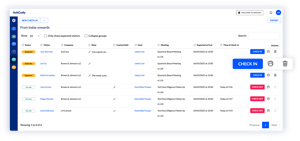
The Visitor Management Portal is where receptionists, front desk teams and concierges run the day: who is expected, for which meeting and room, who is on-site and who has left. Guests arrive pre-registered from the Outlook invite, so checking them in, printing the badge and telling the host takes seconds.
Built on, with, and for tech you trust
Microsoft Azure, Microsoft 365 and modern add-ins for Outlook.
Recognized by analysts
Named a market-leading vendor in the Meeting Management category.
What is the Visitor Management Portal?
The reception is where a visit succeeds or fails, and it usually happens at the busiest moment of the morning: three guests at the desk, a courier with a parcel, a host who is still in another meeting and a phone that keeps ringing. Many visitor tools start with a tablet in the lobby. The AskCody Visitor Management Portal starts with the people behind the desk.
It is the reception view of AskCody Visitor Management, in the AskCody Management Portal: the screen your receptionists, front desk team and concierges keep open all day to welcome guests, check them in and out, print badges and keep hosts informed. Guests reach the list from the Outlook invite, together with their meeting, room and host, so nobody retypes a name from an email.
Everything the front desk needs, in one portal
Expected guestsToday and the days ahead, with company, host, meeting, room and expected arrival.
Live statusExpected, Notified, On-site and Off-site, for every guest on the list.
One-click check-inCheck guests in and out, and register walk-ins on the spot.
Badge printingName and company, plus the host, group, time and your logo if you choose.
Host notificationsBy email and SMS, the moment a guest checks in.
Notes on the visitSpecial needs and access details from the host, and a custom field for your team.
Expected groupsEvents and delegations on your list, imported from a CSV file.
Self check-in kioskRecognizes pre-registered guests and shows your terms, such as an NDA.
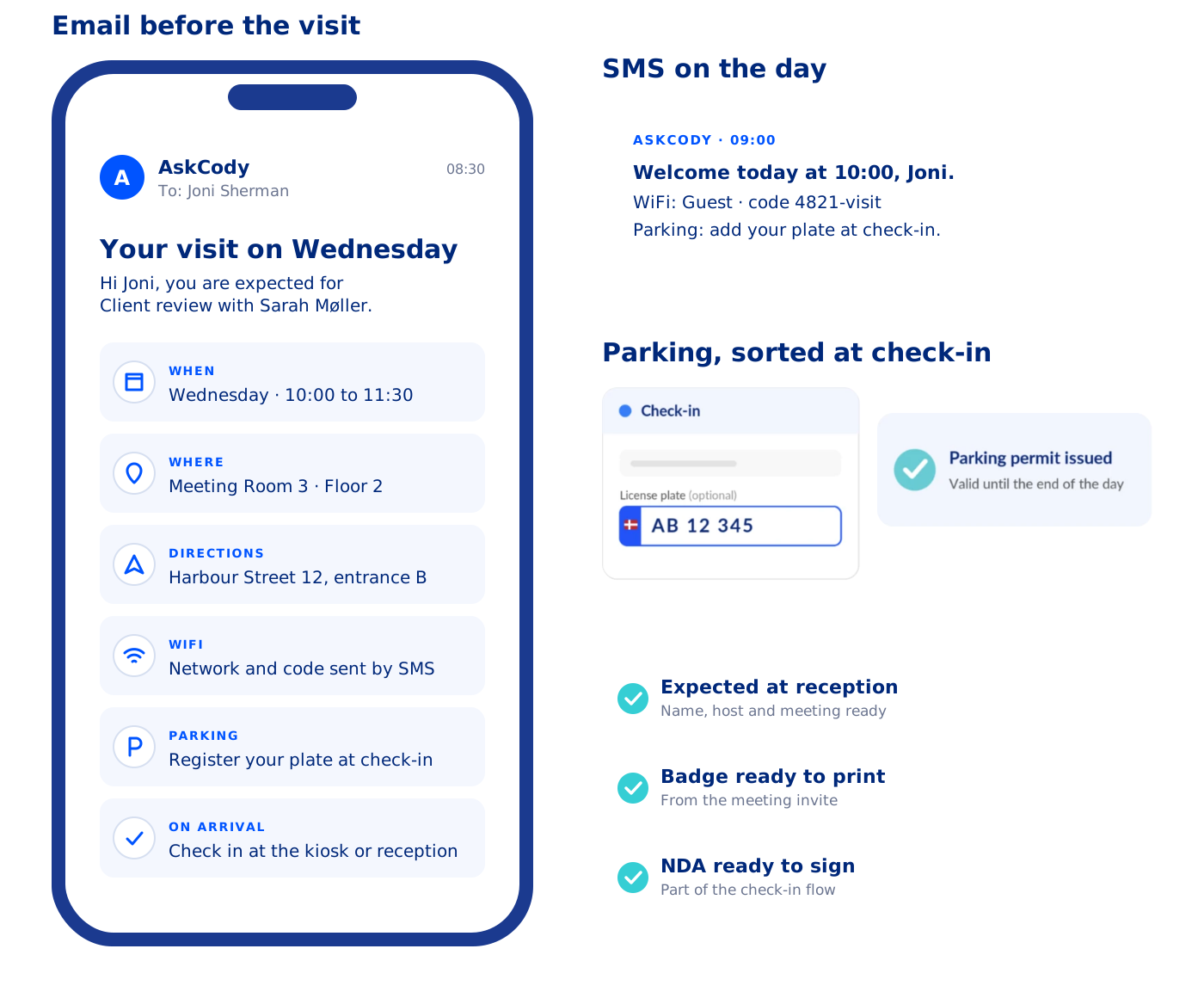
Messages before arrivalEmail and SMS with the time, the room and how to check in.
Visitor parkingPermits issued at check-in, for locations in Denmark with APCOA.
Several receptionsEach with its own members, rooms, languages and time zone.
Insights and privacySee your busiest hours, and anonymize visitor data automatically.
See every guest with their meeting, room and host
Start the day with the list, not the inbox. The portal shows who is expected today, and the days ahead if you choose, with the visitor, company, host, meeting, room and expected arrival on one line. Meeting organizers add guests in the Outlook invite with the AskCody Visitors add-in, so each guest reaches your list together with the meeting they belong to.
- Status at a glance: Expected, Notified, On-site and Off-site.
- Notes from the host, such as a guest who needs step-free access, and a custom field for notes between colleagues.
- Search, filter and export: show only expected guests, collapse groups and find any check-in in your reception.
- When the meeting moves, the expected guests move with it, so your list follows the invite, and your meeting coordinators see the same guests on the meeting in Workplace Central.
Check in, print the badge and tell the host
When a guest arrives, find them on the list and select Check in. The status turns On-site and the host is notified by email or SMS that their guest is here, so you are not calling around the building while the next guest waits. Print the badge from the same line, with the details the host already registered, so every name is spelled right.
- Walk-ins: select New check-in to register a guest nobody announced, or add someone as an expected visitor for later.
- Badges your way: name and company, plus the host, group, check-in time, an infotag and your logo if you choose.
- Check-out: check guests out when they leave, and set a daily time that checks out anyone still on-site.
Let guests check themselves in when the line grows
A Check-in Kiosk takes the queue off your desk at peak hours, at events and when a large group arrives at once. It runs full screen on a touch display or tablet, and you decide which details guests fill in.
- Pre-registered guests are recognized: they enter their email, their details appear, and the expected guest on your list simply turns On-site.
- Your terms on screen: guests accept your terms, such as an NDA or house rules, before they can check in.
- A doorbell for the unexpected: No appointment and Mail and package buttons notify the right contact person.
- In their language: guests switch between the languages your reception offers.
Guests arrive prepared, so the desk gets fewer questions
The visit starts before the guest reaches your desk. AskCody can send guests an email or SMS before the meeting with the time, the room and how to check in, as many days or hours ahead as you choose. Fewer guests stand at the desk asking where the meeting is.
- Messages in your words: edit the email and SMS texts for each reception and language.
- Visitor parking at check-in (Denmark): guests add their license plate, and an APCOA parking permit valid for the rest of the day is issued automatically. On each check-in in the portal, you can view or edit the plate and issue the permit.
See when your reception is busiest
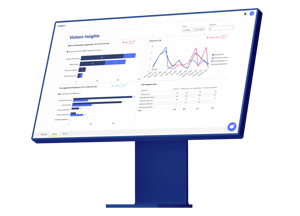
Visitor Insights shows your check-ins by weekday and time of day. Plan who covers the desk around real visitor traffic, spot the peak hours before they turn into a queue, and see how visits develop over time.
- Staffing: cover the busiest mornings with the right number of people.
- Peaks: know when a kiosk or an extra pair of hands makes the difference.
- Guest experience: fewer bottlenecks at the moment your guests form their first impression.
What does IT need to set up the portal?
The Visitor Management Portal is part of the AskCody Platform and runs on the same Microsoft 365 integration as the rest of it.
- Receptions: an administrator creates each reception in the Admin Center, with its name, the meeting rooms that allow visitor registration, time zone, languages and badge settings.
- Hosts from Microsoft Entra ID: hosts are synchronized automatically, so names, emails and mobile numbers stay current.
- Access by group: link an Entra ID group to one or more receptions, and its members get access. Remove someone from the group, and their access is revoked.
Privacy built in
Guests sign in digitally instead of in an open paper log book, and the list is visible only to the people with access to the reception. An account-wide setting removes the personal data of visitors after a retention period you set between 1 and 365 days, while the visit counts stay for reporting.
Kiosks
Each Check-in Kiosk runs from a URL shown in the Admin Center, full screen on a touch display or tablet, with a kiosk template linked to one reception.
80 percent of reception time given back
“In general, the AskCody benefit is the time savings and removing the daily frustrations around meeting planning. The biggest benefit until now is that we have saved 80 percent of the reception time, which was taken up with dealing with visitors coming and going.”
A reception that is ready before guests arrive
“The benefit of AskCody is that we are all a lot more prepared. The receptionists are not struggling to gather visitor information, which has streamlined the whole process and made it much easier for the receptionist and a better experience for our visitors.”
Catering, setup, AV and visitors together
“I don’t believe the other vendors can do the catering, the room setup, and AV requests as well as the visitor management piece altogether as seamlessly. Also, what we found was the AskCody user experience was just slicker.”
Simple was the measure of success
“The user pathway was our main concern to address. The easy and simple process to find the needed meeting room, book it, request services, and manage visitors has been our main success criterion.”
Modern, integrated and intuitive
“We wanted a system that would be integrated with our email system... We wanted something with a nice modern look and feel. And something that was user-friendly and intuitive. Looking at all the various players on the market, AskCody checked off all of those boxes.”
A partner that is there when you need it
“With people all over the United States and across the globe, it can be a hassle to be met with ‘Sorry, but I’m busy’... But that is not the case with our AskCody project manager. She makes herself available, and everyone at AskCody is made available.”
Common questions about the
Visitor Management Portal
The Visitor Management Portal is the reception view of AskCody Visitor Management, in the AskCody Management Portal. Receptionists, front desk teams and concierges use it every day to see expected guests with their meeting, room and host, check guests in and out, print badges and notify hosts. See how to use the portal.
The members of a reception: typically receptionists, front desk officers, concierges and office managers. Members can check visitors in and out, print badges, register visitors and add notes to visits. Administrators set up receptions, kiosks and messages in the Admin Center.
Meeting organizers add external guests to the Outlook invite with the AskCody Visitors add-in, and the guests appear on the reception list with the meeting, room and host. Reception can also add expected visitors and groups in the portal, import them from a CSV file, or register a walk-in with New check-in.
Yes. A Check-in Kiosk on a touch display or tablet lets guests check in themselves. When the email field is required on the kiosk, a pre-registered guest who enters their email sees their details prefilled, and the expected guest on the reception list turns On-site. How the Check-in Kiosk works.
When a guest checks in, at the desk or on the kiosk, AskCody notifies the host automatically by email, SMS or both, depending on how the reception is set up. Guests without an appointment and couriers can use the No appointment and Mail and package buttons on the kiosk to notify a contact person.
Yes. Reception prints a badge from the portal for any registered or expected guest, and a badge prints from the kiosk after the guest checks in. It always shows the guest's name and company, and can also show the host, group, check-in time, an infotag and your logo. What a badge can show.
Yes. You can run several receptions, each with its own members, meeting rooms, time zone, languages and badge settings. Access can follow Microsoft Entra ID groups, so people get access to the right reception and lose it when they leave the group. How to give access to a reception.
Guests sign in digitally instead of in a paper log book that the next guest can read. An account-wide setting anonymizes visitor data after a retention period you choose, between 1 and 365 days, and keeps the visit counts for reporting. Read about AskCody and GDPR.
Yes. Visitor Management, including the portal, is part of the AskCody Platform. See pricing or talk to a consultant about the number of receptions you need.
See the portal at your own front desk
Talk to a consultant and see how your reception would run the day: every expected guest with their meeting, check-in in one click, badges and host notifications.