.svg)

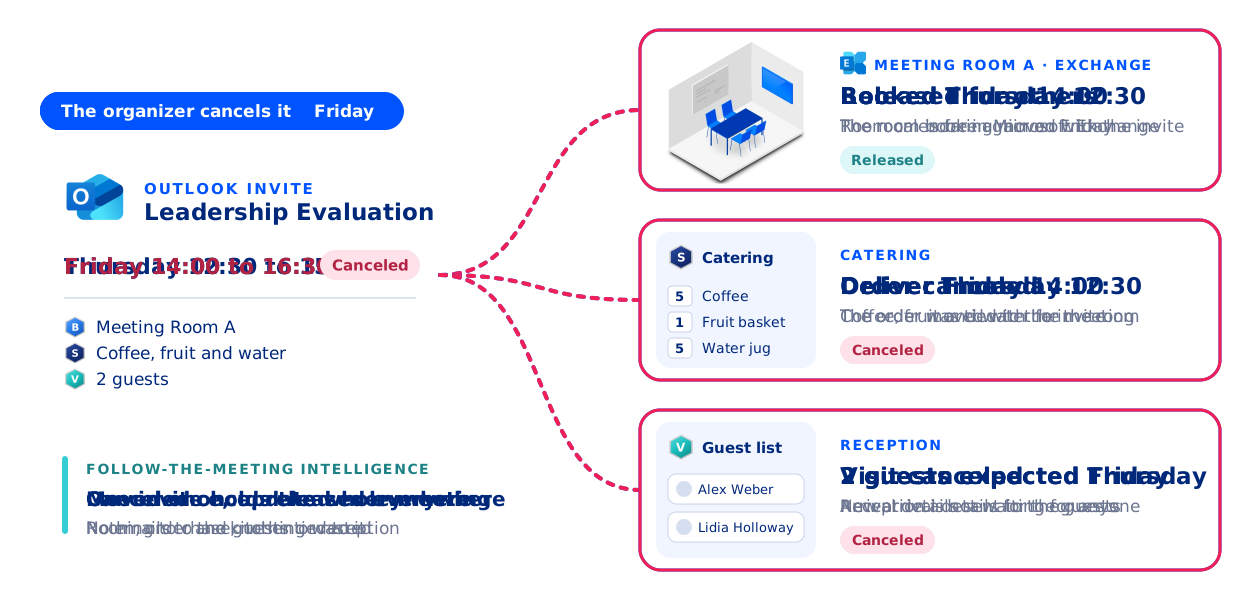
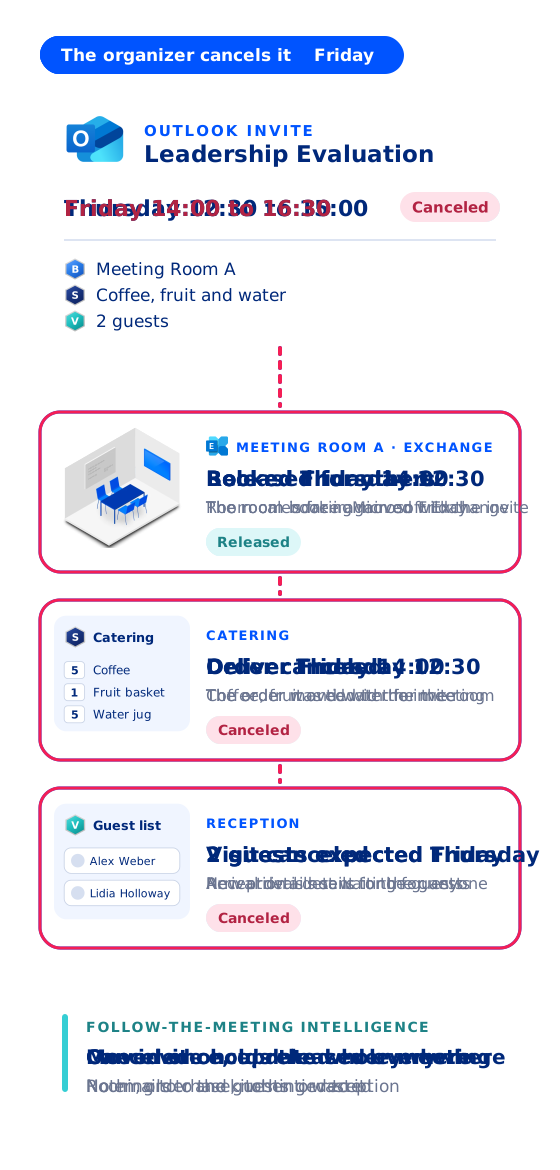
Follow-the-meeting intelligence is the logic AskCody is built on. Every room, service order, visitor registration, cost center and data point is attached to one meeting in Microsoft Exchange. When that meeting moves, everything attached to it moves with it. When it is cancelled, everything attached to it is cancelled too. Nobody has to chase the change.
Meetings are where ideas evolve, teams align and decisions get made. Yet in most organizations, the systems behind them are scattered. The room is booked in Outlook. Catering is an email to the kitchen. Room setup goes through facilities, the screen and microphones through the help desk, and the guest list to reception in a spreadsheet. Guest parking? Nobody remembers anymore.
A meeting is an endless, cascading flow of tasks and to-dos, and that flow ends in chaos when it is not managed and structured. The burden of stitching it together falls on organizers, executive assistants, service teams, reception and facility managers, who never asked for that job in the first place. The result is a disjointed experience and hours lost to coordination, most of them spent on one thing: the meeting changed, and somebody was not told.
What Is Follow-the-Meeting Intelligence?
Follow-the-meeting intelligence is the principle that everything related to a meeting follows that meeting, wherever it goes, throughout its lifecycle. The meeting is the single anchor for every action, service, resource and piece of data connected to it, from the moment it is created to the moment it has run and been settled.
When a meeting is created, the room, the service orders, the visitors, the cost center and the data are all linked to that specific meeting. No manual tracking, no duplicate entries, no scattered records. If the meeting changes, everything changes with it, automatically.
That makes the meeting itself the system of record. Because AskCody is built native to Microsoft Exchange, that record is the meeting in your Exchange calendar: the same meeting Outlook, Teams and Microsoft 365 already rely on. One meeting, one source of truth.
It is not a workflow stitched together as an afterthought, and it is not an integration layer bolted on top. It is the foundation AskCody is built on, and it is what makes AskCody different.
It Has Been There From the Beginning
Follow-the-meeting intelligence is not a new idea for us. It has shaped AskCody since the first line of code, more than a decade ago. From day one we believed the meeting should drive every related process, not the other way around. That is why AskCody behaves as one platform rather than a bundle of features. Everything we built after that, from services and visitors to insights, room booking and booking policies, exists because this core logic makes it possible. It is not an add-on. It is who we are.
How Does Follow-the-Meeting Intelligence Work?
It starts with one rule: the meeting has to exist before anything can follow it. The organizer creates the meeting in Outlook, finds a room with the AskCody Bookings add-in and sends the invite. Exchange accepts the room, or a room delegate is asked to approve it. From that moment, AskCody knows the meeting exists, and the organizer adds catering, room setup and visitors to that same meeting from the Services and Visitors add-ins in Outlook.
The order matters. Tools that let you order services before the invite is sent have to store the meeting in their own database and sync it to Exchange later, and that is where double bookings and orphaned orders come from. Sending first may cost a click today. It saves a ton of trouble tomorrow. (Services can be requested as soon as the invite is sent, even while a managed room is still waiting for approval: see how services work with a pending room booking.)
Once the meeting exists, everything attached to it follows it:
- Room booking: the booking lives on the room's Exchange calendar. Move the meeting in Outlook and the room booking moves with it, with Exchange checking that the room is free.
- Services and catering: orders follow the meeting. Reschedule it and the order is updated and the provider is notified. Move it to another room the provider serves and the delivery follows. Cancel it and the order is cancelled, with no manual follow-up.
- Buffer time: when services are ordered, AskCody can block time before and after the meeting for setup and cleanup. Service teams see those blocks in Workplace Central, so nobody books the room back to back by mistake.
- Visitors: guests are pre-registered on the meeting. When it is rescheduled or cancelled, the pre-registration follows, and reception sees the right guests on the right day.
- Cost centers: the cost center or client matter added to an order stays on that order, wherever the meeting goes.
- Insights: the same meeting record feeds the data. Insights reports on what was booked, ordered and expected, so the numbers describe the meetings you actually have.
This includes Microsoft Teams meetings. A Teams meeting is an Exchange meeting, so every Teams meeting gets the right room, services and visitor setup, with no extra app to deploy.
Where Following Stops, on Purpose
Following the meeting does not mean overruling the people who serve it. Three rules keep the logic honest:
- Preparation deadlines: if a meeting moves after the provider's preparation deadline, or after the order has been marked ready, the order is detached from the meeting and the organizer is notified. The kitchen has already started, so a person decides what happens next (see notifications from AskCody Services).
- Declined rooms: if the meeting moves to a room that declines it, or to a room the provider does not deliver to, the order is cancelled or detached, and the organizer is told why.
- Buffer time: buffer time protects the room when it is booked with the Bookings add-in. A room booked outside AskCody does not carry the buffer (see what buffer time is and how to set it up).
Two Meetings That Moved
A Project Kickoff Moves a Week
Imagine a project kickoff at a large financial organization:
- The project lead creates the kickoff in Outlook, books a conference room in Copenhagen with the Bookings add-in and sends the invite.
- Catering for ten is ordered, and three external partners are pre-registered as visitors.
- Two days before the meeting, the project timeline changes. The kickoff moves to next week and to a room on another floor.
In a disconnected setup, this triggers a chain of emails: rebook the room, cancel the old catering order, place a new one, update the guest list, tell reception.
With follow-the-meeting intelligence, the project lead makes one change in Outlook: the new date and the new room. Everything else follows:
- The catering order moves to the new date and the new room, and the kitchen is notified.
- The three partners' pre-registrations move with the meeting, so reception expects them on the right day.
- Insights still counts it as one meeting, so the data on rooms, orders and costs stays clean.
The meeting is a living thing, and everything else follows it.
A Strategy Session Moves From Tuesday to Thursday
An executive team is preparing a quarterly strategy session:
- The executive assistant schedules the meeting in Outlook for Tuesday at 10:00, on the CFO's behalf, and sends the invites.
- The boardroom is booked with a special room setup, and buffer time blocks an hour before and after the meeting so the layout can be changed.
- Catering for twelve, AV setup and visitor registration for two external advisors are added to the meeting.
- The CFO's travel plans change, and the meeting has to move to Thursday.
In most setups, this triggers a small administrative storm. With AskCody, the executive assistant moves the meeting in Outlook, and everything goes with it:
- Catering and AV setup move to Thursday, and the providers are notified.
- The buffer time moves with the meeting, so the setup crew still has its hour.
- The advisors' visitor registrations follow the meeting.
- The room booking moves without overlap or double booking, because Exchange only accepts the room if it is free.
Think of it like a holiday. You have booked flights, seats, a hotel, restaurants and tickets to an amusement park. Then you need to postpone a week. Imagine changing only the flight, and watching everything else rebook itself. That is what follow-the-meeting intelligence does for a meeting.
Why Does Follow-the-Meeting Intelligence Matter?
It removes the friction between people, places and processes, and makes meetings reliable. A booked room is actually booked, and everything the meeting needs is where it should be, at the right time.
- For organizers and executive assistants: simplicity. Change the meeting once, in Outlook, and stop chasing updates.
- For service teams and conference service: clarity. Orders arrive with the right date, room and headcount, and changes arrive as notifications instead of phone calls. Workplace Central shows every meeting and its services in one grid.
- For reception: the right guests, expected on the right day.
- For IT: one source of truth in Exchange, and no second calendar database to keep in sync.
- For management: reliable data on meetings, services and costs, without anyone reconciling spreadsheets.
It turns meeting management from a set of disconnected tasks into one automated workflow. We have written about who gets left out when a meeting moves in Your Meeting Has a Distribution List. Reception Is Not on It.
Why Systems Without It Fall Short
Many meeting tools stop at surface-level integration. They connect to calendars, but they do not treat the meeting as one object that carries its context. When the integration is not native and there is no follow-the-meeting logic, changing a meeting becomes harder than booking it was in the first place.
Without follow-the-meeting logic:
- A reschedule becomes a manual headache.
- Service orders go missing or go out of date.
- Visitor communication breaks down.
- Data becomes fragmented and unreliable.
These systems see meetings as static entries. AskCody sees them as events that change, and that need technology that changes with them.
The symptoms are familiar: meetings scattered across tools that do not talk to each other, service teams working from old information, visitors given the wrong instructions, reports nobody trusts, and a workplace team with a reputation for friction. These are not the real problem. They are consequences of a root cause. If the meeting is not the single source of truth, everything downstream is vulnerable. Get the integration right, make sure the system follows the meeting, and the whole chain of symptoms disappears. Clean architecture creates clean operations.
Native vs. Sync-Based Meeting Management: What Is the Difference?
A sync-based solution treats the meeting as something that lives in two places. The user books in one system, the meeting is stored in that system's own database, and the two must keep synchronizing with Exchange. That creates delays, conflicts, orphaned bookings and inconsistent data. Every change has to be pushed back and forth, and every push is a chance for the two copies to disagree. Add no follow-the-meeting logic on top, and you can guess what happens when a meeting changes.
A native solution like AskCody removes that fragility. There is only one meeting, stored once in Microsoft Exchange, using the same data that Outlook, Teams and Microsoft 365 rely on. AskCody connects to Exchange Online through Microsoft Graph, with access to calendars rather than full mailbox content, and to Exchange Server through Exchange Web Services. No second database. No synchronization of meeting data. Because AskCody works on the Exchange meeting directly, everything attached to it follows it, and the meeting stays the single source of truth from start to finish. Read more about how AskCody integrates with Microsoft 365.

The difference shows up everywhere: in the user experience, in data integrity, in IT overhead and in how well the solution scales. With a sync-based solution, the meeting is copied between systems to stay up to date, which can be error-prone. With a native solution, there is only one meeting, and Exchange is the single source of truth. Combine that with follow-the-meeting intelligence and you have a meeting management platform that works for you, not against you. For a side-by-side look at where the booking lives on different platforms, see Microsoft 365 Meeting Room Booking: Where Does Your Booking Actually Live?
The Meeting Manages Itself
Follow-the-meeting intelligence is not a feature. It is the principle that every action connected to a meeting stays connected to it, however often the meeting changes. That is how AskCody is built, across meeting room booking, meeting services, visitor management and workplace analytics.
AskCody is not just helping you manage meetings. It is helping your meetings manage themselves.
FAQs About Follow-the-Meeting Intelligence
What is follow-the-meeting intelligence?
Follow-the-meeting intelligence is the logic AskCody is built on: the room, service orders, visitor registrations, cost centers and data are all attached to one meeting in Microsoft Exchange. When the meeting is moved or cancelled in Outlook, everything attached to it is updated or cancelled automatically.
What happens to the catering order when a meeting is rescheduled in Outlook?
With AskCody, the order follows the meeting to the new time and the provider is notified. If the meeting moves to another room the provider delivers to, the delivery follows too. If it moves after the provider's preparation deadline, or after the order is marked ready, the order is detached and the organizer is notified, so a person can decide what happens next.
What happens to visitor registrations when a meeting is cancelled?
Visitors pre-registered on the meeting follow it. When the meeting is rescheduled or cancelled in Outlook, the pre-registration is updated or cancelled with it, so reception always works from the current meeting.
Why do you have to send the meeting invite before ordering services?
Because AskCody has to know the meeting exists before anything can follow it. Once the invite is sent and the meeting is on the room's Exchange calendar, accepted or pending approval, services and visitors are attached to that meeting. Tools that take orders before the invite is sent keep the meeting in a separate database and sync it later, which is how double bookings and orphaned orders happen.
Does follow-the-meeting intelligence work with Microsoft Teams meetings?
Yes. A Teams meeting is an Exchange meeting, so the room, services and visitors added in Outlook follow a Teams meeting the same way. There is no extra app to deploy.
What is the difference between native and sync-based meeting management?
Native meeting management works directly on the meeting in Microsoft Exchange, so there is one meeting and one source of truth. Sync-based meeting management stores the meeting in its own database and synchronizes it with Exchange, which can cause delays, conflicts, double bookings and orphaned orders.
Key Takeaways
- Follow-the-meeting intelligence attaches the room, services, visitors, cost centers and data to one meeting in Microsoft Exchange.
- When the meeting moves or is cancelled in Outlook, everything attached to it is updated or cancelled automatically.
- The invite comes first: the meeting has to exist in Exchange before anything can follow it.
- Preparation deadlines and declined rooms are respected, so a person decides when following would overrule the service team.
- Native meeting management keeps one meeting in Exchange. Sync-based tools keep a second copy that can drift.
- Teams meetings are Exchange meetings, so they follow the same logic with no extra app.