In most workplaces, the time a service team needs to make a room ready exists only because somebody protects it by hand. A coordinator blocks the slot. A kitchen quietly refuses late orders. It works until that person is on vacation. AskCody buffer time and preparation deadlines move that protection out of a person’s head and into meeting services, where it applies to every meeting booked the right way.
The situation this exists for is ordinary. A meeting ends at ten. The next one starts at ten. Between them, somebody has to clear the table, reset the layout and get the coffee in. The calendar has allocated exactly zero minutes for that, because a calendar does not know that meetings have a physical tail.
What happens next is one of two things. Either the service team arrives before the first meeting ends and works around the people still in the room, or the second meeting starts late. Neither is a failure of effort. Both are the predictable result of a schedule with no representation of preparation.
What Is Buffer Time in AskCody?
Buffer time adds minutes before and after a meeting that has catering or other services ordered, so the service team can prepare the room and clear it afterwards. An Owner switches it on once for the account, in the Admin Center under Services, Settings, and chooses the duration. It is a global setting, and it can be turned off on individual meeting room calendars where it makes no sense.
When an organizer books through the AskCody Bookings add-in for Outlook and ticks Add time for service team to prepare the room, the room search only returns rooms that are free for the meeting plus its buffer. Where buffer time is policy, Preselect in Bookings Add-in ticks it for everyone by default, so nobody has to remember. The full setup is in the AskCody Help Center.
Why Does Buffer Time Only Apply When Services Are Ordered?
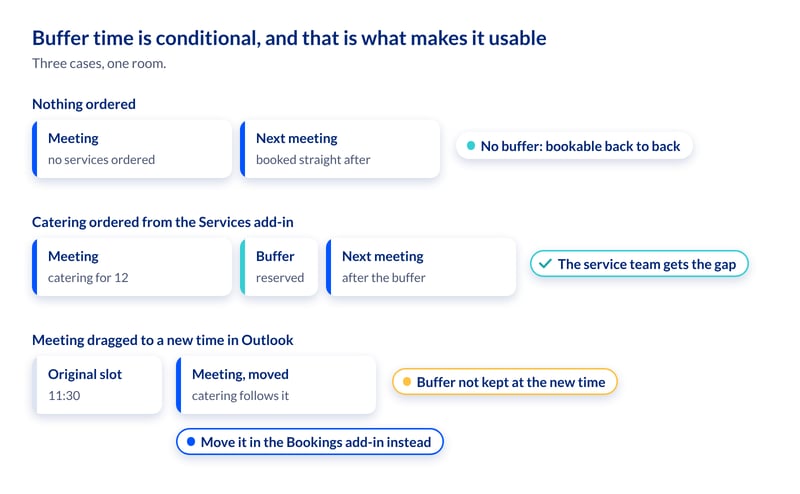
Buffer time is activated once a service request is actually placed from the AskCody Services add-in. If nobody orders anything, no buffer is applied and the room stays freely bookable back to back.
That is the design decision that makes it usable at scale. A blanket buffer on every room would be switched off within two weeks, and rightly: it takes capacity out of a constrained estate to protect preparation that most meetings do not need. A conditional buffer spends room time only on the meetings with a physical tail, which are exactly the meetings that start late today.
How Do Preparation Deadlines Work?
Buffer time protects the room. Preparation deadlines protect the kitchen. On each service provider, under Admin Center, Services, Service Providers, Advanced configuration, the service provider preparation deadline sets how far ahead orders must be placed. With a deadline of one day before 12 pm and a provider open Monday to Friday, a Wednesday meeting has to be ordered by Tuesday at noon.
An item preparation deadline can ask for more notice on a single item, a hot lunch rather than a jug of water. It applies when it is longer than the provider’s deadline, and it respects the provider’s opening days. Both are documented in Services preparation deadlines.
Together they replace a rule that lives in one person’s judgment with one that lives in the system and applies to everybody. The kitchen manager who says no to a late order is making a correct operational call and absorbing the social cost of it personally. Encoded, the same call is made at the point of ordering, before anyone has been promised anything.
What Happens to Buffer Time When a Meeting Moves?
Services follow the meeting. Move it and the catering moves with it; cancel it and the catering is canceled too. That is follow-the-meeting logic, and it is why an order does not stay behind in the old room.
The buffer is stricter about how the meeting is moved, and it is worth knowing before you roll it out. Outlook ignores buffer time when a meeting is dragged to a new slot, so a meeting with a protected gap should be moved by searching for a room again in the Bookings add-in. Rooms booked directly in Outlook get no buffer at all. In Workplace Central the buffer blocks are visible in the grid, so a reschedule there does not run over them unseen. And booking, extending or ending a meeting on a room display can overrule a buffer, which is why the Help Center recommends switching those display functions off where buffer time is policy.
Three People, One Protected Gap
An executive assistant at an insurance group books a board lunch for Thursday at 11:30 in the Bookings add-in, ticks the option to add time for the service team, then orders catering for twelve from the Services add-in. That order is what switches the buffer on. The room stops being bookable in the minutes before and after, so the kitchen no longer arrives while the previous meeting is still finishing.
A kitchen manager at a university sets a provider preparation deadline of one day before 12 pm, so a Wednesday lunch has to be ordered by Tuesday at 12:00, and a longer item deadline on hot lunches. He used to refuse late orders on his own authority and absorb the argument that followed. Now the cut-off belongs to the system and applies to everybody, so he is no longer the rule.
On a Monday morning review, a workplace administrator at an engineering consultancy notices that the meetings starting late were the ones where nobody had ticked the box, and turns on Preselect in Bookings Add-in. Organizers keep booking the way they always did, and the protection is there by default, so nobody has to remember it.
What to Check This Week
- Is buffer time enabled, and is the duration right for your heaviest orders?
- If buffer time is policy, is Preselect in Bookings Add-in switched on?
- Do people book and move meetings with services through the Bookings add-in, rather than directly in Outlook?
- Where buffer time is policy, are booking, extending and ending switched off on the room displays?
- Are the provider and item preparation deadlines the ones your kitchen actually works to, or the ones typed in on day one?
One caveat changes how you brief people: buffer time applies to meetings with services attached. A meeting that needs a room reset but orders nothing will not trigger it. Where resets matter on their own, model them as a service item so the meeting carries them.
Key Takeaways
- Buffer time reserves minutes before and after a meeting with services ordered, so the service team can prepare and clear the room.
- It activates only when a service request is placed, so rooms are never blanket-blocked for meetings that need nothing.
- An Owner enables it once in the Admin Center; Preselect in Bookings Add-in makes it the default for every organizer.
- Provider and item preparation deadlines put the kitchen’s cut-off into the system, consistently, at the point of ordering.
- Services follow a moved meeting. The buffer holds when the meeting is moved in the Bookings add-in, not when it is dragged in Outlook.