
.svg)
AV & Meeting Room
Specialists
The Guardians of a
Flawless Meeting
Experience
You’re the reason meetings start on time. You sit at the intersection of technology and experience.
You make sure every Teams Room works, every display connects, and every microphone picks up every word.
Making Sure that Every Room Just Works
The AV & Meeting Room Specialist (or Workplace Technology Specialist) is the one who makes sure every meeting just works: screens turn on, Teams connects, microphones pick up clearly, and no one has to call IT.
When the meeting runs smoothly, no one notices.
When it doesn’t — you’re the first person they call.
AskCody helps you keep every room running smoothly, every system connected, and every user confident.
“We spend half our day reacting to issues: missing equipment, double-booked rooms, tech not synced with Teams or Webex. It’s chaos that always lands on us. The meeting room is where technology, people, and culture collide. And when something breaks, it’s always the technology that gets blamed. Always! ”
Constant Firefighting and Fragmented Systems
You’re responsible for the backbone of collaboration, but the tools you rely on are often disconnected, hard to monitor, and even harder to control at scale.
You deal with:
- Inconsistent room technology across buildings, regions, or teams.
- Manual monitoring and reactive troubleshooting instead of proactive control.
- Lack of visibility into how meeting rooms and Teams Rooms are actually being used.
- Last-minute setup requests from users who expect everything “just to work.”
- Pressure from leadership to improve meeting experiences and reduce downtime.
You’re expected to guarantee reliability across hundreds of endpoints, while juggling updates, firmware, and user errors, with limited insight into what’s really happening day to day.
AskCody + Microsoft Teams Rooms = Total Control, Complete Clarity
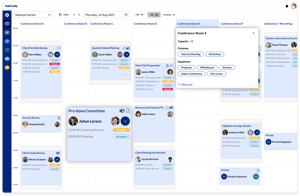
AskCody brings the missing layer of coordination between meeting room technology, bookings, and people.
It works natively with Microsoft 365 and Microsoft Teams Rooms, giving you full visibility and consistency across your AV infrastructure.
With AskCody, you can:
- Standardize your meeting room setup across all locations with synced Teams Rooms and room metadata.
- Connect room bookings directly with technology ensuring every room has the right equipment for the right type of meeting.
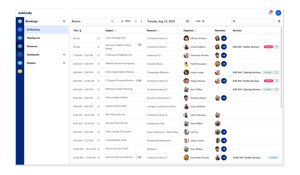
- Gain insight into room performance and usage tracking how rooms are used and when issues occur.
- Reduce downtime by aligning IT, Facilities, and Workplace teams with shared data and alerts.
- Provide a better user experience - meetings that simply work, with tech that supports, not distracts.
AskCody helps you move from reactive support to proactive excellence where every meeting space runs like a well-tuned system.
From Reactive Support to Reliable Performance
When your meeting room technology works seamlessly, the workplace transforms.
Here’s what you gain:
- Reduced downtime and service calls.
- Consistent experience across every meeting room and Teams Room.
- Better visibility into usage and performance data.
- Confidence from leadership and employees that “it just works.”
- More time for strategic improvements instead of daily firefighting.
AV Specialists using AskCody describe one core benefit: control.
Control over their systems, visibility across their spaces, and the ability to deliver excellence every day, not just fix problems when they happen.
Learn more about AskCody for AV and Meeting Room Specialists
Room Booking Reserves the Room. Meeting Management Runs the Meeting.
Meeting Journey Mapping is the Key to Understanding How Work Actually Works
What's the Purpose of Your Meeting? (And Why Purpose Matters More Than Capacity)
Why Forward-Thinking Firms Run Their External Meeting Rooms Like a Conference Center
Tips and tricks on meeting management for Law Firms
Enhancing Your Office's First Impression with Visitor Management Software
A comprehensive guide to Hot desk management: unlock its potential
Common questions from AV & Meeting Room owners
AskCody gives you complete visibility into how meeting rooms and their technology are used.
Because it connects directly with Microsoft 365 and Microsoft Teams Rooms, you can see when and how spaces are booked, what technology is in use, and when issues occur.
This data helps you proactively identify underperforming rooms, plan upgrades, and prevent recurring problems instead of reacting to them after a meeting fails.
Yes.
AskCody is fully compatible with Microsoft Teams Rooms and integrates with the Microsoft 365 calendar infrastructure.
When a Teams-enabled room is booked, the system automatically syncs the meeting details, ensuring the room is ready, the devices are connected, and the meeting starts seamlessly.
AskCody can also integrate with third-party Room Displays (Crestron, Philips, and more)
AskCody helps prevent downtime by eliminating confusion around bookings and meeting logistics: two major sources of AV problems.
When bookings are made through AskCody, the right technology is assigned to the right meeting type, ensuring each room is properly equipped and used.
Combined with analytics, you can spot patterns, such as rooms with frequent cancellations or repeated technical issues, and address root causes before they impact users.
AskCody’s room utilization analytics show how often each room is booked, how it’s used, and what kind of meetings it supports.
By correlating this with support logs or service requests, you can identify:
-
Which rooms need equipment upgrades.
-
Where to invest in new Teams Rooms setups.
-
Which spaces could be repurposed or consolidated.
This turns anecdotal “meeting feedback” into actionable data for smarter budget and technology planning.
Yes.
Each meeting room can be tagged with metadata such as display type, camera setup, audio system, or Teams compatibility.
When booking, users only see rooms that fit their needs (e.g., “Teams-enabled with video conferencing”).
For AV teams, this metadata also simplifies inventory tracking and makes it easier to plan replacements or standardize room setups across multiple locations.
AskCody data can be exported directly into Power BI, Tableau, or Excel through built-in reporting or via API access.
You can combine meeting and utilization data with AV performance metrics, creating unified dashboards for uptime, usage, and resource allocation.
This integration allows AV and Workplace Technology teams to measure and report on ROI, equipment performance, and overall meeting efficiency.
AskCody reduces the volume of reactive support requests by ensuring meetings are planned correctly, equipment is used properly, and information is shared automatically.
Rooms are used as intended, bookings are clear, and service teams receive advance notice of any special requirements.
The result: fewer emergency calls, fewer user errors, and more time for strategic improvement.
Your Rooms. Your Technology. Your AskCody.
You make collaboration possible. AskCody helps make it perfect.