Skip to content

Not enough meeting rooms?

Before you build more rooms, look at the ones you have. Bookings nobody turns up for, small meetings in big rooms and meetings that end early all keep rooms booked that nobody is using. AskCody gives that time back in Outlook, at the door and on the floor plan, built on Microsoft 365.

Monday at 10:00 every meeting room shows as booked, but three of six are not in use. The AskCody room display releases a room nobody confirmed, the Outlook add-in shows the seats on every room, and End frees a room early, so the same rooms take three more meetings.
Why rooms run out

Booked is not the same as used

When every room shows as booked, it looks like a space problem. Often it is a booking problem. Room time leaks away in four ways, and it hurts most on the busiest days: in Europe, offices averaged 46% utilization across the week but 71% on the peak day (CBRE, 2025). Rooms planned for the average week run out on the busy days.

Ghost bookings

The room is booked, but nobody comes. The calendar says busy, so nobody else can use it.

Too big for the meeting

Two people book the room for twelve, because it was the first free room they found.

Meetings that end early

The meeting is over at 9:30, but the room stays booked until 10:00.

Free rooms nobody can see

A room is free right now, but the only way to know is to walk past it.

Check-in on an AskCody meeting room display: the meeting waits for Confirm or Cancel, and if nobody checks in in time it is removed and the room is released
Room displays

How do you stop ghost meetings from blocking rooms?

Put an AskCody room display at the door and turn on Confirm. When a meeting is about to start, the display asks the people in the room to confirm it. If nobody confirms within the pending time your administrator sets, the meeting is ended in the room's calendar and the room is free for others to book.

  • Confirm or cancel on the display, before or just after the start
  • Pending time set by your administrator in the display template
  • The released time is free to book in Outlook

See how AskCody room displays work

Outlook add-in

How do you stop small meetings from taking big rooms?

With the AskCody Bookings add-in, people book rooms where they already plan meetings: in Outlook. The add-in counts the invitees and only shows rooms with enough seats, and people can filter by capacity, equipment, purpose and location.

  • Only rooms that are free for the whole meeting, buffer time included
  • The seats on every room, so a meeting for two can take a room for four
  • Resource groups decide which rooms each team can see and book

Book meeting rooms in Outlook

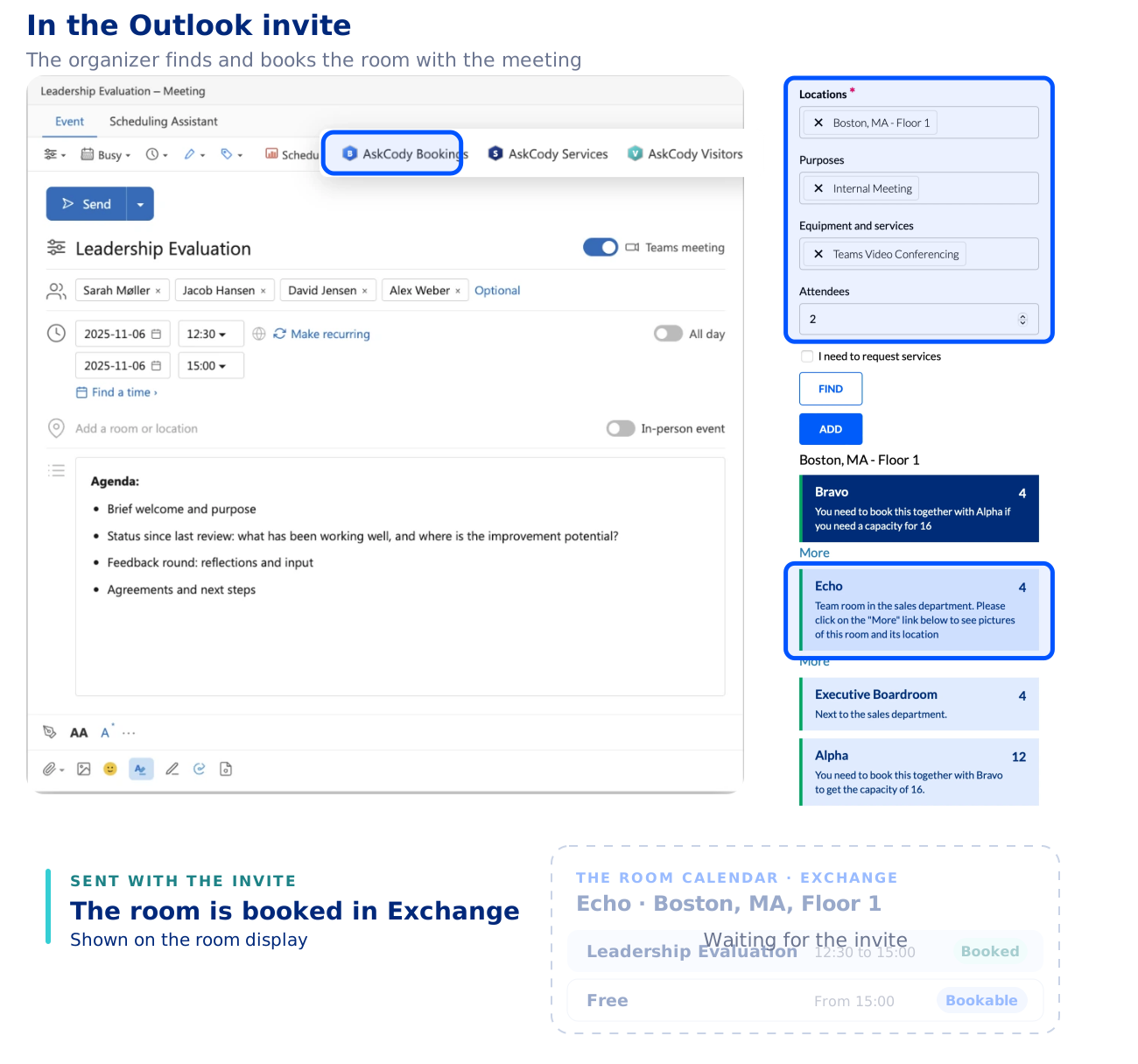
An organizer plans the meeting Leadership Evaluation in the Outlook invite and opens the AskCody Bookings add-in, next to AskCody Services and AskCody Visitors. In the add-in, the organizer chooses the location, the purpose of the meeting, the equipment and services needed and the number of attendees, and sees the rooms that fit, each with its capacity: Bravo, Echo, Executive Boardroom and Alpha. The organizer adds the room Echo and sends the invite as usual. The room is booked in its room calendar in Microsoft Exchange, 12:30 to 15:00 for 4 attendees, and the meeting is shown on the room display.
Ending a meeting early on an AskCody meeting room display: tap End, confirm, and the display turns green with the next meeting
End and extend

What happens when a meeting ends early?

Meetings rarely end exactly on time. With Ending turned on in the display template, people tap End on the room display when they leave, and the room is free for the next team. With Extending turned on, a meeting that runs over can be extended from the same screen when the room is free.

The time goes back to the people who need it, without anyone opening Outlook.

Find a room now

How do people find a free meeting room right now?

When people need a room now, they ask two questions: which room is free, and where is it? AskCody answers both where they are.

  • At the door: the room display shows if the room is free, and people can book it on the spot
  • On the floor plan: AskCody Maps shows free rooms and desks in blue and booked ones in red, and people book straight from the map
  • In the lobby: dashboards show which rooms are available and which are in use

Explore AskCody Maps or meeting dashboards

AskCody Maps floor plan with free desks and rooms in blue and booked ones in red. Desk 20 is booked from the map and saved in Outlook as Free, then Conference Room B is booked for 30 minutes and turns red.
Room time check

How much room time are you losing?

Put in your own numbers to see how much booked time is never used, and what it adds up to in rooms. The result is only as good as your estimates. For the real figures, AskCody Insights reads the room calendars in your Microsoft Exchange.

Your office

1.
2.
3.
60%
0% 100%
4.
10%
0% 50%

Your own estimate.

5.
10%
0% 50%

Your own estimate.

Every week

Room hours lost to unused bookings
hours
The same as this many extra rooms
rooms

Based on a five-day week. Your own estimates, not a benchmark.

How AskCody Insights measures meeting room utilization. A conference room with 10 seats is open from 08:00 to 17:00. It is booked for a review from 09:00 to 10:00 with 4 people, a one-to-one from 11:00 to 12:30 with 2 people, and a client workshop from 14:00 to 16:00 with 8 people. Time utilization compares booked hours with open hours: 4.5 of 9 hours, or 50 percent. Capacity utilization compares the people in each meeting with the seats in the room: 14 of 30 seats, or 47 percent. Half the open hours are booked, but most meetings use fewer than half the seats, which across many rooms is the case for more small rooms or for combining large ones. If a room's seat count changes, Insights recalculates its history. Both numbers come from the meeting data in Microsoft Exchange.
Insights

Do you need more meeting rooms, or the right ones?

Before you plan a new floor, look at how your rooms are really booked. AskCody Insights works from the booking data in your Microsoft Exchange calendars, with reports in Microsoft Power BI, so there are no sensors to install.

  • Capacity utilization: the attendees of each meeting against the seats in the room
  • Time utilization: the hours a room is booked against the hours it is open

Rooms that are always booked by small groups point to a different mix of rooms, not more of them. Insights shows scheduling intent by design: what people booked and for how many, not who walked in.

Explore workplace analytics

For IT

Can IT set booking limits for rooms in Exchange?

Yes. Booking rules live on each room's calendar in Microsoft Exchange, so they hold wherever people book, also in plain Outlook. Your IT team can set the longest meeting a room accepts, how far ahead it can be booked, whether repeating meetings are allowed, and whether attendees are limited to the room's capacity.

In AskCody, administrators use resource groups to decide who can see and book which rooms.

Read about booking rules and policies

The Boardroom's own calendar in Microsoft Exchange, with its scheduling options: book up to 180 days ahead, meetings up to 4 hours, working hours only, repeating meetings allowed. Scheduling permissions: the leadership team books automatically, everyone else needs approval by a delegate. It is set by IT or the room owner in Exchange. Four booking requests arrive. Maria Holm books Thursday 09:00 to 13:00 with the AskCody add-in: accepted. Jonas Berg books Saturday 10:00 to 12:00 straight in Outlook: declined, outside working hours. Jonas Berg books a Tuesday nine months out straight in Outlook: declined, beyond 180 days. The sales team books Monday 09:00 to 10:00 straight in Outlook: sent to a delegate, then approved in Outlook. The same rules apply whether the room was booked in AskCody or in Outlook.
Jesper Imhof Rosendahl, IT Project Manager
Jesper Imhof RosendahlIT Project Manager

Room for the meetings nobody planned

“Only being able to book meeting rooms in advance is just not enough for us... With AskCody we can keep some rooms for exactly that and book our emergency meetings directly on a tablet just outside the meeting room. It gives our users peace of mind to know that there is always a resource that can be used.”

Nané Pr’Out, Director of Information Technology
Nané Pr’OutDirector of Information Technology

Cancel the meeting, and the room frees up

“The biggest impact I think is simply the ease of reserving conference rooms when you’re scheduling meetings... and also when you cancel a meeting, that the conference room frees up, and you don’t have to do additional steps to go into another system and remove it.”

Luke Schnoebelen, Director of Professional Development
Luke SchnoebelenDirector of Professional Development

The power back in the hands of the user

“AskCody simplifies the booking process. It gave the power back to the user rather than a ‘wait and see scenario’... AskCody gave us visibility into all the available resources, and that’s great. That was at the core of what we needed.”

Jennie DePhillips, Training Manager
Jennie DePhillipsTraining Manager

Even computer-phobic partners feel at home

“With AskCody we have a system based on Outlook which everyone is already familiar with, so training of the end user is painless. The system can be explained in a clear, logical, and relevant way, and assist even computer-phobic partners in feeling comfortable with handling meeting bookings.”

Nabil Zerdazi, IT Project Manager
Nabil ZerdaziIT Project Manager

The whole meeting, organized in Outlook

“By using AskCody, our employees will be able to manage the end-to-end process of organizing their own meetings in Microsoft Outlook, and easily find a workplace that will perfectly fit their needs.”

Anthony Moore, IT Director
Anthony MooreIT Director

One of the best vendor experiences we have had

“Not only is the AskCody product a really good product and the best one that fits our needs, but working with everyone from our account executive to technical resources has been one of the best experiences that we’ve had with a vendor.”

Common questions about meeting room shortages

Why are there never enough meeting rooms in our office?

Usually because booked time is not the same as used time. Rooms are held by meetings nobody attends, by small meetings in big rooms and by meetings that end early, and demand piles up on a few busy days a week. Fix how rooms are booked and released before you add more.

Should we build more meeting rooms?

Check your booking data first. If your rooms are full on the busiest days with meetings that match their size, you may need more rooms or different ones. If they are booked but empty, or two people sit in a room for twelve, better booking will give you more than more space. AskCody Insights shows both from your Exchange calendars.

How do we stop meeting rooms from being booked and left empty?

Put a room display at the door and turn on Confirm. If nobody confirms the meeting within the pending time, it is ended in the room's calendar and the room is free to book again. More in our post on empty conference rooms.

What is meeting room auto-release?

Auto-release gives a booked room back when nobody shows up. On an AskCody room display it is the Confirm setting: people confirm the meeting at the door, and if nobody does within the pending time, the meeting is ended in the room's calendar. Your administrator sets the pending time before and after the start in the display template.

How do people find a free meeting room right now?

On the room display at the door, on the floor plan in AskCody Maps, on dashboards in the lobby, or in Outlook with the AskCody Bookings add-in. All of them read the same room calendars in Microsoft Exchange.

How do we get people to book rooms that fit the meeting?

Make the size visible when people book. The AskCody Bookings add-in in Outlook counts the invitees, only shows rooms with enough seats and shows the seats on every room, so a meeting for two can take a room for four. Resource groups let administrators decide which rooms each team can see and book, and AskCody Insights shows which rooms are booked by groups much smaller than the room.

Does AskCody use occupancy sensors?

No. AskCody works from the booking data in Microsoft Exchange: what was booked, when and for how many. People confirm meetings on the room display, and bookings nobody confirms are released. Insights reports scheduling intent by design, not who walked in.

Do people need a new app to book meeting rooms?

No. People book in Outlook with the AskCody Bookings add-in, on the room display at the door or on the floor plan in AskCody Maps. Every booking lands in the same room calendar in Microsoft Exchange.

How do we handle peak days when every room is booked?

Peak days are when released time matters most. Turn on Confirm and Ending on your room displays so unused time goes back the same day, help people book rooms that fit, and use Insights to see which rooms run full and which are too big for the meetings in them.

Can IT set booking limits for meeting rooms in Exchange?

Yes. Your IT team sets them on each room's calendar in Exchange: the longest meeting a room accepts, how far ahead it can be booked, whether repeating meetings are allowed, and whether attendees are limited to the room's capacity. They hold wherever people book, also in plain Outlook.

Find the meeting rooms you already have

Talk to a consultant about your rooms, your busiest days and how AskCody fits your Microsoft 365 setup.