Meeting management, native to Microsoft 365
AskCody runs on the Microsoft 365 you already have. Bookings live in your Exchange room calendars, people sign in with Microsoft Entra ID, and everyone books from Outlook. No middle layer and no second database to keep in sync.
Built on, with, and for tech you trust
Microsoft Azure, Microsoft 365 and modern add-ins for Outlook.
Recognized by analysts
Named a market-leading vendor in the Meeting Management category.
Which Microsoft products does AskCody work with?
AskCody works with Microsoft Exchange, Microsoft Entra ID, Outlook, Microsoft Teams and Power BI, and runs on Microsoft Azure. Exchange holds every booking. Entra ID decides who signs in and what they can do. Outlook is where people book rooms, catering and visitors. The Teams link travels in the same invite, Power BI turns bookings into insights on how rooms are used, and Azure hosts the platform in the EU or North America.
Exchange is the single source of truth
Every room and desk is a resource mailbox in Exchange, and every booking lives in its calendar. AskCody reads that calendar when a feature needs it, and writes to it only when someone books through AskCody. There is no separate database and no copy of your calendars to keep in sync, so Outlook, the room display and Workplace Central always show the same booking.
AskCody connects to Microsoft 365 and Exchange Online through Microsoft Graph. On-premises Exchange Server connects through EWS, and in a hybrid setup each mailbox connects where it lives. When a meeting moves in Outlook, the room, the catering order and the guest list move with it.
Your rooms, desks and equipment stay in Exchange
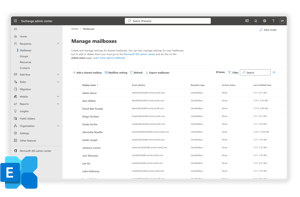
AskCody works with the resource mailboxes you already manage in the Exchange admin center. Every meeting room, desk and piece of equipment is a resource mailbox with its own calendar, and AskCody books against that calendar. AskCody does not create mailboxes of its own, so there is no second room list to build or keep up to date.
In the AskCody Admin Center you add each Exchange calendar by its mailbox address and choose its type: room, desk, equipment or person. Then you set its location, buffer time and Insights. The name you give it is used across the whole AskCody platform.
AskCody reads and writes calendars only. It has no mailbox access: no inbox, no sent items, no email bodies and no attachments. You decide which rooms AskCody manages and which booking policies apply, and you can limit AskCody to the room and desk mailboxes it uses with RBAC for Applications in Exchange Online.
Sign-in, users and groups from Entra ID
People sign in to AskCody with Microsoft single sign-on, so there are no extra passwords to manage. AskCody never sees or stores your users' passwords.
With automatic user management, Entra ID provisions users and groups to AskCody through SCIM. You set access per security group: its role, reception and service provider access, and its cost center. Add someone to a group and they get access. Remove them from every group, or disable their Entra ID account, and they are disabled in AskCody. After the first sync, changes flow through every 40 minutes.
Book the whole meeting from Outlook
The AskCody add-ins sit in the Outlook toolbar. Bookings finds and books rooms and desks, Services orders catering and AV from the invite, and Visitors registers guests with reception. They are modern add-ins, so they work in Outlook for Windows and Mac and in Outlook on the web, with Microsoft 365 or Outlook 2019 and 2021.
Your Microsoft 365 administrator deploys them centrally, and updates arrive without reinstalling anything. People keep sending invites the way they always have.
Teams meetings with the room and services attached
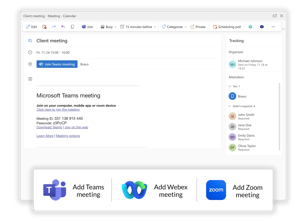
Add a Teams link to the invite as you always do, then book the room, the catering and the guests with the AskCody add-ins. Because it is one invite in Exchange, the Teams link, the room, the services and the guest list stay together, even when the meeting moves. The same goes for a Webex or Zoom link.
Meetings booked in Outlook, including meetings with a Teams link, show on AskCody room displays and dashboards, so everyone can see what is happening in each room. There is nothing extra to install in Teams: people keep the Teams they already use.
Workplace insights built on Power BI
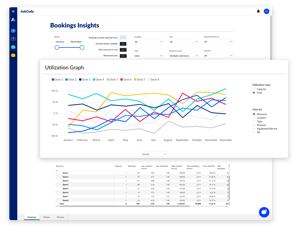
AskCody Insights is built on Microsoft Power BI and draws on real booking data from Exchange. See how meeting rooms, desks and other resources are used, filter across reports, and export the data for your own analysis in Excel. Power BI Embedded is built into AskCody, so you do not need a separate Power BI subscription.
Insights keeps one year of history, and you can export data up to three years back, even from before you started with AskCody, as long as the rooms are resources in Exchange.
Insights is anonymized when the data is collected, so it shows how rooms are used, not who used them.
Sync-based solutions vs. natively integrated solutions
Almost every meeting room tool works with Exchange. What differs is where the meeting lives. A sync-based solution keeps its own database and copies each booking to Exchange, so there are two records and a sync job that keeps them in step. A natively integrated solution has only one record: the meeting lives in Exchange, and Outlook, Teams, AskCody and the room display all read it there.
A well-run sync can work, so treat this as a design choice, not a verdict. Still, you should know which one you are buying. We checked 17 meeting room booking tools against their own documentation to see where each one keeps the booking.
Which tools are native and which sync? See all 17 compared
| Compared | Sync-based | Natively integrated, like AskCody |
|---|---|---|
| Where the meeting lives | In the app’s own database, with a copy in Exchange | In Exchange. One meeting, no second record |
| When a meeting moves in Outlook | The app catches up the next time the sync runs | The room, catering and guests move with it |
| When the sync lags or fails | Delays, conflicts, double bookings and orphan bookings | Nothing to reconcile, because there is only one record |
| The Teams link | Has to be carried across by the sync | It sits in the same invite and stays with the room and services |
| Where rooms are booked | Often in the app, with Outlook as a second view | From Outlook, as resource mailboxes in Exchange |
| Who owns the reconciliation | Someone, at the vendor or on your team | No one needs to |
Permissions, data and security
One consent, scoped to what AskCody needs
A Microsoft 365 Global Administrator connects Exchange Online once, in the AskCody Admin Center, and grants admin consent to the AskCody enterprise application. No service account or password is shared with AskCody.
AskCody requests calendar read and write on resource and user calendars, user read for single sign-on, and group read for Entra ID group sync. Microsoft Graph application permissions apply to all mailboxes by default, but AskCody does not need tenant-wide access: you can limit it with RBAC for Applications in Exchange Online to the room and desk mailboxes connected to AskCody, plus the mailboxes of the people who book and attend meetings in those rooms.
Calendars, not mailboxes
AskCody reads calendar data such as the organizer, time, location and attendees. It has no mailbox access: no email, inbox, sent items, attachments or files.
Exchange stays the system of record
Exchange meeting data is never synchronized to AskCody and never backed up by AskCody. It is read from Exchange when a feature needs it. When someone orders catering or registers a visitor, the few meeting details that order needs, such as the room, the time and the host, are stored with it.
Runs on Microsoft Azure
AskCody runs on Microsoft Azure, with separate European and North American setups, and your data stays in the region you signed up in. Exchange Online connects with OAuth 2.0 through Microsoft Graph, and all Exchange traffic requires at least TLS 1.2.
Independently assured
An annual ISAE 3000 Type 2 assurance report covers how AskCody protects personal data under the GDPR.
It put our old system to shame
“The flexibility of AskCody and the direct integration to Outlook put our old system to shame, and we now have a much better opportunity to connect lawyers across multiple locations... All employees can do it themselves, so our efficiency has improved.”
Live on time, in fact early
“We had to get it implemented by a certain date and we were able to meet that date without going over. In fact, we finished early! So that allowed me to breathe easy that month when we went live.”
No infrastructure for IT to run
“Another important feature was cloud-based. It’s very advantageous for us to have that in the cloud, where we’re not responsible for the infrastructure, for doing the updates.”
It looks and feels like Outlook
“AskCody was a much easier transition because it looks the same as the native Outlook experience, but it’s easier for the end user as you can do all the requirements of your meeting in this one spot.”
Why we left our old booking tool
“We shouldn’t have to go to a different solution than Microsoft Outlook to book a conference room, and the two systems never talked to each other... So that was kind of one of the drivers for us saying: Let us find a new tool!”
Common questions about AskCody and Microsoft 365
AskCody integrates with Microsoft Exchange (Exchange Online in Microsoft 365, and on-premises Exchange Server), Microsoft Entra ID, Outlook, Microsoft Teams and Power BI, and runs on Microsoft Azure.
AskCody connects to Microsoft 365 and Exchange Online through Microsoft Graph only. It does not use EWS for Exchange Online.
On-premises Exchange Server connects through EWS, which Microsoft's EWS retirement does not affect, because that retirement applies to Exchange Online only. In a hybrid environment, mailboxes in Exchange Online connect through Microsoft Graph and on-premises mailboxes through EWS. If you connected Exchange Online through the former EWS connection, upgrade the integration to Microsoft Graph.
No. Exchange stays the system of record. Exchange meeting data is never synchronized to AskCody and never backed up by AskCody: it is read from Exchange when a feature needs it.
When someone orders catering or registers a visitor, the meeting details that order needs, such as the room, the start and end time, the meeting name and the host, become part of that order.
AskCody requests scoped permissions through Microsoft Graph (Exchange Online) or EWS (on-premises Exchange Server), appropriate to the modules in use. For a typical deployment this is calendar read and write on resource and user calendars, user read for SSO identity, and group read for Entra ID group sync. No access to personal mailbox content, email bodies, or attachments is requested or required.
Microsoft Graph application permissions apply to all mailboxes in the tenant by default. AskCody does not require tenant-wide access and fully supports running behind a restriction. Customers can limit AskCody's access using Microsoft RBAC for Applications in Exchange Online, scoped to the room and desk mailboxes connected to AskCody plus the user mailboxes of people who book and attend in those rooms.
Full permission list: AskCody Help Center: Permissions
Scoping guidance: AskCody Help Center: RBAC for Applications in Exchange
A Microsoft 365 Global Administrator connects Exchange Online once, from the AskCody Admin Center, and grants admin consent to the AskCody enterprise application.
To set up automatic user management, someone with the Application Administrator, Cloud Application Administrator or Global Administrator role sets up the enterprise application in Entra ID, and an AskCody Owner or Integration Administrator enables provisioning in AskCody. Automatic user management needs a Microsoft Entra ID P1 or P2 license.
No. AskCody has no mailbox access. It reads calendar data, such as the organizer, subject, time, location and attendees, on the room and desk calendars and on the calendars of the people who book and attend meetings in those rooms. It never accesses email, inboxes, sent items, attachments or files.
Microsoft 365 and Exchange Online are fully supported, with the full feature set, through Microsoft Graph. Exchange Server Subscription Edition and Exchange Server 2019 are supported on premises through EWS, with limited functionality, because some features depend on Microsoft Graph and are available with Microsoft 365 only. Microsoft's support for Exchange Server 2019 has ended, so Exchange Server Subscription Edition is the recommended on-premises version. Exchange Server 2016 and earlier are not supported.
People sign in with Microsoft single sign-on through your Entra ID. With automatic user management, users and groups are provisioned from Entra ID through SCIM, and access is set per security group. Remove someone from every group in scope, or disable their Entra ID account, and they are disabled in AskCody.
The add-ins work with Microsoft 365, Outlook on the web, and Outlook 2019 and 2021 for Windows and Mac. Outlook 2016 has limited functionality for delegated access. Your administrator can deploy them centrally through Microsoft Centralized Deployment.
No. Power BI Embedded is built into AskCody, so you do not need a separate Microsoft subscription. AskCody Insights is available on the Essentials plan or higher.
Insights keeps one year of history. You can export data up to three years back, even from before you started with AskCody, as long as the rooms are resources in Exchange.
AskCody runs on Microsoft Azure, with separate European and North American setups. In Europe it uses the North Europe and West Europe Azure regions, in North America East US and West US. Customer data stays in the region where it is placed.
No. AskCody uses standard Microsoft APIs on top of your existing Exchange and Entra ID. It does not modify your Exchange organization, mailbox database or Entra ID configuration, and it adds no custom transport rules and no schema changes. It writes to a calendar only when someone books through AskCody.