.svg)

Visitor arrival is the handoff most workplaces leave to improvisation: the guest is in the lobby, the host is in another meeting, and reception is reconstructing whose guest this is from a spreadsheet. In AskCody, the arrival is part of the meeting record itself. Pre-registered in Outlook, expected at the front desk, announced to the host the moment the guest checks in.
The most expensive thirty seconds in your workplace happen at the front desk. A guest arrives for a 10:00 meeting. Reception has no record of them. The host booked the room weeks ago, invited the guest by email, and told nobody else. So reception improvises: which meeting, which floor, which host, is there a badge, who escorts them. Meanwhile the guest, often the exact person the meeting was meant to impress, stands waiting while the machinery visibly fails around them. The meeting starts twelve minutes late, and nobody logs it as a failure, because nothing "broke." It just was not reliable.
The Arrival Was Never Attached to the Meeting
The why is structural. In most workplaces the meeting exists in the calendar, and the guest exists in an email thread, and the front desk exists in neither. Three records, zero connections, and a human is expected to join them in real time. That is a handoff disguised as a calendar invite, and it fails on exactly the mornings when the lobby is busiest.
What AskCody Does Instead
AskCody attaches the guest to the meeting record from the moment the meeting is scheduled. That is the difference between Visitor Management software and a check-in app: one records an arrival, the other resolves a meeting.
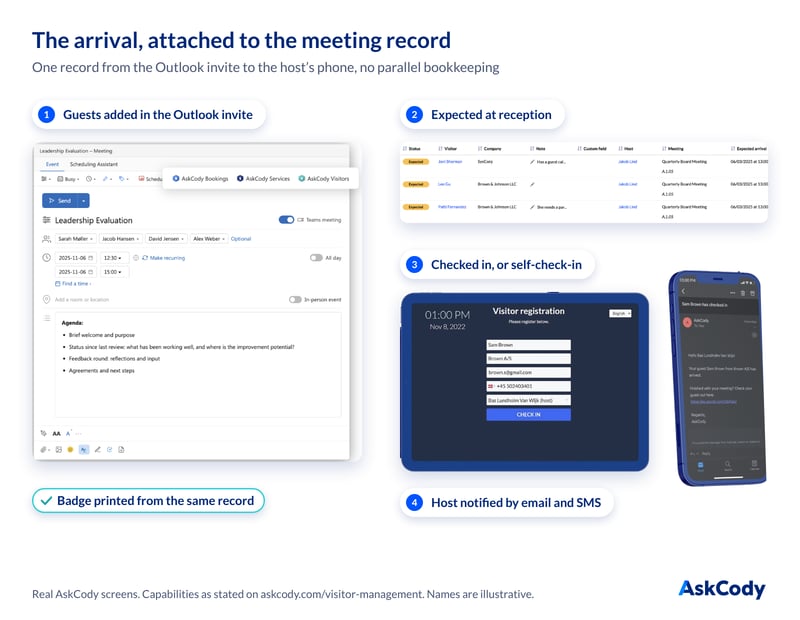
Pre-registration happens in Outlook, while booking. The organizer adds visitors' names and email addresses in the scheduled meeting itself. No separate portal, no second system to remember. This is the Microsoft-native part: the meeting, the room and the guest list live in one flow.
Reception sees who is expected. The front desk starts the day with today's expected arrivals, attached to their meetings, hosts and rooms, instead of a parallel spreadsheet it maintains by hand.
Check-in announces the guest instantly. A check-in by reception, or a self-check-in by the visitor, notifies the host of the arrival by email and SMS the moment it happens. No calling around, no walking the floors. Badge printing runs from the same record.
You control when guests hear from you. Since the notification-timing update, admins set when pre-registered visitors receive their invitation and instructions, so communication lands when it is useful, not when the system happens to fire.
Two Arrivals, One Record
Picture an executive assistant at a professional services firm. She books a client meeting for a Wednesday at 09:00 and adds the two visitors' names and email addresses in the scheduled meeting itself, in Outlook, while booking. She used to send the names to reception in a separate email that reception then copied into its own list. Now there is no second list, because the guests are attached to the meeting record from the moment it is scheduled.
Now picture a reception lead at a manufacturing group, who opens the front desk every morning to today's expected arrivals, attached to their meetings, hosts and rooms. When a guest checks in, the host is notified by email and SMS the moment it happens, instead of reception walking the floor to find someone who is in another meeting.
Why This Is a Reliability Feature, Not a Reception Feature
The point is not a smoother lobby, although you get one. The point is that the calendar made a promise involving a person who does not work for you, and the system keeps it. When arrival is part of the meeting record, reception stops running shadow bookkeeping, hosts stop being surprised, and the guest experiences an organization that expected them. How many of your most important meetings this quarter involve someone from outside the building? For a walkthrough of the setup, the Help Center covers pre-registration, check-in and notifications step by step.
Key Takeaways
- Visitor arrival fails when the guest, the meeting and the front desk live in three unconnected records. AskCody attaches the guest to the meeting record at booking time, in Outlook.
- Reception sees expected arrivals per meeting, checks guests in (or lets them self-check-in), prints badges, and the host is notified by email and SMS the instant the guest arrives.
- Admins control when pre-registered visitors are notified, so guest communication lands at the right moment.
- The result is a reliability guarantee at the front door: the meeting starts on time in front of the person it was meant to impress.