Skip to content

Meeting management for law firms

Client meetings, depositions and closings run on details. Your legal assistants book the room, catering on the client matter, AV and guests in one Outlook invite, and every team behind the meeting gets its task from it, before the client walks in.

The challenge

Why are meetings so hard to get right in a law firm?

A meeting in a law firm is never just a free room and a slot in a calendar. A client meeting, a deposition or a closing has to come together across the room, the guests, catering, AV, room setup and the right client matter, and across the people who deliver them: reception, conference services, catering, AV and IT, finance, and the legal assistants who plan the attorneys' days.

Every one of them works from their own copy of the plan. When the plan changes, and in legal work it changes all the time, every copy has to be updated by hand. This is what that looks like for one deposition that moves to the afternoon.

A deposition on Tuesday at 09:30 in Room 6, with three guests, breakfast for ten, a video link and a room setup. Reception, catering, AV and facilities each get their own email. The legal assistant moves the deposition to 13:00. AV and facilities pick up the new time, with setup moved to 12:30, but reception and catering still work from 09:30. At 09:30 breakfast for ten arrives in an empty room, and at 13:00 the court reporter is not on the reception list. One change, four emails, and two teams still on the old plan.

The five challenges behind it

01

Booking by email and phone

Attorneys live in Outlook, and their legal assistants book for them. When the room sits in one tool and catering, AV and visitors are requests by email or phone, every meeting turns into a thread. An assistant who supports two or three attorneys has no time left for a fourth.

02

Double bookings across systems

When rooms are booked outside the attorney's calendar, the room system and Outlook drift apart. Two matters end up in the same conference room, or a team walks the floor looking for a free one minutes before the client is due. Where time is billed by the hour, every lost minute shows.

03

Costs that never reach the matter

Breakfast for a deposition, lunch for a client team, a video link for a remote witness. When an order is not tied to a client matter when it is placed, someone has to trace it afterward, by hand, before it can be recovered or written off.

04

Confidential matters on shared screens

Room calendars, lobby screens and room displays are seen by everyone who walks past. A meeting subject that names a client, a matter or the other side should not be one of the things they read.

05

A reception that is told too late

Clients, opposing counsel, court reporters and witnesses all arrive at the same front desk. When reception learns about them from a daily memo, or not at all, badges are written by hand, NDAs are chased on paper and the host is found by phone.

One invite

One Outlook invite instead of five emails per meeting

AskCody puts every request in the meeting itself. Legal assistants book the room, catering, AV, room setup and the guests in one Outlook invite, including in the calendars of the attorneys they support, and each team gets its task from that same meeting. When the plan changes, the tasks follow, so nobody works from an old copy of the plan.

One meeting at a large office, before and after. Before, booking a meeting took five steps: book the room, then send separate emails about AV, room setup, catering and security. At 08:05 the organizer books Room 12 for 10:00 in one Outlook invite, with AV, room setup, lunch and two guests, and each team is notified from the same meeting. Buffer time to set up and clear away is added automatically. Before the meeting, the guests receive an email or text message with a map to the room, and the reception expects them. At 10:00 everything is in place. When a later meeting is canceled in Outlook, its catering and other orders are canceled too and the teams are notified, with no one having to tell them.

An organizer plans a meeting in the Outlook invite and opens the AskCody Visitors add-in, next to AskCody Bookings and AskCody Services. Three external guests are added with their name and email. At the reception, the guests appear in the AskCody portal as expected visitors, each with their host, meeting, room and arrival time. When the meeting is moved or made recurring, the guests follow the meeting.
Visitors

Clients, witnesses and court reporters are expected, not just invited

Add clients, opposing counsel and court reporters to the Outlook invite with the AskCody Visitors add-in, next to the room and the catering. They are pre-registered with reception and linked to the meeting, so reception knows who is coming, who they are meeting and in which room.

Before they arrive, guests can receive directions, WiFi details and parking information by email or SMS. At check-in, the badge prints from the invite, guests can sign an NDA, and the host is notified. Visitor data can be anonymized automatically after the period you set.

See how visitor management works

Client matters

Catering billed to the right client matter

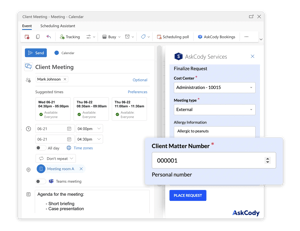
Deposition breakfasts and client lunches add up, and Finance needs to know which matter they belong to. Order catering in the same Outlook invite as the room, and make a client matter number a required field on the order, next to the cost center. The number travels with the order from the invite to the kitchen and on to Finance.

At month end, Finance gets a condensed or detailed report of every settled order for the period, as CSV for your ERP system or through the AskCody Services API.

See how meeting catering works

The AskCody Services add-in in an Outlook meeting invite with a required Client Matter Number field and a cost center on the catering order
What you see is what you book. An AskCody resource group called Executive floor holds the Boardroom and executive desks 1 to 6, and its members are the Entra ID group Leadership team. Maria Holm from the leadership team sees the Boardroom, Meeting Room A, Meeting Room B and executive desk 3 in the AskCody Bookings add-in, all bookable. Jonas Berg from the sales team sees Meeting Room A, Meeting Room B and sales desk 12. The Boardroom is not shown to Jonas.
Confidentiality

Confidential matters stay confidential

Mark a meeting as private in Outlook, and room displays, dashboards, Workplace Central and maps show the room as Occupied, without the subject or description. The client's name stays off the screen outside the door.

Resource groups link rooms and desks to your Entra ID security groups, so people see and book only the spaces they are allowed to, such as the client floor or a deposition suite. Legal assistants with delegate access can order catering and services on behalf of the attorneys they support.

See booking rules and policies

When plans change

When the deposition moves, everything moves with it

Depositions, hearings and client meetings move all the time. In AskCody, the room, the catering order and the guest list are tied to the same Outlook invite, so when the organizer changes it, everything changes with it. Move the meeting to Friday, and the room booking, the delivery time and the guests' arrival details follow. Cancel it, and the room is released and the order and the visit are canceled.

If the kitchen has already prepared the order or its deadline has passed, the order is not changed silently: it is detached and the organizer is told, so a person decides.

Follow-the-Meeting Intelligence. An Outlook invite called Leadership Evaluation holds Meeting Room A, an order of coffee, fruit and water from Catering, and two guests, Alex Weber and Lidia Holloway. On Thursday at 12:30 the room is booked in Microsoft Exchange, Catering has accepted the order and reception expects the two guests. The organizer moves the meeting to Friday at 14:00 in Outlook, and the room booking, the catering delivery and the guests' arrival details all move with it, with no emails to the kitchen or reception. Then the organizer cancels the meeting, and the room is released for others, the catering order is canceled and reception cancels the visit.

Customer story

How Eversheds Sutherland's secretaries handle a bigger workload

Eversheds Sutherland, a global law practice, used to schedule a meeting in the attorney's Outlook calendar, then book the room and order services in a separate program, and type daily memos so AV and catering knew what each day needed. With AskCody, bookings, services and visitors are handled in one place across its US offices.

50%

more workload handled by the firm's secretaries, as the firm reports it

700+

guests a month across the US offices, welcomed with visitor management

171+

bookable rooms and desks, with more than 3,500 bookings a year

Read the Eversheds Sutherland story

Susann Holloway, Conference Services Manager
Susann HollowayConference Services Manager

More attorneys per secretary

“Our secretaries managed two or three attorneys and partners before. Now they’re managing maybe five or six. It’s only possible to manage that increased workload, because they can handle everything in one spot with AskCody.”

Dale Pollock, Conference Services Manager
Dale PollockConference Services Manager

A reception that is ready before guests arrive

“The benefit of AskCody is that we are all a lot more prepared. The receptionists are not struggling to gather visitor information, which has streamlined the whole process and made it much easier for the receptionist and a better experience for our visitors.”

Luke Schnoebelen, Director of Professional Development
Luke SchnoebelenDirector of Professional Development

The power back in the hands of the user

“AskCody simplifies the booking process. It gave the power back to the user rather than a ‘wait and see scenario’... AskCody gave us visibility into all the available resources, and that’s great. That was at the core of what we needed.”

Anthony Moore, IT Director
Anthony MooreIT Director

Ten bookers used to mean ten ways to book

“Ten different people booking a meeting resulted in ten different ways of creating a meeting, and everything that goes with it... With AskCody employees can now book rooms and request services themselves, and it gives them a kind of self-service aspect where they can take control of their own meetings.”

Henry Chace, CIO
Henry ChaceCIO

Try it, and the time savings speak for themselves

“The pilot helped us understand just how much time we could give back to the attorneys and assistants and the price of that time... My best advice is to try it. You will see quickly that the ease of use, ease of management, and overall time savings are worth it.”

Nané Pr’Out, Director of Information Technology
Nané Pr’OutDirector of Information Technology

Cancel the meeting, and the room frees up

“The biggest impact I think is simply the ease of reserving conference rooms when you’re scheduling meetings... and also when you cancel a meeting, that the conference room frees up, and you don’t have to do additional steps to go into another system and remove it.”

A great fit for law firms

Why law firms choose AskCody

No double bookings or duplicate system of record. Meetings stay in Microsoft Exchange

AskCody is a meeting and workspace management platform built natively on Microsoft Exchange. Every meeting and every room reservation lives in Exchange, so there is one system of record and nothing to synchronize. Booking tools that keep their own database outside Microsoft have to sync it with Exchange, and every sync is a chance for a mismatch or a double booking.

Because the meeting is a normal Exchange meeting, one-click setup and join for Teams, Zoom and other video meetings works the way it does in Outlook, without custom integrations. The AskCody add-ins for Outlook are modern add-ins, deployed centrally and always up to date.

In line with the IT strategy

AskCody fits the IT strategy of law firms that build on Microsoft 365: a cloud platform with modern add-ins for Outlook, running on the Exchange you already have. It covers what legal services require, such as client matter numbers, general ledger codes, booking across multiple locations, and settlements for cost recovery.

Managing meetings with people's calendars in Exchange and room calendars in a separate database has become a growing source of frustration, especially for firms that keep adding collaboration technology. With AskCody, Exchange stays the one place your meetings live.

We help law firms implement
a scalable solution in Microsoft 365

Law firms appreciate that AskCody is not just another tool in their tech stack, but an integrated part of Microsoft 365 and their existing IT infrastructure. AskCody is built natively on Exchange and Microsoft Azure and works inside Outlook through modern add-ins.

The American law firm Shook, Hardy & Bacon became an AskCody customer in 2019. The firm had grown to a size where it needed to standardize its meeting processes, and it wanted a solution integrated natively with Microsoft 365 and Outlook.

“We shouldn’t have to go to a different solution than Microsoft Outlook to book a conference room.” Luke Schnoebelen, Director of Professional Development

Read the Shook, Hardy & Bacon case study

We offer streamlined video conference setup
with one-click Teams meetings

AskCody works natively with Microsoft 365, so the organizer adds a Teams meeting in Outlook with one click, in the same invite as the room, the AV and the other services. For law firms, easy access to video-enabled rooms, AV equipment and the right room setup is vital to the business.

Eversheds Sutherland books more than 171 rooms and desks this way. Shook, Hardy & Bacon became a customer in 2019, just before the pandemic, and the platform's flexibility let the firm adapt quickly, including setting up its main conference room for remote court sessions.

We help reduce mistakes, giving law & legal
a solution they can trust

One of the reasons law firms choose AskCody is that they have had bad experiences with unstable or poorly integrated workplace software.

Synchronization issues and double bookings usually come from how a platform is built. When a booking tool keeps its own database outside Microsoft, every action has to travel between that database and Exchange, and an outage or a delay on either side can leave the two out of step.

Because AskCody is built on Azure and Exchange, your meeting data stays in Microsoft. That significantly reduces the risk of synchronization issues and double bookings, and gives law firms software they can trust.

We help law firms & legal services streamline and standardize meetings

One issue we hear again and again is the lack of a standard way to book. When there are several ways to reserve rooms or desks, order services and manage visitors, you lose control of the meetings that matter most. This was a major issue for the Chicago law firm Burke, Warren, MacKay & Serritella, and one of the main reasons it chose a workplace management solution.

“Ten different people booking a meeting resulted in ten different ways of creating a meeting, and everything that goes with it. Meeting management can be a convoluted process, so we really needed a standardized system that was easy for our people to use and that could automate the current processes in place. With AskCody, employees can now book rooms and request services themselves, and it gives them a kind of self-service aspect where they can take control of their own meetings.” Anthony Moore, IT Director, Burke, Warren, MacKay & Serritella

Read the Burke, Warren, MacKay & Serritella case study

Meets the needs of veteran attorneys while introducing the right technologies to attract talented digital natives

Law firms compete for the next generation of attorneys and legal professionals. Firms have to meet the needs of their veteran attorneys while introducing the right technology to attract talented digital natives, the younger attorneys who will carry the firm in the future. Here is what our customers deliver on:

  • An intuitive, self-service experience. Legal professionals expect the right technology for basic tasks, so they can spend more time on clients. Phone calls and manual emails for non-billable tasks are becoming less acceptable.
  • One-click video meetings. Teams, Zoom, Webex and other video meetings work from the Outlook invite, with no additional integrations.
  • Hosted software, less to run in-house. AskCody is cloud-based, so firms free up internal IT resources and focus on being better law firms.
  • One source of truth as the tech stack grows. As firms add collaboration tools, keeping a separate booking database in sync with Exchange becomes a growing burden. With AskCody, Exchange is the backbone for meetings.

Visitor records that support your
ISO certification

ISO certification shows that a firm is committed to maintaining high standards, and it strengthens the firm's credibility, especially in international work. Visitor management plays a part in it: every guest who enters your offices is registered, documented and tracked.

Eversheds Sutherland, one of the largest law firms in the world, first brought in AskCody Visitor Management for its ISO certification work. Guests are pre-registered from the Outlook invite, checked in at reception and recorded with the meeting they attend, which improves security, confidentiality and access control while giving guests a great first impression.

AskCody itself is covered by an independent ISAE 3000 Type 2 report.

Read the Eversheds Sutherland case study

Common questions from law firms and legal teams

What is the best meeting management software for law firms?

For law firms on Microsoft 365, AskCody is built for how legal teams run meetings. Legal assistants book the room, catering, AV and visitors in one Outlook invite, including for the attorneys they support with delegate access, and catering orders can carry a required client matter number. Every booking lives in your Microsoft Exchange room calendars, so there is no separate booking database to keep in sync, and orders and visits follow the meeting when it moves. Law firms such as Shook, Hardy & Bacon, Eversheds Sutherland and Burke, Warren, MacKay & Serritella use AskCody.

How does AskCody keep client matters confidential?

Mark a meeting as private in Outlook, and room displays, dashboards, Workplace Central and maps show it as Occupied, without the subject. Resource groups tied to your Entra ID security groups decide who can see and book each room. Visitor data can be anonymized automatically after 1 to 365 days, 31 by default. AskCody runs on Microsoft Azure and is covered by an ISAE 3000 Type 2 report.

Read about the ISAE 3000 report

Can legal assistants book rooms and order catering on behalf of attorneys?

Yes. With delegate access to the attorney's calendar in Outlook, a legal assistant books the meeting and the room in that calendar. To order catering and services as well, the assistant gets the AskCody role Add-in User with Delegate Access and opens the AskCody Services add-in from the meeting in the attorney's calendar.

Read how delegated access works

Can catering be charged to a client matter number?

Yes. Organizers pick a cost center when they order in the Outlook invite, and you can add your own fields, such as a required client matter number or a general ledger code, as text, number, checkbox or drop-down fields. Finance gets a report of every settled order as CSV for your ERP system, or through the AskCody Services API.

Read about cost centers

What happens to catering and guests when a deposition or client meeting is moved or canceled?

When the organizer moves the meeting in Outlook, the room booking, the catering order and the guests' arrival details move with it. Cancel the meeting, and the room is released and the order and the visit are canceled. If the order has already been prepared or its deadline has passed, it is detached and the organizer is told.

Can we control who books specific conference rooms?

Yes. Resource groups link rooms and desks to Entra ID security groups, so people see only the spaces they are allowed to book. For rooms that need approval, Microsoft Exchange can send each request to delegates who approve it, and the rules hold whether people book in Outlook or in the AskCody Bookings add-in.

Read about resource groups

Do attorneys and legal assistants need to learn a new system?

No. AskCody works inside Outlook, with add-ins for booking rooms, ordering services and registering visitors, and every booking lives in your Microsoft Exchange room calendars. Reception, the kitchen and facilities work from their own views of the same meetings.

See how your firm's meetings would run

Talk to a consultant about how rooms, catering on the client matter and client visits come together in one Outlook invite, and follow the meeting when plans change.