.svg)

Before you buy room booking software, ask whether it works natively on your Microsoft 365 and Exchange calendars or keeps a second copy, whether people will actually adopt it, and what happens to the catering, AV and visitors when a meeting moves. Then ask the vendor about security, uptime, support, pricing, implementation, long-term stability, and whether AI is built in or bolted on. The right answer is the platform, and the partner, that makes sure the meeting actually takes place, as planned, every time.
Modern businesses run on meetings, from team huddles and client calls to high-stakes board discussions. Yet too often a meeting feels more like a logistics exercise than a working session. The culprit is rarely the people. It is outdated processes, fragmented tools and no shared view of the meeting from booking to follow-up.
Most room booking software demos well. The differences show up later, in the questions nobody asked. This guide gives you those questions, in the same seven steps as The Complete Buyer’s Guide to Meeting Management Software, which you can download in full, free and ungated, plus one add-on for 2026:
- Why meeting management software matters
- Who should be involved, and what each team needs
- What to look for: eight capability areas
- How to prioritize your investment
- 11 questions to ask before buying room booking software
- 10 questions to ask the vendor
- Updated for 2026: AI must be built in, not bolted on
- Are you ready?
1. Why Meeting Management Software Matters
In a hybrid, digital-first workplace, the in-person meeting is still the backbone of collaboration. A physical meeting is where trust is built, decisions are made and, in many industries, revenue is earned. In law firms, financial services, consulting and professional services, and large corporate and public offices, meetings are where deals are closed and client relationships are won or lost.
That is why the pressure on meetings keeps rising:
- Meetings carry revenue. Where time is billable, a meeting that starts late or in the wrong room costs the client relationship as well as the hour.
- Hybrid work makes scheduling harder. The right people, rooms and equipment have to line up, and remote participants need an equal meeting experience.
- Inefficiency is expensive. People search for free rooms, last-minute changes ripple through the day, and rooms that are booked but not used still cost real estate.
- Visitors raise the bar. Reception needs to know who is coming, check-in has to be secure, and visitor data must be handled in line with GDPR.
- Teams behind the meeting are overloaded. Catering, facilities and IT handle requests by email and phone, often at the last minute.
Here is what that looks like on a bad morning. You host an important client meeting in ten minutes. You learn that the room was moved, the lunch was delivered to the old room, and your guest has been waiting in reception for half an hour without anyone noticing.
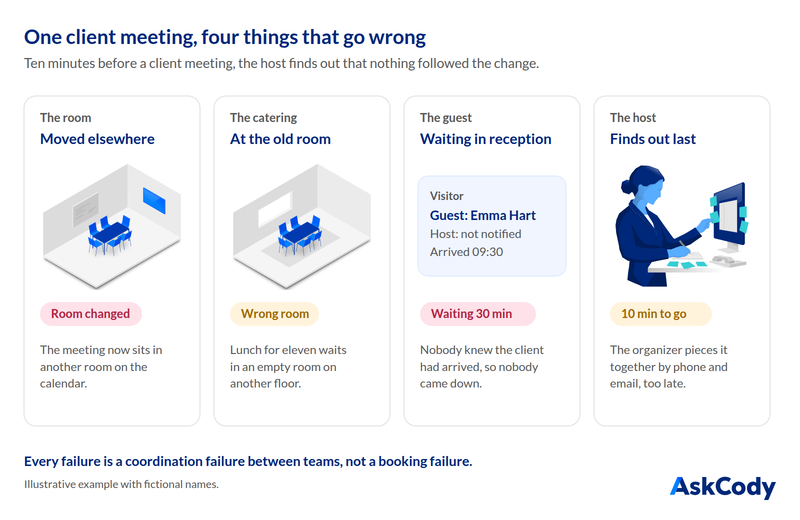
None of those failures is a booking failure. Each is a coordination failure between teams that do not share one view of the meeting. A good meeting management solution turns that around: booking takes seconds, rooms are used well, no-shows are released, visitors are expected, and every team works from the same meeting. The first question to ask is about you, not the vendor: what does a failed meeting cost us?
2. Who Should Be Involved, and What Each Team Needs
Managing meetings is a team sport. Buying the software is never a one-person decision, and it matters most for mid-size and large organizations, roughly 500 to 5,000 employees, with many meetings, complex logistics or several locations. Bring every team that touches a meeting into the evaluation, and ask how the solution serves each of them.

End Users: Employees, Executives and Assistants
Needs: a simple, fast way to book rooms, desks and resources without hassle.
Ask the vendor:
- Can people book from Outlook and Microsoft 365, on mobile and at a kiosk or room display?
- Does search show real-time availability by size, location and equipment?
- Do reminders and check-in reduce no-shows?
Conference Services and Workplace Logistics
Needs: full control over meeting setup, logistics and coordination.
Ask the vendor:
- Is there one overview of every meeting, room and service for the day?
- Can workflows differ by meeting type, from internal syncs to events?
- Are rooms released and rebooked automatically when plans change?
Hospitality and Catering
Needs: visibility into catering requests and real-time updates on changes.
Ask the vendor:
- Is each catering order linked to its meeting, so it moves when the meeting moves?
- Are the kitchen and service teams alerted to changes and cancellations?
- Can orders record dietary needs and preferences?
Facilities and Office Management
Needs: insight into space use and coordination of cleaning and maintenance.
Ask the vendor:
- Does it show how rooms are actually used, not only how they are booked?
- Can cleaning and maintenance follow the booking schedule?
- Can issues be reported against a specific room?
IT and AV Support
Needs: meeting technology that works, with few tickets and little administration.
Ask the vendor:
- How does it integrate with Microsoft Teams and the room AV?
- Can issues in meeting rooms be reported and followed up quickly?
- Does usage data show which AV investments pay off?
Reception and Security
Needs: a clear overview of visitors and meetings for check-in and security.
Ask the vendor:
- Can guests be pre-registered from the meeting invite?
- Does it support digital sign-in and badge printing?
- Is the host notified on arrival, and is visitor data handled in line with GDPR?
Finance
Needs: data on meeting-related costs and a basis for budget decisions.
Ask the vendor:
- Can costs for catering and services be allocated to cost centers or client matters?
- Is there reporting on space use against real estate costs?
- Does it show the return on meeting space investments?
Leadership and Workplace Strategy
Needs: data to improve office space and meeting efficiency.
Ask the vendor:
- Is there a workplace analytics view of meeting and booking trends?
- Does the data support forecasting and office redesign?
- Can it track resource use for sustainability goals?
Without one platform, these teams work in silos, which leads to miscommunication and a poor experience for employees and guests. A unified solution gives every stakeholder real-time visibility, removes manual work through automation, and turns meetings into data you can act on.
3. What to Look For: Eight Capability Areas
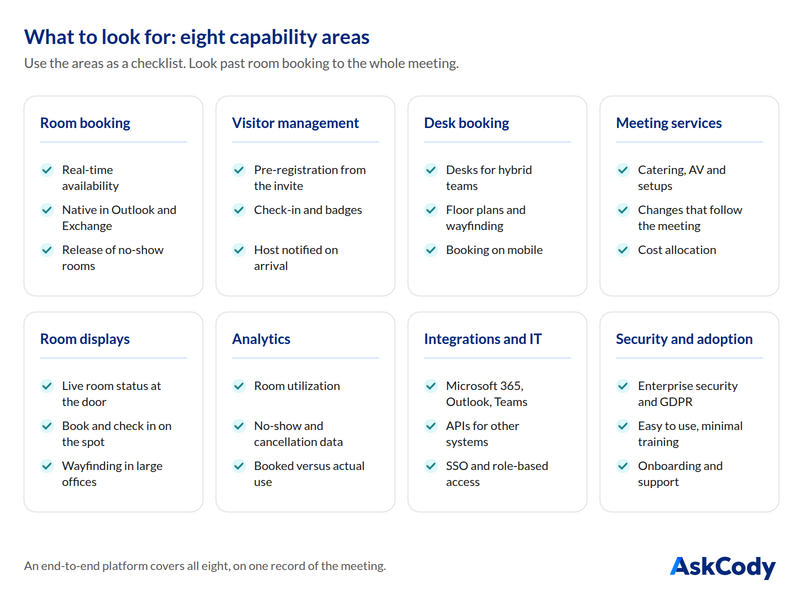
Look beyond room booking to an end-to-end platform that covers the entire meeting lifecycle, fits your existing workflows, and keeps your data secure and compliant. Use these eight areas as your checklist.
Room Booking
Real-time availability and conflict prevention, native booking in Outlook and Microsoft 365, automatic release of rooms nobody checks in to, recurring meetings, and smart room suggestions. Ask: does the booking live in Exchange as the single source of truth, or in a second calendar that has to be kept in sync?
Visitor Management
Pre-registration from the invite, secure check-in and badge printing, host notifications on arrival, visitor logs for evacuation, and data handling in line with GDPR. Ask: can the organizer register the guest in the same step as booking the meeting? See how AskCody handles visitor management.
Desk Booking for Hybrid Teams
Hot desks and flexible workspaces, interactive floor plans and wayfinding, team neighborhoods, booking on mobile, and desk utilization data. Ask: do desks and rooms share one booking experience?
Meeting Services and Resources
Catering, AV and room setups ordered with the meeting, last-minute changes, and automated cost allocation and billing. Ask: when the meeting moves or is cancelled, do the orders follow automatically?
Room Displays and Digital Signage
Live room status at the door, touch booking and check-in, wayfinding for large offices, and your own branding. Ask: does check-in on the display feed the no-show data and release the room?
Analytics and Workplace Optimization
Room utilization reports, no-show and cancellation tracking, behavior insights for HR and facilities, and recommendations based on the data. Ask: can you see what was booked against what actually happened?
Integrations and IT
Deep integration with Microsoft 365, Outlook and Teams, secure APIs for HR, security, facilities and IT service platforms, and single sign-on with role-based access control. Ask: is it native through Microsoft Graph, or a plugin synchronizing Exchange data? Read more about Microsoft 365 integration.
Security, Scalability and Adoption
Enterprise-grade security with external penetration tests, GDPR compliance, support for global, multi-location and multilingual deployment, an intuitive interface, mobile and multi-device access, and proper onboarding and support. Ask: will employees use it with minimal training?
This is also where many buyers discover what they are really shopping for. Room booking software reserves a space at a time. Meeting management runs everything around the booking: the rules, the services, the visitors and the changes. Our guide to meeting room booking versus meeting management sets out the dividing line. Either way, avoid buying a set of disconnected tools: every gap between them is a place where a meeting can fail.
4. How to Prioritize Your Investment
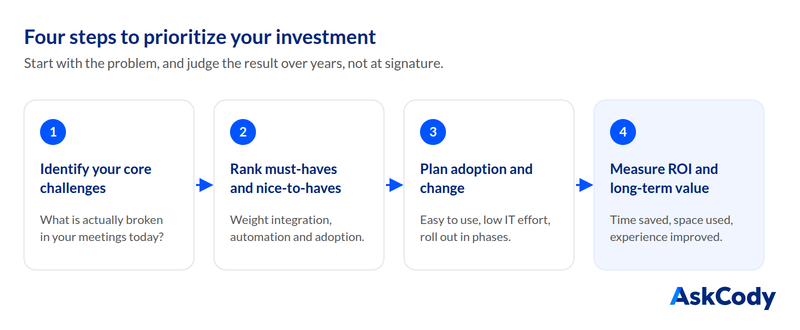
Most organizations struggle with the same fundamental question: what problem are we actually trying to solve? Start there, and judge the result over years, not at signature.
Step 1: Identify Your Core Challenges
- Are rooms frequently booked but left empty?
- Are employees frustrated by double bookings and scheduling conflicts?
- Do visitors face delays, security gaps or unclear check-in?
- Is your hybrid model struggling to make good use of office space?
- Do employees regularly call IT or facilities for last-minute meeting needs?
- Do workplace services, facilities and the corporate kitchen spend hours on manual work for meetings and events?
Many organizations shop for features without understanding what is broken in their current process. Start with the problem.
Step 2: Rank Must-Haves Against Nice-to-Haves
Must-haves solve your core challenges: integration with your tech stack, such as Microsoft 365; automation of manual tasks like room release, visitor check-in and notifications; the enterprise depth to handle room amenities, catering processes, business policies and booking permissions; security and compliance; and a solution employees and IT will actually use.
Nice-to-haves add value but are not deal-breakers, such as custom branding for check-in kiosks, AI-driven room recommendations or multi-location analytics dashboards. A solution that checks every must-have and some nice-to-haves is likely a good fit.
Step 3: Plan for Adoption and Change
- Is the system easy to adopt? If people find it complicated, they fall back on manual workarounds.
- Does it need ongoing IT support? A tool that IT constantly has to fix creates more problems than it solves.
- Can you roll it out in phases, for example meeting rooms first and visitor management next?
Step 4: Measure ROI and Long-Term Value
- How much time will it save employees and administrators?
- Will it reduce space costs by improving how rooms are used?
- Will it improve the visitor experience and security?
Look beyond the initial price to the efficiency gains over the years you will run it.
5. 11 Questions to Ask Before Buying Room Booking Software
No single platform will check every box on your wishlist. Every organization has its own requirements, tech stack and workflows. So instead of searching for a perfect solution, look for the best fit: the one that meets your most critical needs and leaves room to grow. These 11 decision factors, each with its guiding questions, give you a structured way to get there.
1. Core Business Needs
- Does the solution address our biggest meeting challenges?
- Which pain points are we actually solving: booking conflicts, visitor security, room utilization or something else?
2. Integration With Existing Tools
- Does it work inside our Microsoft 365 ecosystem, in Outlook, Teams and Exchange, or does it need workarounds?
- Is the core integration native to Exchange through Microsoft Graph, or based on synchronizing a copy of the calendar, with the sync issues that brings?
3. User Experience and Adoption
- Will employees adopt it with minimal training, and is the interface intuitive?
- How easy is it to configure, manage and maintain?
- Can our business processes be supported in the system, or do they need custom development?
4. Flexibility and Scalability
- Can it grow with us across locations, new office layouts and new ways of working?
5. Room and Desk Booking Capabilities
- Does it prevent double bookings, show real-time availability and help us use rooms and desks well?
- What happens to the catering order, the AV setup and the visitor registration when a meeting moves or is cancelled?
6. Security and Compliance
- Does it meet our enterprise security requirements and regulatory needs, including GDPR and visitor data protection?
7. Workplace Analytics and Reporting
- Does it give actionable insight into meeting patterns and space use that helps us reduce wasted space?
8. Automation and AI Capabilities
- Does it automate manual tasks, such as smart scheduling, no-show handling and resource optimization?
9. Vendor Support and Reliability
- Is the vendor known for strong support, regular feature updates and a future-proof roadmap?
10. Cost Versus ROI
- Does it deliver measurable ROI through time saved, better space use and less work for IT?
- Are all features included, or is pricing split into tiers and add-ons?
11. Prioritized Stakeholder Value
- Does it deliver value to every stakeholder, from IT, facilities and workplace logistics to reception, the corporate kitchen and security?
- When stakeholders want different things, for example the kitchen prefers a solution that does not fit the IT strategy, who has the final say?
How to Score the Answers
- Rank each factor by your priorities, and turn the ranking into weights that add up to 100%.
- Score each solution on every factor from 1 (poor) to 5 (excellent).
- Multiply each score by its weight and add up the results.
- Discuss the trade-offs. If a solution scores high where it matters most but lacks a feature, ask whether configuration or an integration can close the gap.
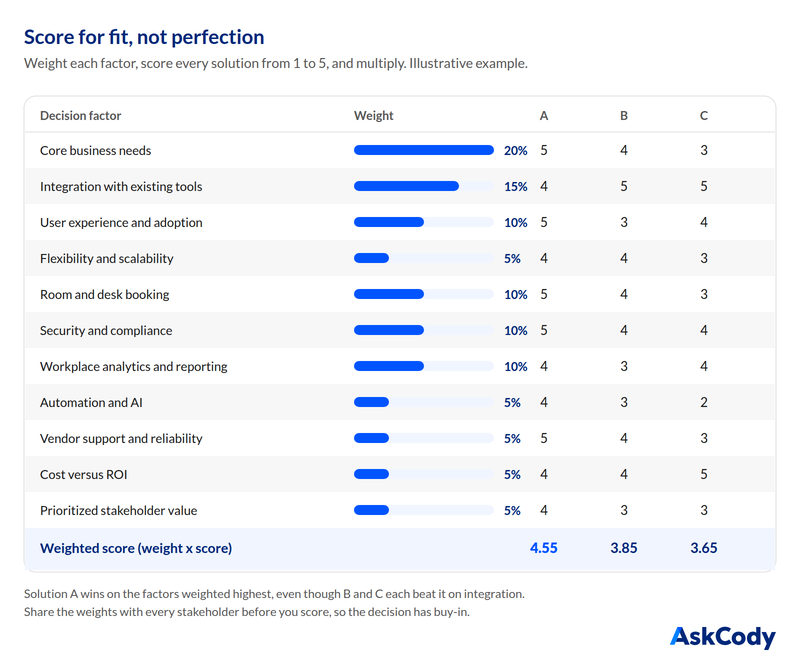
In this illustrative example, Solution A comes out on top because it is strongest where the weights are highest, even though B and C each score better on integration. If the totals are close, look at the trade-offs behind them. Adjust the weights to your own priorities, and share them with every stakeholder before you score. Agreeing on the weights first is what gives the final decision buy-in, and it makes the implementation that follows much easier.
6. 10 Questions to Ask the Vendor
Buying meeting management software is not only about the application. It is just as much about the vendor and business partner behind it. A feature-rich solution is only valuable if the vendor provides the support, security, implementation and innovation that keep it working for years.
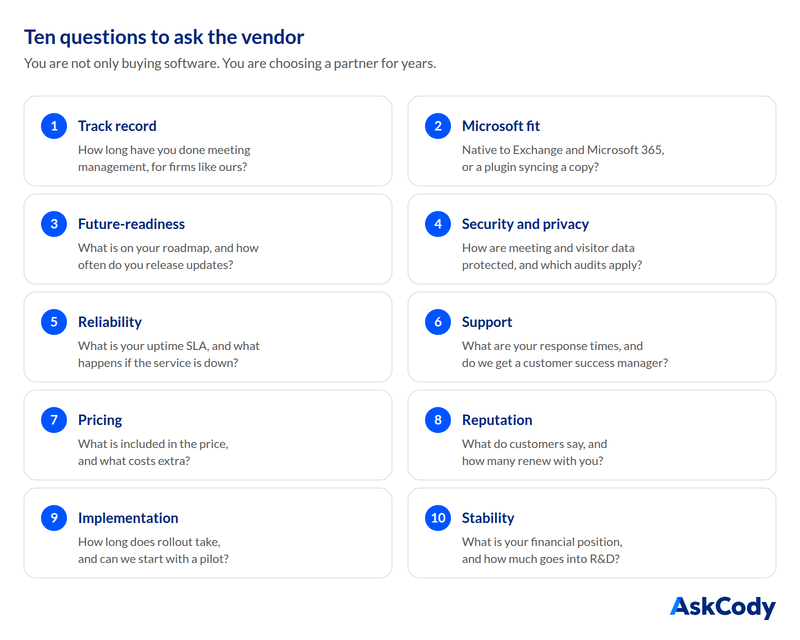
1. Industry Expertise and Track Record
Look for a vendor that specializes in meeting management and workplace challenges, with proven success at organizations like yours.
- How long has the vendor worked in meeting management?
- Do they have experience with organizations of our size and industry?
- Can they share references or customer stories?
2. Microsoft and IT Ecosystem Fit
Native integration with Microsoft 365, Outlook and Teams avoids workarounds that add IT complexity. The solution should also connect to your security and facilities tools, and fit your IT strategy.
- Is the solution natively integrated with Microsoft, or an add-on that synchronizes Exchange data?
- Can it work in our IT environment without custom development?
- Which deployment options are available, and do they fit our strategy?
3. Scalability and Future-Readiness
The platform should support multiple offices, hybrid work and changing needs, backed by a roadmap and regular releases.
- How does the solution scale to more offices and more users?
- What is on the product roadmap?
- How often are new features and improvements released?
4. Security, Compliance and Data Privacy
Meeting and visitor data must be protected with enterprise-grade security, role-based access control, single sign-on and encryption.
- Does the vendor comply with GDPR and the security standards our organization requires?
- Which independent audits or assurance reports cover the service?
- How are meeting and visitor data encrypted and protected?
- Does it support single sign-on and multi-factor authentication?
5. Reliability, Uptime and Performance
Business-critical software needs minimal downtime, proactive monitoring and fast performance when people book rooms, check in visitors or open reports.
- What is the uptime commitment in the SLA?
- How is system performance monitored and maintained?
- What happens if the service is down?
6. Customer Support and Service Quality
Look for support that matches your locations and hours, personal help during onboarding, and good self-service resources.
- What are the response times for critical issues?
- Is onboarding included, with ongoing training and re-onboarding when teams change?
- Are managed services available?
- Is there a dedicated customer success manager?
7. Transparent Pricing and ROI
A clear, predictable pricing model avoids surprises for add-ons, integrations or support, and the vendor should be able to show the return.
- What is included in the price, and what costs extra?
- Are there hidden fees for integrations, updates or support?
- How does the vendor demonstrate ROI?
8. Customer Feedback and Reputation
Reviews, testimonials and long customer relationships say more than any demo.
- What do other customers say about the vendor on independent review sites and in references?
- How many customers renew?
- Does the vendor share insight and best practice with the industry?
9. Implementation and Time to Value
Avoid solutions that need long setup times or heavy customization, and look for training and change management support.
- How long does implementation take?
- What training and onboarding are provided, and are stakeholder workshops part of it?
- Is there a pilot or trial period?
10. Vendor Stability and Long-Term Commitment
You want a partner that will still be investing in the product in five years, not just a software provider.
- What is the company’s financial position and growth trajectory?
- How much does it invest in R&D and innovation?
- Will it act as a true partner, helping us improve how we manage meetings?
Updated for 2026: AI Must Be Built In, Not Bolted On
The questions above still decide most of the evaluation. But one question has moved from nice-to-have to must-have this year: does the platform have intelligence built in, or is AI bolted on?
Most meeting software today is deterministic. It stores the meeting as a system of record and applies the rules you set: who may book which room, what needs approval, when a no-show is released. That is the foundation, and you still need it. But rules only cover the cases someone thought of in advance. Everything else lands in inboxes: the meeting that moved while the catering did not, the visitor booked for a room that changed, the clash between two teams that no policy settles. In most organizations, a person catches those by hand every day.
An intelligence layer, sometimes called an agentic layer, is the next step. It reads the same meeting record and the same rules, predicts what needs attention before it turns into a problem, and resolves it or hands it to the right person, with people in control.

Built In or Bolted On: How to Tell the Difference
- Bolted on is an AI assistant or chat window added beside the product. It works from a copy of the data, cannot see the rules or the services behind a meeting, and so it can answer questions but rarely act on them.
- Built in means the intelligence works on the same meeting record as everything else: the room, the rules, the catering, the visitors and the changes. It knows what changed, who is affected and what it is allowed to do about it.
What to Look For in an Intelligence Layer
- It works on the one meeting record, not on an export or a second copy.
- It understands your rules and policies, and acts only within them.
- It surfaces the exceptions no rule covers, before they reach the meeting.
- It routes each issue to the team that owns it, so nobody has to chase it.
- It keeps people in control, with clear approval before it changes anything that matters.
- It learns from what actually happened, not only from what was booked.
The 2026 Add-On: Six Questions to Ask About AI
- Is the AI built into the platform, or a separate assistant added on top?
- Does it work on the same meeting record and rules, or on a copy of the data?
- What can it actually do: answer questions, suggest actions, or act with approval?
- Who stays in control, and how do we approve, review and undo what it does?
- Where is our data processed, is it used to train models, and how is it handled under GDPR and the EU AI Act?
- What is live today, and what is on the roadmap? Ask to see it working, not on a slide.
In the scorecard, this belongs under factor 8, automation and AI capabilities. For most organizations it now deserves a higher weight than the example above gives it.
7. Are You Ready?
The workplace of the future demands smarter, more connected solutions. Choosing the right meeting management software, and the right partner, positions your organization for the years ahead. With the questions above, you are ready to start the search with confidence.
How AskCody Answers the Vendor Questions
We encourage you to put AskCody through the same questions as everyone else. Here are our short answers:
- Track record: AskCody has worked with meeting management since 2011. You can read customer stories from organizations like yours.
- Microsoft fit: AskCody is built for Microsoft 365 and works directly on your Exchange room calendars through Microsoft Graph, so the booking in Outlook is the booking, with no second calendar to keep in sync.
- The whole meeting: organizers order catering, AV and room setups in the same Outlook meeting and register visitors on the invite. When the meeting moves, the orders and the visitor registration move with it.
- Security: our controls are documented in an independent ISAE 3000 report, and we describe our commitment to GDPR openly.
- Rules and intelligence: AskCody runs a built-in rules and policies layer on the meeting record, covering room governance, access control, booking policies and scheduling permissions. That shared record is the foundation an intelligence layer needs.
- Pricing: all features are included from the first license. See AskCody pricing.
- Support: our support and service catalogue sets out what is included.
- Stability: AskCody is part of Volaris Group, a Constellation Software company. Read about the next chapter for AskCody.
FAQs About Buying Room Booking Software
What questions should you ask before buying room booking software?
Ask whether it solves your core meeting problems, integrates natively with Microsoft 365 and Exchange, will be adopted with minimal training, scales across locations, prevents double bookings, meets your security requirements, reports on real usage, automates manual work, comes with reliable vendor support, delivers measurable ROI and creates value for every stakeholder.
What questions should you ask a meeting management software vendor?
Ask about their track record, how natively they integrate with Microsoft 365, their roadmap and release cadence, security and data privacy, uptime and SLA, support and customer success, what the price includes, what customers say, how long implementation takes, and their financial stability and R&D investment.
Who should be involved in buying room booking software?
Everyone who touches a meeting: end users and assistants, conference services, hospitality and catering, facilities, IT and AV, reception and security, finance, and leadership. Each team needs something different from the same meeting.
Should meeting management software have AI built in?
Yes, increasingly. Look for an intelligence layer that works on the same meeting record and rules as the rest of the platform, so it can predict and resolve issues with people in control. AI bolted on as a separate assistant works from a copy of the data and can rarely act on what it finds.
How do you compare meeting management solutions?
Weight the 11 decision factors by your priorities so they add up to 100 percent, score each solution from 1 to 5 on every factor, multiply and add up. Share the weights with all stakeholders before you score, and discuss the trade-offs when totals are close.
Is room booking software the same as meeting management software?
No. Room booking reserves a space at a time. Meeting management runs everything around the booking, including the rules on who may book which room, services, visitors, changes and data. Room booking is one part of meeting management.
What if no solution meets every requirement?
That is normal. Choose the best fit for your most critical needs rather than a perfect solution, and check whether configuration or integrations can close the remaining gaps.
Key Takeaways
- Start with the problem and the cost of a failed meeting, not the feature list.
- Involve all eight teams behind the meeting, and ask how the software serves each of them.
- Ask every vendor the same 11 product questions and 10 vendor questions, and write the answers down.
- The integration question decides the most: native on Exchange, or a second calendar to keep in sync.
- In 2026, ask whether AI is built in or bolted on: an intelligence layer on the meeting record, not an assistant beside it.
- Weight the factors, score for the best fit, and share the weights before you decide.
Download The Complete Buyer’s Guide to Meeting Management Software, free and ungated.