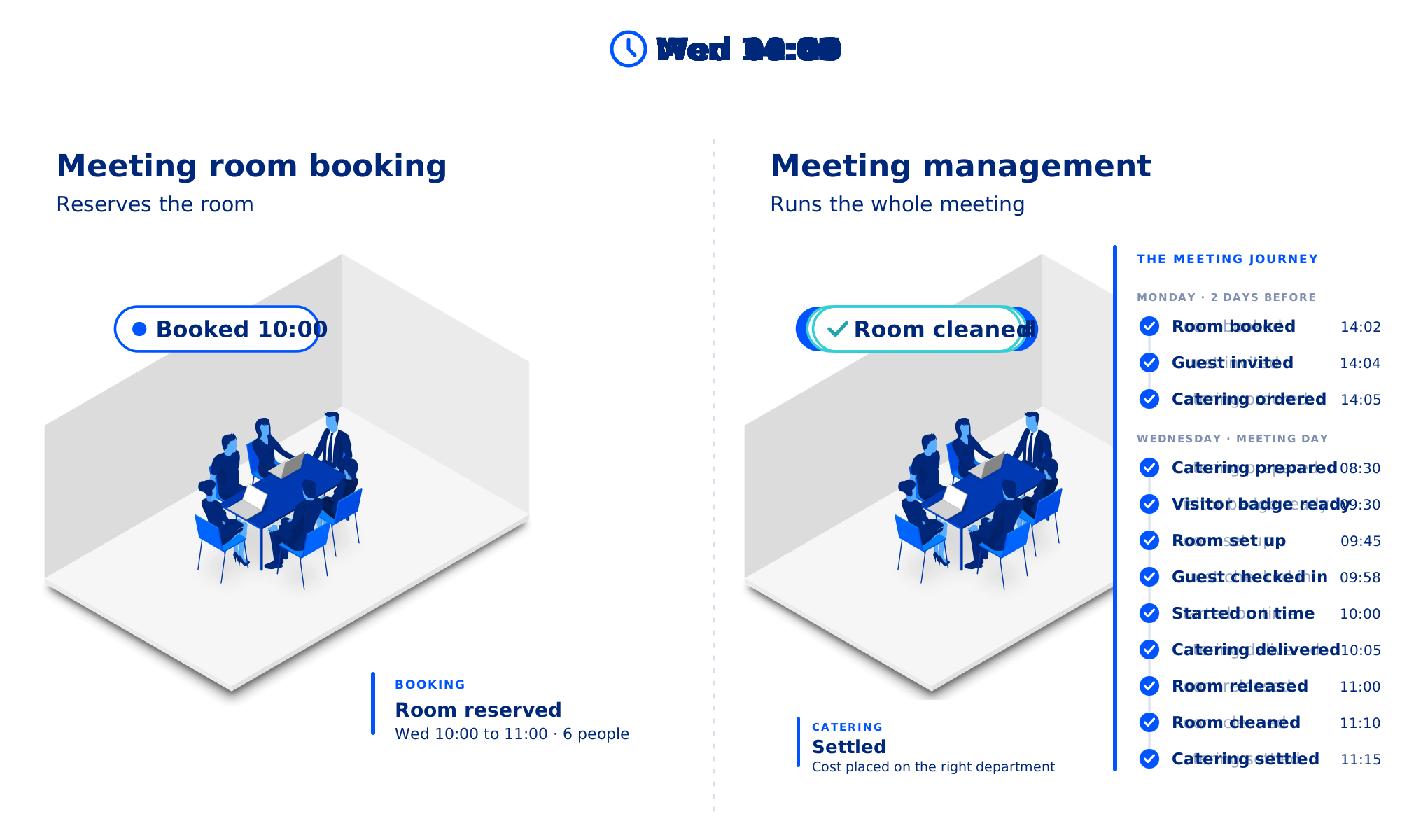
Meeting management is more than booking a room
Meeting management is the discipline of making meetings work, from booking to follow-up. It brings together rooms, booking rules, catering, AV, visitors, changes, costs and the data behind them, on one platform connected to the calendar people already use.
Meeting scheduling, meeting room booking and meeting management
These terms are often used interchangeably, but they describe three different jobs:
- Meeting scheduling answers when: finding a time that works for everyone.
- Meeting room booking answers where: finding and reserving an available room.
- Meeting management answers everything else: the booking rules, catering, AV and room setup, visitors, changes and costs.
Booking is the foundation of meeting management, not an alternative to it. Where the line falls for your organization is explained in Room Booking Reserves the Room. Meeting Management Runs the Meeting.
A cross-organizational team sport
A single meeting can involve facility management, the kitchen, reception and finance, from preparing the room and catering to managing visitors and allocating costs.
And when a meeting changes, everything around it may need to change too. Without a platform connecting these steps, organizing a one-hour meeting can take more time than the meeting itself.
Navigating the meeting management category can be complex
On this page we have gathered what you need to know about meeting management software, so you can understand the category and find the right solution.
The Role of Meeting Management Software
Meeting management software helps organizations plan, coordinate and run meetings by bringing room booking, booking rules, services, visitors and analytics into one platform. It makes sure meeting spaces are used well and that meetings run as planned across the workplace.
Meeting room booking systems focus on one part of that job: scheduling meetings and reserving rooms, and often desks, larger venues and other shared resources.
Meeting management software includes booking and goes further. It adds the rules that govern rooms, such as restricted access, approval and release of no-shows, and connects visitor management, service and catering management, digital signage and the calendar, so everything attached to a meeting stays in step.
Organizations that implement meeting management software benefit from:
Avoid conflicts and double bookings with intelligent scheduling tools.
Ensure meeting rooms, desks, workspace resources, and shared spaces are used efficiently.
Manage AV equipment, catering, and visitor access effortlessly.
Gain insights into meeting trends, space utilization, and employee collaboration.
What does Meeting Management Software do?
A meeting management platform supports organizations in planning, organizing, running and evaluating meetings, including the services and people attached to them.
Meeting management software is designed to streamline the entire meeting process, from scheduling to execution and follow-up. It combines tools and automation so meetings are efficient, well organized and free from administrative burden.
Behind that simple purpose sits a set of features that keeps the workplace organized and on track:
- One key function is scheduling and coordination. The software automates booking and prevents conflicts and double bookings. Working with calendars such as Microsoft 365, it keeps schedules in sync and helps find the right time and place.
- Another essential feature is room and resource booking. Users reserve meeting rooms, desks and shared spaces, and manage the resources that go with them, such as AV equipment and catering.
- Booking rules and policies govern shared spaces: who may see and book which rooms, which rooms need approval, and how long a booking may run.
- Visitor management lets organizations pre-register guests, send invitations with arrival details and streamline check-in for a professional, secure experience. It can also connect to access control systems.
- Workspace and meeting analytics track room utilization and meeting trends, so decisions about layouts, costs and meeting culture rest on data.
- Check-in and no-show management asks people to confirm the meeting at the room. If nobody checks in, the room is released automatically, so space is not wasted and workplace policies are enforced.
- Finally, with hybrid work and flexible offices now the norm, organizations need one central platform to manage meetings. Meeting management software removes manual processes and makes sure meeting spaces support business goals.
Understanding the category of Meeting Management Software
The Meeting Management software category is a broad net that, depending on whom you ask, can cover much more than first meets the eye.
Like most technology segments, the category keeps changing as new technologies develop and expectations of an efficient office evolve.
Meeting management systems, resource scheduling applications, meeting room booking systems and integrated workplace management systems (IWMS) all support scheduling spaces and amenities in a corporate setting, but at different levels, with different complexity and for different users across the workplace.
Overall, these solutions simplify finding available space and resources, which saves time better spent on more important work.
Used well, they transform workplaces and workplace experiences.
Technically, all of these categories fall under the umbrella of resource scheduling, which covers everything from room rentals to visitor management. A tool that only finds a time for people to meet is meeting scheduling. A system that also helps people find and book rooms is meeting room booking. A system that also governs the rules on rooms and runs the catering, visitors, changes and analytics around each meeting is meeting management.
So before you choose a category, understand the problem you are solving. If your rooms are open to everyone and nothing is attached to your meetings, booking may be enough. If rooms come with rules, or meetings carry services, guests and costs, you need meeting management. Our guide on meeting room booking versus meeting management sets out eight signals to help you decide.
What happens without meeting management software?
Scheduling meetings and managing workplace bookings is an everyday activity. Yet for many organizations it remains cumbersome, labor-intensive and time-consuming, and it gets far less attention than the value a streamlined process brings.
For many meeting managers, assistants, facility managers and canteen managers, the work around each meeting still runs on manual processes.
When booking a meeting, they face a string of challenges caused by manual procedures and disconnected solutions from different vendors, or by managing meetings and services in a paper log or a spreadsheet.
Organizers can easily spend more time arranging a meeting than the meeting itself lasts, and that is before ordering catering, a table arrangement or AV equipment, or checking with facilities that the right equipment is in the room.
Then add the time spent booking a desk, a huddle room, a focus room or space for next week's project meeting.
No solution, or a poor one, has three major consequences for meeting planners
- Manual, labor-intensive scheduling makes it hard to keep an overview of all meetings and facilities. The result is poor room utilization, which is expensive.
- Manual processes waste time and resources on informing everyone involved through multiple solutions and channels. People get stressed and frustrated, and friction is added to the workplace experience.
- Disconnected tools for scheduling and communication increase the risk of errors in planning and room booking, and often force people to redo the whole process with no value added.
Who uses and benefits from Meeting Management Software?
Who feels the productivity pinch in every meeting in your organization?
Teams across the organization feel it. Facility services, the company cafeteria, the front desk and the finance department all have a role in a smooth, end-to-end meeting process that makes the most of the organization's resources.
Then think of the employees and administrative assistants who book and manage those meetings. Everyone has a part to play, which is why meeting management belongs in a system that helps the whole organization get the most out of the time it spends in meetings.
So, who uses and benefits from meeting management software?
Meeting management software is essential for organizations that rely on structured meetings, well-used workspaces and smooth collaboration. It helps many industries and roles work more productively, with less administration and better use of resources.
- Businesses and Corporations
Large enterprises and mid-sized companies use meeting management software to streamline scheduling, room booking and resource coordination. It removes scheduling conflicts, makes meetings more efficient and gives insight into workspace utilization.
- Facility and Office Managers
Facility managers and office administrators gain control of the workspace. They set the rules for rooms, see how meeting spaces are used and manage visitor check-in with ease.
- IT and Operations Teams
IT departments look for meeting management software that works natively with Microsoft 365 and keeps one record of every booking. Operations teams use it to automate workflows, maintain compliance and improve efficiency across the workplace.

- HR and People Operations
HR professionals use meeting management software to coordinate training sessions, interviews, and team-building events. It also ensures a smooth experience for employees and visitors by managing access and security measures.
- Event Planners and Conference Services Coordinators
For those managing large events, conferences, or corporate gatherings, the software provides tools for scheduling, venue management, and equipment allocation. It helps maintain order and ensures seamless coordination between teams.
- Consulting and Professional Services
Law firms, financial consultants, and advisory firms benefit from meeting management software by improving client meeting scheduling, reducing administrative tasks, and ensuring confidential discussions take place in secure, booked spaces.
Why it all matters
Across industries, meeting management software enhances productivity, reduces wasted time, and ensures smooth collaboration. By automating scheduling, resource allocation, and visitor management, organizations can focus on what truly matters: effective decision-making and seamless operations.
Ten bookers used to mean ten ways to book
“Ten different people booking a meeting resulted in ten different ways of creating a meeting, and everything that goes with it... With AskCody employees can now book rooms and request services themselves, and it gives them a kind of self-service aspect where they can take control of their own meetings.”
Every request for a room, under one roof
“The fact that admins can manage each reservation for a room and each request that is needed for that event or meeting all under one roof really helped a lot with organizing... Everyone gets it, and we don’t have to have five or six different emails going back and forth for each meeting.”
Catering, setup, AV and visitors together
“I don’t believe the other vendors can do the catering, the room setup, and AV requests as well as the visitor management piece altogether as seamlessly. Also, what we found was the AskCody user experience was just slicker.”
Rooms and catering in one overview
“AskCody’s platform gives us an easy overview of available rooms, as well as quick access to book catering for our meetings. Without AskCody, booking premises is ineffective, which results in a large waste of resources.”
Simple was the measure of success
“The user pathway was our main concern to address. The easy and simple process to find the needed meeting room, book it, request services, and manage visitors has been our main success criterion.”
One platform across 150 locations
“Our vision was to tailor the entire workflow for the individual employee. We now plan everything in AskCody. It is extremely easy for the individual employee to book meetings... In this way, we make the most of all resources across our 150 locations.”
Meeting Management according to Gartner
According to Gartner Peer Insights, the resource scheduling market consists of vendors that offer technologies that support various aspects of scheduling for corporate facilities such as meeting rooms, conference spaces, offices, and desk hoteling. These software solutions may also include scheduling of other services such as catering and visitor management.
A key feature of resource scheduling software is that it helps organizations support large and mobile workforces with a smaller real estate footprint, without sacrificing productivity. Meeting management and resource scheduling applications simplify finding an available space, seeing which amenities it offers, booking it and ordering other services.

What are the core features of meeting management software?
- Room and workspace scheduling
-
Associated service requests and scheduling
-
Integration with calendars and other applications such as Microsoft 365, Microsoft Exchange, and Outlook
-
Hardware compatibility, including sensors for space utilization and meeting room displays
-
Visitor management, vendor management, and facilities management
-
Access via mobile devices to support activity-based work and the mobile workforce
-
Workplace utilization analysis to track data related to the usage of physical spaces and equipment
Meeting Room Booking according to G2
Gartner takes a highly functional lens to what these solutions offer. G2 covers most of the same features and functions, such as booking and integration with calendars and email, but puts more weight on the value to individual users.
According to G2, meeting room booking systems provide simple tools for reserving conference rooms and other spaces or resources in an office. They make sure organizers and attendees have what they need for important meetings, while office managers keep an accurate, up-to-date view of how the company uses its resources. Office managers can also set user permissions and other restrictions to make sure resources are used appropriately.
Meeting room booking systems help users plan and invite others to meetings, scrums, sales calls, one-on-ones and brainstorming sessions. They make booking rooms and inviting attendees more efficient and prevent double bookings and other meeting faux pas.
G2 also notes that the best and most comprehensive meeting room booking systems include analytics that give insight into shared space usage and help refine room scheduling rules.
These tools often integrate with, or share features of, visitor management software to check in and track meeting attendees, which is particularly useful for guests from outside the company.
Digital signage is also part of many meeting room booking systems, showing meeting details on tablets or displays outside the room.
What should meeting management software include?
- Provide an overview of company conference rooms, with scheduled meeting times and details
- Let users with the right permissions book available meeting rooms and meeting services, change event details and invite attendees
- Give administrators, such as office managers, tools to manage user permissions, room and resource details, and meeting information
- Set booking rules per room: who may book it, whether it needs approval, how far ahead and for how long
- Help conference services and hospitality teams support and manage meetings and conference scheduling, and oversee conference centers
- Work natively with Microsoft Outlook and Microsoft 365, including Teams meetings
- Make room search and booking easy, so users quickly find and reserve rooms by time, location or required amenities
- Prevent double bookings and conflicts
- Automate check-in and no-show handling by asking users to confirm attendance, and release rooms nobody checks in to
- Offer integrated catering and service requests, so users order catering, IT support or room setup while booking and facility teams are notified in real time
- Provide visitor management that pre-registers visitors, sends invitations with meeting details, enables self check-in at kiosks or with QR codes, reduces front-desk workload and notifies hosts when their visitors arrive
Where does AskCody fit in?
AskCody is the meeting management platform for Microsoft 365, built for organizations where meetings are business-critical. It covers every element described on this page: room and resource booking, the booking rules that govern rooms, services, visitors, room displays and insights. We help organizations get meeting management under control.
AskCody works directly on the Exchange room calendars you already have, so the booking in Outlook is the booking, with no second calendar to keep in sync. Services, visitors and costs attach to that same meeting and follow it when it moves.
For some large enterprises, the reason to choose AskCody is the rules alone: rooms that only certain groups may see or book, rooms that need approval, confirmation at the door and release of no-shows, and insights into how the company actually uses its rooms. For others, it is everything that hangs off the meeting.
Comparing AskCody alternatives? We read 43 vendor websites and compared the 17 we meet most often side by side: where we're strong, and where others have the edge.
The heart of the meeting management category
Whatever you call the category, your platform should save time and make meetings reliable. It should replace manual processes and disconnected point solutions with one system that everyone involved in a meeting can trust.
Meeting management and resource scheduling platforms play an important role in the modern workplace. They take tedious tasks off people's plates and give them more time for what matters.
Can you run a modern workplace without meeting management software?
Yes, you can. You can schedule and plan every part of a meeting without a meeting management platform, but it usually takes at least three tools:
- Outlook for meeting invites
- A tool for room booking
- A third solution for service requests, catering or visitors
A meeting management platform brings these into one system, and adds functionality that helps run a physical office, such as meeting room displays, booking rules, services and analytics.
Common questions about
meeting management
For a deeper look at where booking ends and management begins, read Room Booking Reserves the Room. Meeting Management Runs the Meeting.
Meeting management software brings everything a meeting depends on into one platform: room and resource booking, the rules that govern rooms, catering and other services, visitor registration, room displays and data on how rooms are used. It works on the calendar people already use, such as Microsoft 365 and Outlook.
Meeting scheduling finds a time that suits the people who need to meet. Meeting room booking finds a free space at that time and reserves it. Meeting management includes both and runs everything around them: booking rules, services, visitors, changes, costs and insights.
Often, yes. If your rooms come with rules, such as access for certain groups only, approval, confirmation at the door or automatic release of no-shows, and you need insights into how your company uses them, you are managing meetings, not only booking rooms.
For finding and reserving a free room, often yes. Exchange also supports basic booking policies, such as how far ahead and for how long a room can be booked, and approval by a delegate. They do not coordinate the catering, AV and visitors attached to a meeting.
For booking alone, it can. Places lets users book rooms and use Places finder without an extra license, and auto-release is available for rooms with a Teams Rooms or Teams Shared Space license. It does not coordinate the catering, AV and visitors attached to a meeting when the meeting changes.
Keep one record of every booking, so every tool checks the same Exchange room calendar. That prevents double bookings. For no-shows, ask people to confirm the meeting at the room, for example on a room display, and release the room automatically when nobody checks in.
A meeting management platform that runs on Microsoft 365. It handles rooms, services, visitors and meeting data on the calendar you already use, without the lease, maintenance and asset modules of an integrated workplace management system.
Because the booking only secures the space. Meetings fail on what the booking does not carry: the catering arrives at the old time, the AV is set up in the wrong room, reception does not know the guest is coming, or nobody turns up and the room sits empty.
Ready to learn more about meeting management?
See how a meeting management platform fits the way your organization works