The daily tool for the teams that serve every meeting
Catering, facilities, AV and conference services teams see every order with its meeting, room and time. Accept it, prepare it and deliver it on your own items, prices, deadlines and rules. When the meeting moves, the order moves with it.
Built on, with, and for tech you trust
Microsoft Azure, Microsoft 365 and modern add-ins for Outlook.
Recognized by analysts
Named a market-leading vendor in the Meeting Management category.
What is the AskCody Services Portal?
Meeting services succeed or fail in the hours before the meeting: lunch for twelve that has to be ready at noon, a room that has to be set as a U-shape, a screen that has to work at nine. Most tools start with the person ordering. The AskCody Services Portal starts with the people who deliver.
It is the service team's view of AskCody Services, in the AskCody Management Portal: the screen kitchens, catering, facilities, AV and IT, and conference services teams keep open all day to receive orders, prepare them and deliver on time. Orders arrive from the Outlook invite with their meeting, room and time, so nobody retypes an order from an email. Read more for catering managers, facilities managers, AV specialists and conference service managers.
Everything the service team needs, in one portal
Current requestsToday, tomorrow and pending orders, each with its meeting, room, time and notes.
Live statusPending, Accepted, Readied, Completed, Rejected and Canceled, for every request.
Accept or auto-acceptAccept and reject by hand, or accept every order placed in time automatically.
Print-ready listsA full or compact list for the kitchen, and a room filter to plan the rounds.
New requestOrders that come in by phone, on the same form employees use in Outlook.
Items and categoriesSingle items, package deals and arrangements; hide seasonal ones without deleting them.
Prices, SKU and VATEvery item carries its price, description, SKU and VAT category.
Deadlines and opening daysA preparation deadline per provider that respects the days you deliver.
Item preparation timeItems that take longer, like a buffet, get their own lead time.
Rooms you serveEach provider delivers to its own rooms, or runs as pickup only.
Buffer timeTime to set up and clean, blocked before and after the meeting.
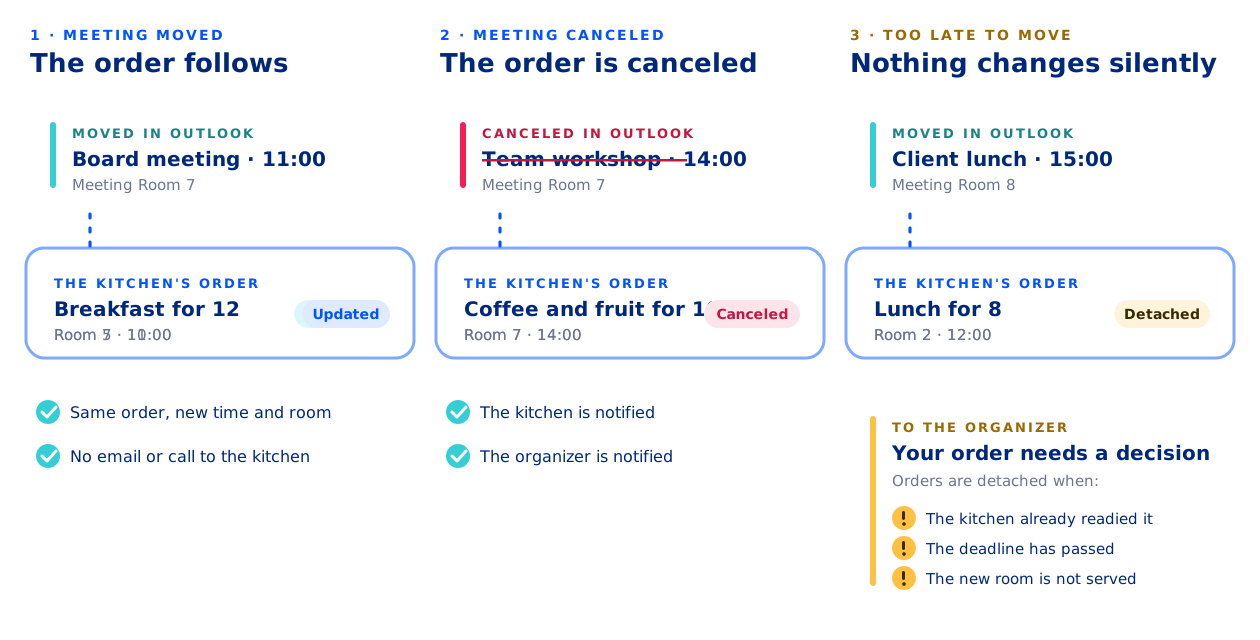
Orders follow the meetingMoved and canceled meetings update the order, and your team is told.
Several teamsCatering, facilities and IT as providers, each with its own members and email.
Cost centers and custom fieldsCost centers, project codes and required fields travel with every order.
Reports, API and InsightsCSV reports of settled requests, the Services API, and demand by provider and item.
How do catering, facilities and IT each work their own orders?
Each team is set up as a service provider in AskCody, with its own members, the rooms it serves, opening days, deadlines and the email address that gets new orders. Members see their own provider's requests, and an Owner sees every provider.
If you work for more than one team, you switch between them in the portal. The same requests also show in Workplace Central, next to the meeting, the room and the attendees.
How does a service team handle an order from request to delivery?
New orders land on the Current requests dashboard with the meeting subject, time, requester, delivery location and notes. Today, Tomorrow and Pending show what needs you now, while Accepted, Readied, Completed, Rejected and Canceled keep the rest in order.
Accept or reject each request, or switch on auto-accept so every order placed in time is accepted for you. Mark it Readied when it is prepared, and it is completed once the delivery time has passed. The organizer is emailed when you accept, ready or reject it.
Print the full list or a compact one for the kitchen, use the room filter to plan the rounds, and search past and future requests.
How do you manage your menu, items and prices?
Your inventory lives in the portal: single items, package deals or larger arrangements, grouped in categories people can browse, such as meeting types or food and beverages. Each item carries its price, description, SKU and VAT category, and can have its own preparation time.
Hide seasonal items without deleting them, and export the list as CSV for your inventory system. A new price applies at once to new orders, while orders already placed keep their price until they are updated.
Orders that come in by phone go in with New request, on the same form employees see in Outlook.
How do you protect the preparation time your team needs?
Set opening days for each provider, so nobody orders for a weekend you do not serve. A preparation deadline per provider closes ordering in good time, for example 12:00 the day before, and items that take longer, like a buffet, get their own preparation time. An item deadline overrules the provider's deadline and still respects its opening days.
Choose the rooms each provider serves, mark providers whose orders are picked up, and add buffer time before and after meetings so the room is free to set up and clean. Who can order at all follows the users and groups the Outlook add-in is deployed to in Microsoft Entra ID.
What does the service team see when a meeting moves or is canceled?
The order belongs to the meeting in Microsoft Exchange, so nobody has to chase changes by email. When the organizer moves the meeting to a time and room you serve, the request moves with it and you are emailed that it has been updated. An accepted request comes back to Pending, so your team confirms the new time. When the meeting is canceled, the order is canceled and your team gets the cancellation.
Once a request is readied, or the deadline has passed, a move detaches it instead, so a person on your team decides what happens.
How are service orders charged to the right cost center?
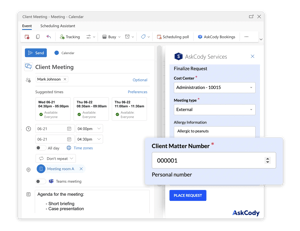
Each order can carry a cost center, and cost center groups decide which ones each person can pick. Custom properties such as a project code or a client matter number travel with the order, and can be made required and checked against a format. VAT categories and VAT codes put the right rate on every line.
At month end, Finance and Reports turns settled requests into a CSV report, standard or with the fields you choose, and the AskCody Services API can feed your ERP system.
How much does each service team deliver, and when?
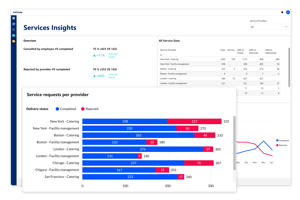
Insights for Services shows requests per provider by completed, canceled and rejected, requests over time and the top items. The Item requests per provider view shows which items are most popular, when they are requested and how demand changes, for one provider or all of them, with up to 13 months of data.
Use it to spot seasonal trends and plan ahead on real demand.
More attorneys supported, from one spot
“We’re finding that our secretaries may have been managing two or three attorneys and partners before. Now they’re managing maybe five or six. It’s only possible to manage that increased workload because they can handle everything in one spot with AskCody.”
Catering saves one to two hours a day
“We definitely know for catering that their job has been extremely streamlined with AskCody. They were originally apprehensive because they couldn’t believe all the things they didn’t have to do anymore... They estimate that they save on average 1 to 2 hours per day with AskCody.”
The one-stop shop we were looking for
“Internally, we wanted to have something that would integrate with Outlook and could help us communicate the meeting needs in one whole package. It’s a one-stop shop... AskCody was the only one that was really robust enough to provide all the services that we need.”
Every request for a room, under one roof
“The fact that admins can manage each reservation for a room and each request that is needed for that event or meeting all under one roof really helped a lot with organizing... Everyone gets it, and we don’t have to have five or six different emails going back and forth for each meeting.”
Rooms and catering in one overview
“AskCody’s platform gives us an easy overview of available rooms, as well as quick access to book catering for our meetings. Without AskCody, booking premises is ineffective, which results in a large waste of resources.”
Common questions about the AskCody Services Portal
The Services Portal is where catering, facilities, AV and conference services teams handle the orders employees place in their Outlook invites: today's and tomorrow's requests, statuses, items, prices, deadlines, rules and reports, with every order tied to its meeting. See how the portal works.
The people who deliver the service. Each kitchen, facilities, AV or IT team is a service provider with its own members, and an Owner sees every provider. Employees never need the portal: they order in the AskCody Services add-in in Outlook. How providers are set up.
The request follows the meeting to a new time and a room the provider serves, and the provider is emailed that it has been updated; an accepted request goes back to Pending for the team to confirm. A canceled meeting cancels the order. A request that is readied, or past its deadline, is detached instead, so a person decides. Notifications from AskCody Services.
Yes. Each provider has opening days and a preparation deadline, and items that need longer can have their own preparation time. The item deadline overrules the provider deadline and still respects the opening days. Preparation deadlines.
Yes. Any list can be downloaded or printed as a PDF, either in full with every request detail or as a compact list with the essentials. The room filter shows which rooms have requests today and tomorrow.
Yes. New request in the portal uses the same form employees see in Outlook, and the request shows the portal as the requester. Teams can also add ad-hoc requests for each occurrence of a recurring meeting. Requests for recurring meetings in the portal.
Orders can carry a cost center, custom properties such as a project code, and VAT categories and codes. Finance and Reports creates CSV reports of settled requests for a period, and the AskCody Services API can send the data to your ERP system. Cost centers in AskCody.
No. The Services Portal handles the services that belong to a meeting. Maintenance, assets and IT tickets stay in the systems you already use.
AskCody Services and the Services Portal are included in the AskCody Platform, from $5,149 per year. See pricing.
Yes. Orders are placed in the AskCody Services add-in in new Outlook for Windows, Outlook for Mac and Outlook on the web, and each order is tied to the meeting in Microsoft Exchange. Microsoft integrations.
See the Services Portal with your own menu
Talk to a consultant about how your kitchen, facilities and AV teams would run their day in AskCody.