Facilities services
for meetings, ready
before anyone walks in
Request the layout, the equipment, AV support and cleaning in the same Outlook invite as the room. Your facilities and AV teams see every request with its meeting, with buffer time built in, so there is time to turn the room around before the next meeting.
The meeting starts when the room is ready, not when it is booked
A booked room is not a ready room. The tables are still in rows from the training session, the screen will not find the laptop, and the last team's coffee cups are still on the table. Too often, facilities and AV teams hear about a meeting from an email, a phone call or not at all. AskCody makes facilities services for meetings part of the invite itself: setup, equipment, AV and cleaning are requested in the same Outlook invite as the room, so the people who prepare the room work from the same plan as the people who use it.
How do you request room setup and AV support for a meeting?
Open the meeting in Outlook and choose AskCody Services. Each team is set up as its own provider with its own items: facilities for table arrangements and room preparation; AV and IT for screens, video meeting support and equipment; cleaning for after the meeting. Pick what the meeting needs, set when it should be done and add a note, such as "boardroom layout for 16, flipchart at the front".
Services can be booked only in rooms added to that provider, so organizers see what their room supports, and every request reaches the right team.
Every request, with its meeting, room and time
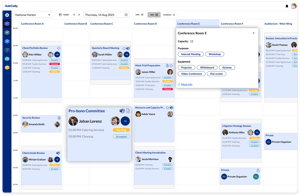
Facilities, AV and IT teams see their requests in the AskCody portal and in Workplace Central, next to the catering and the room: which layout and what equipment, with the order status in real time.
Accept or reject requests, mark them as readied when the room is done, and print the day's list for the morning round. Room filters show which rooms have requests today and tomorrow, so the round starts where the work is.
Time to set up and clean, blocked in the calendar
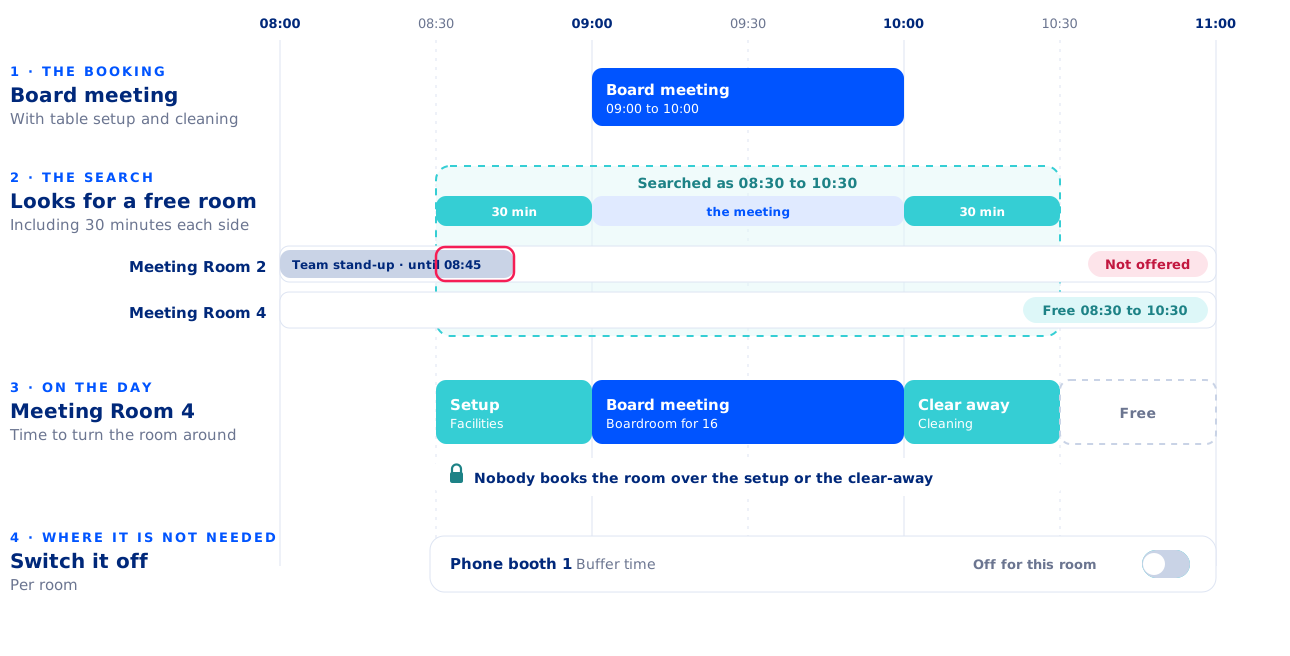
Back-to-back meetings leave no time to turn a room around. Buffer time blocks minutes before and after every meeting with services, so nobody books the room while your team sets it up or clears it away.
- Availability searches include the buffer, so a 09:00 to 10:00 meeting with 30 minutes of buffer looks for a free room from 08:30 to 10:30.
- Switch the buffer off for rooms that do not need it.
- Opening days and preparation deadlines per team make sure requests arrive early enough to plan the work.
Requests on behalf of others
When someone calls or emails, the team can create the request on their behalf, so every job still sits with its meeting.
No separate ticket queue
Requests are tied to the meeting, not to a helpdesk ticket, so the team always sees the room and the time the work is for.
What happens to setup and AV requests when a meeting moves?
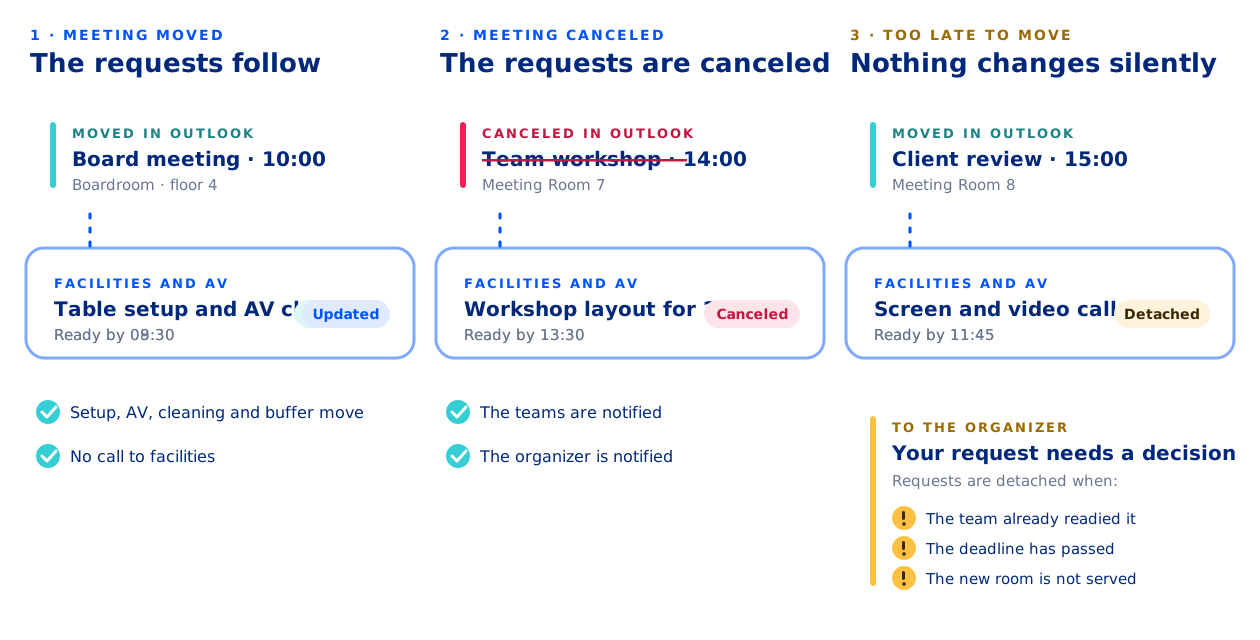
Meetings move all the time. Because the requests live in the meeting, facilities always works from the current plan.
- Move the meeting in Outlook, and the setup, the AV check, the cleaning and the buffer time move with it.
- Cancel the meeting, and the requests are canceled. The teams and the organizer are notified.
- If a request has already been readied, its deadline has passed, or the new room is not served by that team, it is detached and the organizer is told, so a person decides.
One system, not two
The requests are tied to the meeting in Microsoft Exchange, so there is no separate facilities tool to retype into and nothing to keep in sync. Built into Outlook and Exchange, so every Microsoft Teams meeting gets the right room, services and visitor setup, with no extra app to deploy.
Included in the AskCody Platform
Facilities services are part of the AskCody Platform, from $5,149 per year, including 1 reception, 5 meeting rooms and 10 workspaces. See pricing
Ordering catering too? Same invite, same overview. See meeting catering.
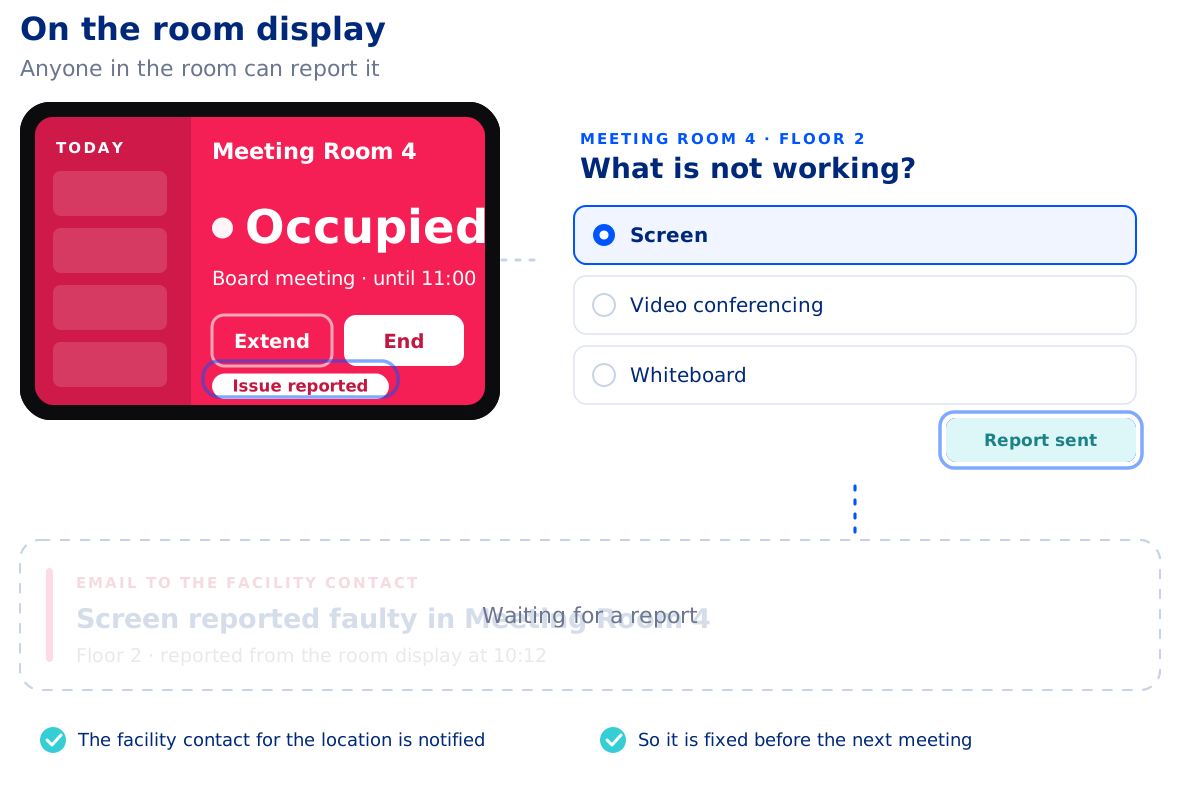
A broken screen is reported from the room, not found by the next meeting
When equipment stops working, people in the room can report it on the AskCody meeting room display. The facility contact for the location is notified by email, so the fault can be fixed before the next meeting finds it.
Define equipment types, assign equipment to rooms, set the facility contact per location and switch on faulty equipment reporting in the display template.
Know what facilities and AV deliver, team by team
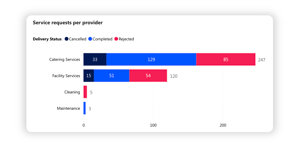
Insights for Services shows requests per provider split by completed, canceled and rejected, requests over time and the most requested items, with up to 13 months of data. See how demand for setup, AV and cleaning changes week by week, and plan the team around it.
Made to empower you
Hear how conference services, facilities and IT teams prepare meetings with AskCody
Susann needs us to support productivity
"We're finding that our secretaries may have been managing two or three attorneys and partners before. Now they're managing maybe five or six. It's only possible to manage that increased workload because they can handle everything in one spot with AskCody. "
Read the Eversheds Sutherland case study
Anthony needs us to decentralize the meeting processes
"With AskCody employees can now book rooms and request services themselves, and it gives them a kind of self-service aspect where they can take control of their own meetings."
Read the Burke Warren case study
Nabil needs us to be integrated with Outlook
"The main benefit for our employees is that AskCody will make their life easier. The user pathway was our main concern to address. The easy and simple process to find the needed meeting room, book it, request services, and manage visitors has been our main success criteria."
![]()
Common questions about
facilities services for meetings
Open the meeting in Outlook and choose the AskCody Services add-in. Pick the facilities or AV provider, choose what the meeting needs, such as a table layout, equipment or an AV check, set when it should be done and add a note. Send the invite as usual, and each request goes to its team with the meeting, the room and the time. See the step-by-step guide.
Yes. One Outlook invite can carry the room, catering, setup, AV and cleaning requests through AskCody Services, and the external guests through AskCody Visitors. Each team sees its part with the same meeting, room and time, and when the meeting moves or is canceled, their requests follow it. See visitor management.
Buffer time blocks time before and after meetings with services, so the room is not booked by someone else while it is set up or cleaned. It is one setting for all locations, rooms and providers, can be switched off per room, and availability searches include it. Read about buffer time.
They follow the meeting. Move it in Outlook and the requests move to the new time and room; cancel it and the requests are canceled, and the teams and the organizer are notified. A request that is already readied, past its deadline or not served in the new room is detached and the organizer is notified, so a person decides.
People in the room report it on the AskCody meeting room display, and the facility contact for the location is notified by email. You define equipment types, assign equipment to rooms, set the facility contact per location and enable faulty equipment reporting on the display template. See meeting room displays.
No. AskCody handles the services a meeting needs: room setup and layout, equipment, AV support, cleaning and catering, tied to the meeting in Microsoft Exchange. Maintenance, assets and IT tickets stay in the systems you use for them today.
Yes. Service requests can carry a cost center, VAT and your own custom properties, and Finance and Reports turns settled requests into CSV reports for the period. Read how cost centers work.
Facilities services for meetings are part of the AskCody Platform, from $5,149 per year, including 1 reception, 5 meeting rooms and 10 workspaces, with all features included. See pricing.
Yes, natively.
AskCody is natively integrated with Microsoft Exchange, Microsoft 365 and Outlook. There are no manual processes, outdated third-party tools, unintegrated SharePoint sites or paper-based booking. Everything works inside the familiar Outlook interface, built on modern integrations into Exchange and on Microsoft Azure.
And Microsoft Teams? AskCody is built into Outlook and Exchange, so every Microsoft Teams meeting gets the right room, services and visitor setup, with no extra app to deploy.
Meetings always stay in Microsoft Exchange: no middle layer and no duplicate system of record. See how AskCody integrates with Microsoft 365.
See facilities services in your own Outlook
Book a demo and see how setup, AV and cleaning come together with the room in one meeting invite. Facilities services are included in the AskCody Platform, from $5,149 per year.