Workplace analytics
for meeting rooms,
services and visitors
See how your meeting rooms and desks are booked, for how many people, and what your reception and service teams handle. AskCody Insights builds it from the Microsoft Exchange data your organization already creates, refreshed every week.
Built on, with, and for tech you trust
Microsoft Azure, Microsoft 365 and modern add-ins for Outlook.
Recognized by analysts
Named a market-leading vendor in the Meeting Management category.
A full calendar does not mean full rooms
Every meeting room looks busy in Outlook. Then you walk the floor and find a room for 12 holding a meeting of two, while the small rooms are booked out all week. Decisions about rooms, desks and services are too often made on a feeling or a single walk around the office.
AskCody Insights turns the bookings already in your Microsoft Exchange calendars into workplace analytics: how much of its open hours each room is booked, how many of its seats the meetings are booked for, and what your reception, catering and facilities teams deliver. You see it per location, room type and period, and you can take the raw data with you to Excel.
How do you measure meeting room utilization in Microsoft 365?
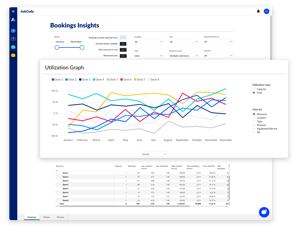
Insights reads the meetings in your room and desk calendars in Microsoft Exchange and compares them with what each room offers: its seats and its opening hours. The Bookings dashboard shows your resources and their capacity, bookings and attendees, bookings outside opening hours, time utilization and capacity utilization.
View the numbers by resource, location, room type, purpose, or equipment and services, and filter by period, to see which rooms are in demand and which are rarely used.
Insights measures scheduling intent, not occupancy
Workplace data comes in two kinds, and they answer different questions.
- Scheduling intent is what people planned: which room or desk they booked, when, for how long, for how many people, and who accepted or declined. It shows what your organization needs from its spaces, and why.
- Occupancy is what physically happened: whether anyone was in the room, and how many. It comes from sensors, badge readers or network data, and shows that a space was used, not what it was used for.
AskCody Insights is built on scheduling intent, by design. It reads the bookings in your room and desk calendars in Microsoft Exchange, with personal data removed before processing. There are no sensors to install and no movements to track.
Occupancy alone misses the context
A sensor can tell you that a room for 12 held two people at 10:00. It cannot tell you that the meeting was booked for ten, that eight of them declined, or that every smaller room nearby was already taken. Without intent, occupancy shows the symptom but not the cause, and a decision to cut, split or add rooms rests on half the story.
Compare both for the full picture
Already collecting occupancy data? Put it next to Insights. Export the booking data to Excel or CSV and compare it with your sensor or badge data per room and period. Where the two match, your rooms work as planned. Where they differ, you see where to act: rooms booked but left empty, meetings that outgrow their room, and spaces used without a booking.
Time utilization and capacity utilization, side by side
A room can look busy all day in the calendar and still hold meetings far smaller than its seats. That is why Insights measures utilization in two ways.
- Time utilization compares the hours a room is booked with the hours it is open.
- Capacity utilization compares the attendees of each meeting with the seats in the room.
- Opening hours and seat counts come from each room's setup in AskCody, so set them for every room.
Room types that match how you meet
Give each room a type, such as huddle room, video conference room, conference room or auditorium, and compare utilization across room types and locations.
History that follows your setup
Change a room's seat count, and Insights recalculates its history with the new number, so you always compare like with like.
How much catering, setup and AV do your teams deliver?
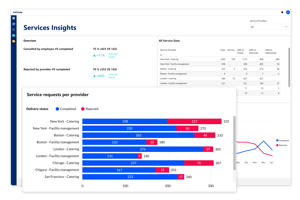
Insights for Services shows every request made through AskCody, per provider: completed, canceled by the organizer or rejected by the provider, requested in the Outlook add-in or created by the team, requests over time and the most requested items, for meeting catering and facilities services alike.
Filter by period, weekday and provider across up to the last 13 months, to plan the team around busy weeks and to see where requests are often rejected.
When is your reception busiest?
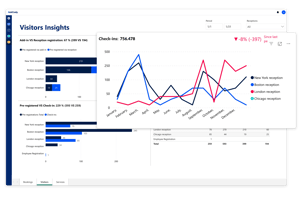
Insights for Visitors shows how guests arrive with AskCody Visitor Management: registered by the host in Outlook or by the reception, pre-registered guests compared with actual check-ins, registrations per reception, and check-ins by weekday and time of day.
See your busiest days and hours, plan reception staffing around real visitor traffic, and spot the pre-registered guests who never arrive.
What data does AskCody Insights use?
Insights is built on the meeting data your organization already creates in Microsoft Exchange, combined with the room details in AskCody. There is nothing to export from Outlook and nothing new for employees to do.
- From Exchange: start and end times, the type of resource, and the number of attendees, internal and external, required and optional, accepted and declined.
- From AskCody: each resource's name, location, room type, opening hours, purpose, equipment, services and capacity.
- Only room and desk calendars are included, and personal data is removed before the data is processed.
Up to 13 months back, from day one
Insights also collects up to 13 months of Exchange data from before you started with AskCody, so you have a baseline from the first week. New data is collected every Sunday at 00:00 UTC and is ready on Monday.
Built on Microsoft Power BI
The dashboards run on Power BI Embedded, so no separate Power BI subscription is needed. Export any table to Excel or CSV and combine it with your other data. Owners and Insights Administrators have access.
The hidden cost of a process that works
“When you come up with an internal process that works, the cost of time savings is often hidden. There was not a cost to the budget, so in terms of dollars, it seemed ‘free’. AskCody quickly showed us through various calculations and analyses with our team that this was not the case.”
Try it, and the time savings speak for themselves
“The pilot helped us understand just how much time we could give back to the attorneys and assistants and the price of that time... My best advice is to try it. You will see quickly that the ease of use, ease of management, and overall time savings are worth it.”
More attorneys supported, from one spot
“We’re finding that our secretaries may have been managing two or three attorneys and partners before. Now they’re managing maybe five or six. It’s only possible to manage that increased workload because they can handle everything in one spot with AskCody.”
One platform across 150 locations
“Our vision was to tailor the entire workflow for the individual employee. We now plan everything in AskCody. It is extremely easy for the individual employee to book meetings... In this way, we make the most of all resources across our 150 locations.”
Catering saves one to two hours a day
“We definitely know for catering that their job has been extremely streamlined with AskCody. They were originally apprehensive because they couldn’t believe all the things they didn’t have to do anymore... They estimate that they save on average 1 to 2 hours per day with AskCody.”
80 percent of reception time given back
“In general, the AskCody benefit is the time savings and removing the daily frustrations around meeting planning. The biggest benefit until now is that we have saved 80 percent of the reception time, which was taken up with dealing with visitors coming and going.”
Common questions about
workplace analytics
Workplace analytics is data about how your office is used: how often meeting rooms and desks are booked, for how many people, and which services and visitors your teams handle. AskCody Insights builds it from your Microsoft Exchange calendars and the AskCody platform, so decisions about space, rooms and services rest on data instead of gut feeling.
In two ways. Time utilization compares the hours a room is booked with the hours it is open: a room open from 08:00 to 17:00 and booked for 4.5 hours has a time utilization of 50%. Capacity utilization compares the attendees of each meeting with the seats in the room: three meetings with 4, 2 and 8 people in a room for 10 use 14 of 30 seats, or 47%. Both use the opening hours and capacity you set for each room in AskCody.
Insights measures bookings: the meetings in your Exchange calendars, their duration and their attendees. It does not use occupancy sensors. To make sure a booked room is actually used, AskCody meeting room displays can ask people to confirm the meeting when it starts, and release the room when nobody does. See how room confirmation is set up.
Scheduling intent is what people planned: the room or desk they booked, when, for how long, for how many people, and who accepted or declined. Occupancy data is what physically happened, measured by sensors, badge readers or network data. AskCody Insights is built on scheduling intent, by design, so it shows what your organization needs from its spaces and why. If you also collect occupancy data, export Insights to Excel or CSV and compare the two per room and period to see where bookings and real use differ.
Meeting data from Microsoft Exchange, such as start and end times, the type of resource and the number of attendees, combined with each resource's details in AskCody, such as location, room type, opening hours and capacity. Only room and desk calendars are included, and personal data is removed before the data is processed. Read how Insights collects data.
Insights shows up to 13 months of data, including Exchange data from before you started with AskCody. Customers with Premium Services can also get a full data dump of up to 3 years through Azure Blob Storage.
Insights collects new data once a week, on Sunday at 00:00 UTC, and the data is ready on Monday. After Insights is switched on, the first data appears once a weekend has passed.
Yes. Set your filters, then export any table in Insights as raw data in CSV or Excel format, and combine it with your other data. See how to export Insights data.
Users with the Owner or Insights Administrator role have access. An Insights Administrator switches Insights on for your room and desk calendars in the Admin Center, under Integrations and MS Exchange Calendars, and sets opening hours on every resource. Follow the setup guide.
No. The Insights dashboards are built on Microsoft Power BI, and Power BI Embedded is built into AskCody, so no separate Power BI subscription is needed.
Yes. Workplace analytics is included in the AskCody Platform together with room and desk booking, meeting services and visitor management, from $5,149 per year. See pricing.
See workplace analytics on your own rooms
Talk to a consultant and see how Insights turns your Outlook bookings into utilization data for every room, desk, service and reception. Workplace analytics is included in the AskCody Platform, from $5,149 per year.
