
The AskCody Assistant
Ask anything about AskCody in your own words and get a clear answer in seconds, right where you work. The Assistant knows the AskCody Help Center and documentation, and it can take you straight to the page you need in the Management Portal.
Try it now: open the Assistant in the lower-left corner of this page.
Built on, with, and for tech you trust
Microsoft Azure, Microsoft 365 and modern add-ins for Outlook.
Recognized by analysts
Named a market-leading vendor in the Meeting Management category.
Stop searching for the answer. Ask for it.
Every platform has a setting you only touch twice a year. When you need it, the question is always the same: where was that again, and how did it work? So you search the Help Center, open three articles, or file a ticket and wait for a reply.
The AskCody Assistant is built into AskCody to shorten that path. Ask it how something works, how to set it up or where to find it, in your own words and in the language you prefer. It answers from AskCody's own product knowledge and takes you to the right page, so your time goes to the meeting, not to the menu.
How do I get help with AskCody without filing a ticket?
Open the Assistant and type your question. It answers in seconds with step-by-step guidance, drawn from more than 800 Help Center articles, guides and technical documents.
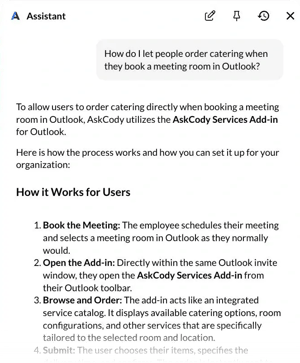
- Setup and configuration, such as how to let people order catering when they book a room in Outlook.
- How a feature works, such as how a meeting room is released when nobody checks in on the display.
- Best practices for meeting rooms, services, visitors and workplace data.
Answers that know where you are
In the Management Portal, the Assistant knows which page you are on. Ask what you can do here, and you get an answer for that page and the next steps that fit it.
Keep, rate and revisit
Copy an answer, give it a thumbs up or down, start a new chat or open an earlier one from your history.
What can you ask the AskCody Assistant?
How do I...
- How do I let people order catering when they book a meeting room in Outlook?
- How do I make a meeting room release automatically when nobody checks in?
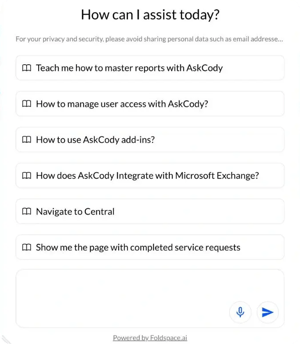
- How does AskCody integrate with Microsoft Exchange?
- How do I manage user access in AskCody?
- Teach me how to master reports in AskCody.
Take me to...
- Take me to Visitors.
- Where can I see upcoming visitors?
- Show me the page with completed service requests.
- What can I do on this page?
- Disable automatic navigation.
Go to any page in AskCody by asking for it
You do not need to remember where a setting lives. Tell the Assistant where you want to go, or describe what you are trying to do, and it takes you there.
- Name the page: "Take me to Visitors" or "Open Insights".
- Describe the task: "Where can I see upcoming visitors?" The Assistant suggests the most relevant page and offers to take you there.
- It reaches the major pages and sections of the Management Portal, including Visitors, Bookings, Insights, Maps and Services.
You stay in control
The Assistant always tells you where it is taking you. The first time, it asks for your confirmation before it moves you. You can then allow automatic navigation, so it takes you straight there from then on.
Change your mind at any time
Just ask: "Disable automatic navigation" or "Navigate without asking". The setting is saved in your browser.
Where can I use the AskCody Assistant?
The Assistant sits in the lower left corner of the screen in three places:
- The AskCody Management Portal, where it answers questions and takes you to the right page.
- The AskCody Help Center, next to the articles it draws on.
- askcody.com, including this page, so you can try it before you buy.
Drag it to another spot on the screen if it is in your way, and it stays where you put it.
How does the AskCody Assistant handle your data?
The AskCody Assistant is an AskCody feature, built and delivered by AskCody. Foldspace supplies the AI layer behind it, and is listed as a sub-processor in our Data Processing Agreement.
- When it answers questions and helps you navigate, the Assistant processes no personal data.
- Before a question is sent to Foldspace, personal data such as a name or role you type is removed, so only the question itself is sent.
- AskCody does not train third-party foundation models on customer data, and customer data is not pooled across customers.
Not Microsoft Copilot
The AskCody Assistant is AskCody's own assistant. It is not Microsoft Copilot and is not built on it.
What comes next
We are building agentic features, where the Assistant acts on your behalf, for example to book a meeting or move it to another room. They will be optional, and customers can turn them off.
AI is not always right
An answer can be incomplete or wrong. For anything critical, follow the Help Center article the Assistant points to, or contact AskCody Support.
Common questions about
the AskCody Assistant
The AskCody Assistant is an AI assistant built into AskCody. It answers questions about how AskCody works, how to set it up and how to get the most out of it, and it can take you to the right page in the Management Portal. It draws on more than 800 Help Center articles, guides and technical documents.
No. The AskCody Assistant is AskCody's own assistant. It is not Microsoft Copilot, it is not built on Microsoft Copilot, and AskCody has no integration with Microsoft Copilot today.
Foldspace supplies the AI layer behind the AskCody Assistant: it interprets your question and produces the answer inside AskCody. Foldspace is listed as a sub-processor in the AskCody Data Processing Agreement. See the sub-processor list.
In the lower left corner of the AskCody Management Portal, the AskCody Help Center and askcody.com. You can drag it to another position on the screen, and it remembers where you put it.
Yes. Name a page, such as "Take me to Visitors", or describe what you want to do, such as "Where can I see upcoming visitors?". The first time, the Assistant asks before it navigates. You can then allow automatic navigation, and turn it off again by asking "Disable automatic navigation". See how navigation works.
When it answers questions and helps you navigate, no. Before a question is sent to Foldspace, personal data such as a name or role you type is removed, so only the question is sent. The Assistant also asks you not to share personal data, such as email addresses, in your questions.
Not today. Today the Assistant answers questions and helps you navigate AskCody. We are building agentic features, where the Assistant acts on your behalf, for example to book a meeting or move it to another room. They will be optional, and customers can turn them off.
Yes. Like any AI, it can give an incomplete or wrong answer. For anything critical, follow the Help Center article it points to, or contact AskCody Support. We keep training and improving it, and you can rate every answer with a thumbs up or down.
Ask in the language you prefer. The Assistant supports multiple languages, so you do not have to write in English.
See the AskCody Assistant in your own Management Portal
Try the Assistant in the lower left corner of this page. Then talk to a consultant and see how the Assistant, meeting room booking, services, visitors and workplace analytics work together in the AskCody Platform.
