
.svg)
The Personal Assistant
The Unsung Strategists
Behind Every Great
Leader
You’re the person everyone relies on to keep time working
for the people who matter most, bringing structure,
clarity, and calm to even the busiest days.
Juggling a Day with Constant Change in Priorities
You are the one who keeps everything running: the schedules, the meetings, the travel, the details.
You make it all look effortless, even when it isn’t.
Behind every confident executive is a Personal Assistant who’s five steps ahead: anticipating needs, solving problems before they appear, and making sure every meeting just works.
But that perfection comes at a cost.
Why?
Because a PA’s challenge isn’t “booking meetings.”
It’s ensuring seamless, strategic time management for the most valuable people in the organization in a world that changes by the minute.
Juggling a Day with Constant Change in Priorities
Executives’ calendars are fluid and unpredictable. A single call, crisis, or opportunity can reshuffle an entire day.
For a PA, that means rescheduling multiple meetings across teams, locations, and time zones, often with VIPs who have limited availability.
It’s ensuring seamless, strategic time management for the most valuable people in the organization in a world that changes by the minute.
Every adjustment triggers a cascade of updates: rooms, catering, attendees, visitors, and follow-up materials all need to be re-aligned.
The challenge you face is keeping everything perfectly synchronized while staying discreet and calm.
The Pressure of Managing VIP or White-glove Meetings
When meetings involve senior executives, board members, or external partners, the stakes rise dramatically.
A missed update, wrong room, or delayed setup isn’t a small mistake. It’s a reputation risk.
PAs are responsible for ensuring:
- The right people are in the right place at the right time.
- The room is prepared, services are delivered, and technology works.
- Everyone has the right materials, agenda, and access.
Every meeting must reflect the professionalism and competence of the leadership they represent.
For the PA, this means operating flawlessly under visibility, with no room for error.
- Fragmented Tools and Manual Processes
- The Emotional Load of Responsibility
- Impact on the Business
Fragmented Tools and Manual Processes
Most PAs are forced to work across disconnected systems like Outlook calendars, Teams invites, catering emails, visitor lists, and room booking tools that don’t talk to each other, and often all this data is either connected mentally to keep the overview, or with good old post its or paper notes.
Each system creates another layer of manual coordination and potential for error. The PA becomes the glue that holds everything together, at the cost of their time and focus.
The outcome of this is too many tools, not enough integration, all leading to double work and endless cross-checking.
The Emotional Load of Responsibility
Personal Assistants carry invisible pressure. They’re not just managing logistics. They’re managing time, relationships, and expectations for people who are always short on all three.
Every delay, conflict, or miscommunication reflects on them personally.
It’s an emotional marathon of staying composed, proactive, and invisible at the same time.
Impact on the Business
When PAs spend hours each day firefighting meeting logistics, it costs more than time. It affects leadership productivity, decision-making speed, and workplace confidence.
Disorganized calendars lead to late starts, missed opportunities, and wasted resources.
Efficient meeting coordination, on the other hand, amplifies leadership effectiveness, ensuring decisions happen on time, collaboration flows, and the organization operates with rhythm and respect.
The Pressure of Managing Executive Chaos
You’re the gatekeeper of time. Not just any time, but the most valuable hours in the organization.
You coordinate complex schedules, manage competing priorities, and make sure every high-stakes meeting happens without friction or failure.
Yet your work depends on systems that don’t talk to each other, and people who underestimate the complexity of what you do.
You deal with:
- Last-minute changes that cascade into reschedules, rebooking’s, and re-coordination.
- Back-to-back meetings across time zones, often rescheduled at the last minute.
- Conflicting priorities between executives, board members, and external partners.
- Fragmented tools for rooms, catering, visitors, and calendars that create endless manual work.
- Pressure to perform flawlessly, because a single mistake can affect reputation and trust.
- Constant interruptions and context switching, leaving no time to plan ahead.
You're not just scheduling meetings, you're protecting executive focus, orchestrating logistics, and managing perception. You carry the responsibility quietly, always one step ahead, always calm, even when everything shifts beneath your feet.
Every change, cancellation, and overbooked room falls back on you. When things go right, no one notices. When they don't, everyone does.

“My calendar looks calm, but underneath it’s chaos. Meetings move constantly, priorities shift, and every change ripples through rooms, people, and services I have to keep in sync.”
“People think I book meetings. What I actually do is manage time, expectations, and chaos — all at once.”
“I manage three executives with packed calendars. Meetings change constantly, rooms aren’t available, guests show up unannounced — and I’m expected to keep it flawless.”
.png?width=300&name=Group%20596%20(1).png)
The Calm Behind Every Calendar
AskCody helps Personal Assistants bring control and clarity back to executive scheduling.
Built directly inside Microsoft 365 and Outlook, AskCody connects every meeting detail — rooms, services, visitors, and notifications — into one streamlined flow.
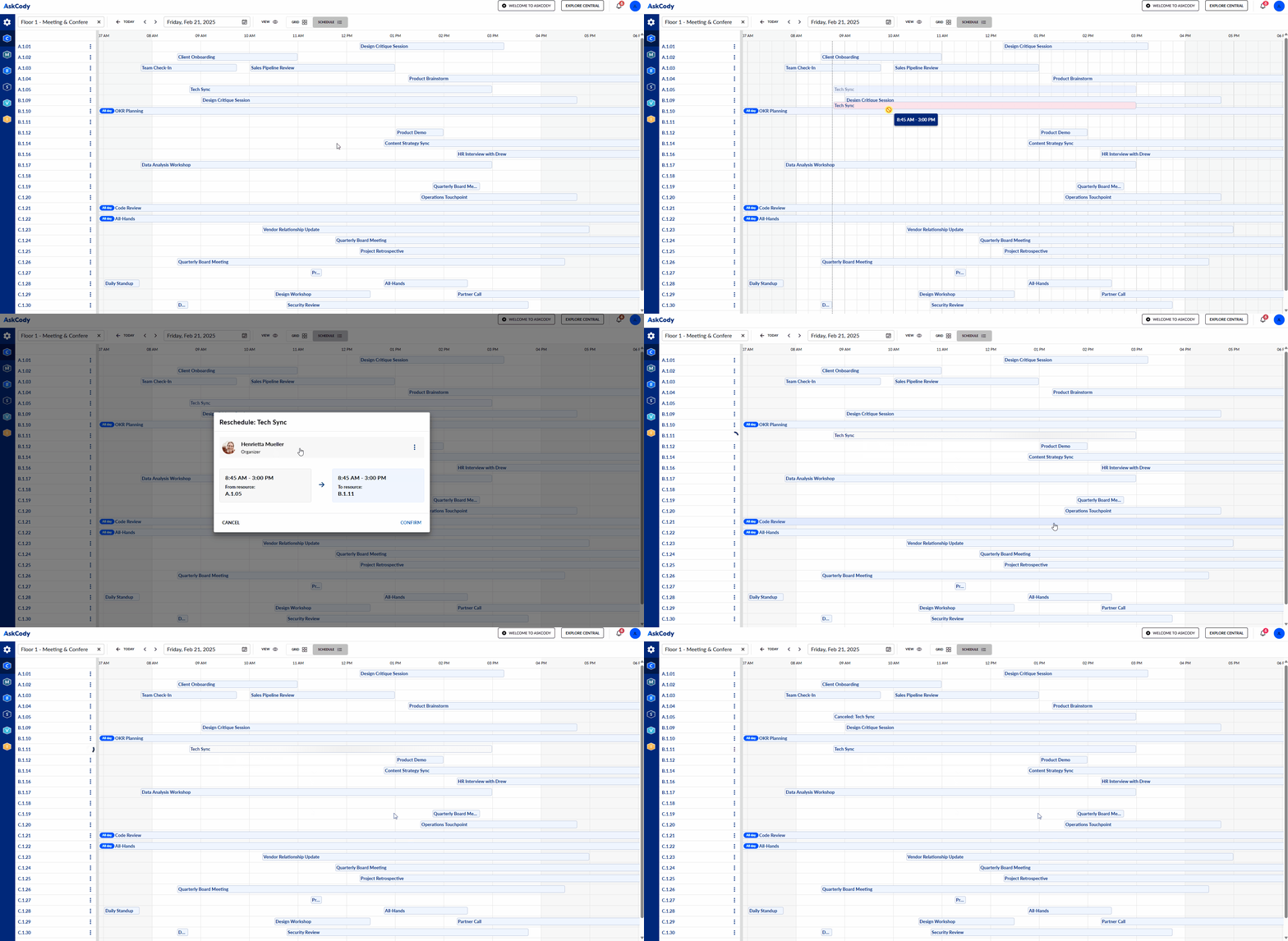
When a meeting changes, everything updates automatically. The right room, catering, and guests stay perfectly aligned.
With AskCody, you can:
- Book and manage meetings effortlessly — no jumping between tools or chasing confirmations.
- Reserve rooms and services directly in Outlook for total accuracy and visibility.
- Handle changes instantly — when the calendar shifts, everything else does too.
- Pre-register visitors and notify reception automatically.
- Ensure VIP-level preparation with clear visibility of logistics, services, and room readiness.
AskCody becomes your quiet assistant so you can stay focused on the executives, not the errors.
From Complexity to Control
When you use AskCody, you gain more than a scheduling tool, you gain peace of mind.
You’re no longer juggling details or firefighting issues. You’re operating with precision, calm, and control.
Here’s what you gain:
- Time and clarity: Spend less time coordinating, more time anticipating.
- Fewer mistakes: No missed rooms, duplicate bookings, or lost guests.
- Professional polish: Every executive meeting runs like clockwork.
- Confidence: You always know what’s happening, when, and where.
- Recognition: You’re not just keeping the calendar — you’re enabling leadership to perform at their best.
Personal Assistants using AskCody describe one word: relief.
Relief from the pressure, the guesswork, and the constant checking, replaced by trust, precision, and control.
Learn more about AskCody for Personal and Executive Assistants
The Guest Belongs on the Invite: 8 Visitor Management Systems for Outlook Compared
The Calendar Is the Easy Part: What the Best Executive Meeting Software Does for EAs in 2026
Microsoft 365 Meeting Room Booking: Where Does Your Booking Actually Live?
Room Booking Reserves the Room. Meeting Management Runs the Meeting.
Your Meeting Operation Runs on One Person's Memory
AI Remembers What Was Said, Not What Happened | AskCody
Booking Was Never the Hard Part of a Meeting
Common questions from PA's and EA's
AskCody lets you handle every part of a meeting - from rooms and catering to visitors and services - directly within Outlook.
That means no more juggling between calendars, booking systems, or email threads.
When a meeting changes, AskCody automatically updates everything linked to it - rooms, services, and attendees - so you don’t have to chase details or fix double-bookings.
It’s like having a calm, invisible assistant inside Outlook keeping everything in sync.
AskCody updates it everywhere.
If an executive meeting moves, AskCody automatically adjusts all related services - catering, AV setup, visitor lists, and room reservations.
You’ll never have to call the kitchen, notify reception, or resend meeting details again.
Everything stays consistent, accurate, and on time.
Absolutely.
AskCody is designed for delegated access, meaning you can manage multiple executives or directors’ calendars from one place.
You can view their availability, book rooms and services, pre-register visitors, and handle last-minute changes — all without switching accounts or tools.
It’s secure, fully integrated with Microsoft 365 permissions, and perfectly suited for EAs managing complex, high-volume schedules.
AskCody ensures every detail of a VIP meeting runs flawlessly.
You can:
-
Pre-register important visitors, ensuring reception greets them by name.
-
Add catering or room services directly to the booking.
-
Attach NDAs or visitor documents digitally for quick sign-in.
-
Send automatic notifications to hosts when guests arrive.
This means you can deliver that polished, professional experience executives expect — without scrambling behind the scenes.
AskCody is not another tool, it’s an extension of Outlook or Teams, and lives inside the tools you already use, supporting your workflows - not the other way arround.
You don’t have to learn a new system or log into a separate platform.
Everything - booking, updates, notifications, visitor lists - happens where you already work every day.
Most assistants report saving 30–50% of their time spent on meeting coordination and gaining back focus for higher-value tasks.
Your Calendar. Their Success. Your AskCody.
You make every minute count. AskCody helps you make it seamless.