Skip to content

Every guest expected before they reach your desk

AskCody for receptionists

You are the receptionist who gives every guest their first impression of the company. AskCody tells you who is coming, who they are meeting and where, prints the badge and lets the host know, so you can welcome people instead of chasing them.

The challenge

Why does reception always hear last?

You know the morning. Three guests arrive asking for someone who is in a meeting, a courier needs a signature, the phone rings, and the visitor list you printed at 08:00 no longer matches the day, because a host moved the meeting in Outlook and never told the front desk.

Reception is where every gap in the plan becomes visible, in front of the guest. This is what one change looks like.

A client visit today at 10:00 in Room 6, three guests, hosted by Sofie Brandt. At 09:40 it moves to 14:00. Reception had the daily visitor list, the host's phone number and the parking details, but never heard about the time change or the guest names. At 10:00 three guests arrive that nobody expected, and at 14:00 a guest is not on the list and has no badge. One change, and the front desk finds out last.

The five challenges behind it

01

Guests nobody announced

Hosts forget to register visitors, so you find out who is coming when they are standing in front of you.

02

A list that goes stale

The morning visitor list is out of date the moment a meeting moves.

03

Hosts you cannot reach

The guest is here, and the host is in another meeting with the phone on silent.

04

A paper log at the desk

A visitor book on the counter shows every name to the next person who signs in.

05

First impressions on you

You are the company's face, even when the interruptions never stop.

One invite

Guests registered in the invite, expected at the desk

Hosts add their guests in the Outlook invite with the AskCody Visitors add-in, next to the room and the catering. The guests are linked to the meeting and appear at reception with their host, meeting, room and arrival time, so the list you see is the plan as it is right now.

A visitor's journey through one meeting on a Wednesday. At 08:30 the organizer adds two guests to the Outlook invite for a client review in Meeting Room 3. At 09:00 the guests receive directions, WiFi and parking information. At 09:05 the meeting moves to 10:30, and the guests, the room and the catering move with it. The reception sees every expected guest with their meeting and room. At 10:26 Anna checks in at the kiosk, her badge prints and she signs the NDA, and the host is notified by SMS. At 10:30 everyone is in the room and the catering is delivered. After the meeting the visit is logged and the visitor data is anonymized automatically. For a recurring meeting, the same guests are registered for every occurrence.

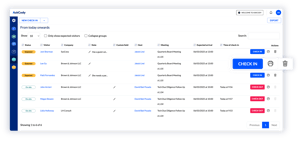
The AskCody portal for reception: today's expected and on-site guests with company, host, meeting, room and arrival time, and one-click check-in and check-out
Your overview

Every expected guest, at every reception

The reception portal gives you one real-time overview of expected and current guests across receptions and locations. Check in a guest and print a badge with one click, from the data in the meeting invite, and check guests out at the desk or from a link in their email.

See how visitor management works

Check-in

Check-in that does not need you

Guests can check themselves in on a kiosk at reception or on their own phone, which helps when large groups arrive or at peak hours. NDAs can be signed on the spot, and a check-in notifies the host by email and by SMS, so you are not the one searching the building.

See the Visitor Management Portal

A guest checks in on the AskCody kiosk with name, company, email, phone and host, and adds a license plate. The check-in completes, the badge prints, the NDA is signed and a parking permit is issued automatically, valid until the end of the day. The host is notified by email and SMS that the guest has arrived. The reception can also check guests in with one click in the AskCody portal, and after the meeting the guest is checked out from the link in the email.
What a guest receives before a visit with AskCody. An email arrives with the time, the meeting room and floor, directions, WiFi details and how to register parking, and how to check in on arrival. On the day, an SMS repeats the welcome with the WiFi code and a parking reminder. At check-in the guest adds a license plate and a parking permit is issued automatically. The reception already expects the guest, the badge is ready to print and the NDA is ready to sign.
Before they arrive

Guests who arrive prepared

Before the visit, guests can receive directions, parking rules, WiFi details and house rules by email or SMS, and on the day an SMS repeats the welcome with the WiFi code. Fewer questions at the desk, and a calmer start for everyone.

The visitor log is digital and for admin eyes only, and visitor data can be anonymized automatically after the period you set.

When plans change

When the meeting moves, the guests move with it

Guests are tied to the meeting in Microsoft Exchange. When the host moves the meeting in Outlook, the guest registrations move with it, and recurring meetings register the guests for every occurrence. The list at reception follows the plan without anyone calling the desk.

Follow-the-Meeting Intelligence. An Outlook invite called Leadership Evaluation holds Meeting Room A, an order of coffee, fruit and water from Catering, and two guests, Alex Weber and Lidia Holloway. On Thursday at 12:30 the room is booked in Microsoft Exchange, Catering has accepted the order and reception expects the two guests. The organizer moves the meeting to Friday at 14:00 in Outlook, and the room booking, the catering delivery and the guests' arrival details all move with it, with no emails to the kitchen or reception. Then the organizer cancels the meeting, and the room is released for others, the catering order is canceled and reception cancels the visit.

What it's worth

What changes for you, and for the people around you

When every guest is expected, the front desk can do what it does best: welcome people. Here is what that is worth.

FOR YOU

Calm at the desk

Guests registered by their hosts, badges from the invite and hosts told automatically, instead of phone calls and paper.

FOR THE HOSTS

Told the moment it matters

An email and an SMS when their guest checks in, wherever they are in the building.

FOR THE GUESTS

Expected by name

Directions and WiFi before they arrive, a badge ready, and a welcome that feels prepared.

How a head office and a headquarters run their receptions

A UK retailer's head office and a medtech headquarters chose AskCody for the same reason: it takes the pressure off reception, and one setup scales to every site.

80%

of reception time spent on visitors saved at Dunelm, by its own account

7

receptions connected across EMEA on one platform at Olympus

200+

rooms at the Olympus headquarters in Hamburg

Read the stories from Dunelm and Olympus

Ben Ashdown, Head of Technology Support and Operations
Ben AshdownHead of Technology Support and Operations

80 percent of reception time given back

“In general, the AskCody benefit is the time savings and removing the daily frustrations around meeting planning. The biggest benefit until now is that we have saved 80 percent of the reception time, which was taken up with dealing with visitors coming and going.”

Manager of Workplace Services

Catering, setup, AV and visitors together

“I don’t believe the other vendors can do the catering, the room setup, and AV requests as well as the visitor management piece altogether as seamlessly. Also, what we found was the AskCody user experience was just slicker.”

Henry Chace, CIO
Henry ChaceCIO

Try it, and the time savings speak for themselves

“The pilot helped us understand just how much time we could give back to the attorneys and assistants and the price of that time... My best advice is to try it. You will see quickly that the ease of use, ease of management, and overall time savings are worth it.”

Susann Holloway, Conference Services Manager
Susann HollowayConference Services Manager

More attorneys per secretary

“Our secretaries managed two or three attorneys and partners before. Now they’re managing maybe five or six. It’s only possible to manage that increased workload, because they can handle everything in one spot with AskCody.”

Nabil Zerdazi, IT Project Manager
Nabil ZerdaziIT Project Manager

The whole meeting, organized in Outlook

“By using AskCody, our employees will be able to manage the end-to-end process of organizing their own meetings in Microsoft Outlook, and easily find a workplace that will perfectly fit their needs.”

Dale Pollock, Conference Services Manager
Dale PollockConference Services Manager

Every request for a room, under one roof

“The fact that admins can manage each reservation for a room and each request that is needed for that event or meeting all under one roof really helped a lot with organizing... Everyone gets it, and we don’t have to have five or six different emails going back and forth for each meeting.”

Common questions from receptionists

What does AskCody do for receptionists?

AskCody gives reception one real-time overview of every expected and current guest, registered by their hosts in the Outlook invite. Reception checks guests in and prints badges with one click, guests can self check-in on a kiosk or their phone, and the host is notified by email and SMS.

How do guests get on the list?

Hosts add them in the Outlook invite with the AskCody Visitors add-in, next to the room and the catering. The guests are linked to the meeting, the room and the catering, and appear at reception with their host and arrival time.

See how visitor management works

What happens when a host moves the meeting?

The guests are tied to the meeting, so moving the meeting moves its guests, and recurring meetings register guests for every occurrence.

Can guests check themselves in?

Yes. Guests can check in on a kiosk at reception or on their own phone, which supports the front desk when large groups arrive, during events and at peak hours. NDAs can be signed on the spot during check-in.

How is the host told that a guest has arrived?

A check-in notifies the host by email and by SMS. Organizers can also notify others, such as an assistant.

How does AskCody handle visitor data and GDPR?

Guests sign in digitally, for admin eyes only instead of in an open paper log book, and visitor data can be anonymized automatically after 1 to 365 days, 31 by default. AskCody runs on Microsoft Azure and holds an ISAE 3000 Type 2 report on personal data protection under the GDPR.

Read about the ISAE 3000 report

Can one team run several receptions?

Yes. The reception portal shows expected and current guests across receptions and locations in one real-time overview, and each reception can register visitors for the rooms it serves.

See how your front desk would run

Talk to a consultant about how guests registered in the Outlook invite reach reception, check in and meet their host without the phone calls.