
.svg)
The Employee
Making Every Meeting
Effortless
You just want meetings to work. The right room, the right people, the right setup.
But too often, what should take seconds turns into frustration: no available rooms, double-bookings, broken tech, missing catering, or running between floors finding a room for your important meeting.
You’re here to get work done. AskCody makes that easy.
“I just wanted to book a room for 30 minutes, and it took me 15. Someone else was already in there, Teams couldn't tell if it was free or busy, and no one knew who reserved it. It’s not that meetings are hard, it’s that booking them shouldn’t be this hard.”
The Pressure of Managing Executive Chaos
The office should make collaboration and in-person meetings easy. That's whats the office is built for! But instead, it often slows you down making you less productive and frustrated when you end up spending more time planning and booking meetings, than being in them.
You face the same challenges day after day:
- No visibility into available rooms or which ones actually fit your needs.
- Double bookings and ghost meetings that leave spaces wasted.
- Unclear equipment availability - you arrive, and the screen or camera doesn’t work.
- No coordination between meeting services, catering, or visitors.
- Endless back-and-forth with colleagues just to find a slot that works for everyone.
You lose time to logistics, not lack of effort, but lack of tools designed for how you actually work. And everything seems to live outside of where you send your time and do your work; in Outlook and in Teams.
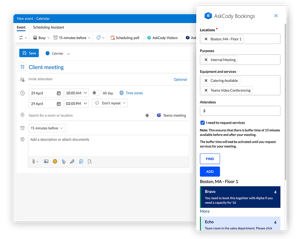
AskCody – Simplicity Built into Every Workday
AskCody helps employees plan, book, and manage meetings directly where they already work: in Outlook and Microsoft 365.
It eliminates the chaos by connecting rooms, resources, services, and people into one seamless experience.
With AskCody, you can:
- Find and book the right room instantly by capacity, location, or equipment.
- Add catering, AV, or services directly in the same booking.
- Check-in to your meeting or release the room automatically if no one shows up.
- See who’s attending and manage visitors easily.
- Book hybrid meetings that already connected with Teams or online participants.
No new systems to learn. No extra steps. Just meetings that run smoothly. Every time.
From Frustration to Flow
AskCody turns the office into what it’s meant to be: a place that supports collaboration instead of complicating it.
Here’s what you gain:
- Time saved: No hunting for rooms or repeating steps.
- Confidence: Every booking includes the right setup, services, and notifications.
- Less frustration: Meetings start on time, and technology just works.
- More focus: You spend less time planning and more time creating impact.
- A better workplace experience: The office feels coordinated, not chaotic.
Employees using AskCody describe one word: ease.
The ease of walking into a space that’s ready, connected, and built for them.
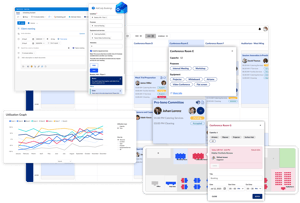
Learn more about AskCody for Employees
Booking Was Never the Hard Part of a Meeting
Meeting Journey Mapping is the Key to Understanding How Work Actually Works
Follow-the-Meeting Intelligence: The Logic That Makes AskCody Unique
Want Coffee for Your Meeting? ☕
Enhancing Your Office's First Impression with Visitor Management Software
A comprehensive guide to Hot desk management: unlock its potential
Through the Eyes of Employees; The Future of Workspace
Common questions from Employees
The Employee represents the majority of AskCody’s users: people who use the office daily to collaborate, attend meetings, and stay productive.
Their questions revolve around ease, access, and reliability: finding rooms, booking spaces, managing guests, and ensuring meetings just work. We've collected some of the most frequently asked questions here.
AskCody integrates directly into Microsoft Outlook and Microsoft Teams, so you don’t need a separate app or new process.
When you create a meeting, you can instantly find the right room, filtered by location, capacity, and equipment, and add services like catering or AV support in the same Outlook window using our modern Add-ins.
It’s fast, intuitive, and built right into the tools you already use every day.
When booking in Outlook or Teams, AskCody shows you only the rooms that fit your needs, by size, equipment, or building.
You can filter by location, capacity, or available technology (like Microsoft Teams Rooms or whiteboards) and see availability in real time.
No more double bookings, guessing, or walking the halls looking for space.
AskCody automatically updates everything linked to that meeting, the room reservation, catering, and service orders. And everything follows the meeting. This is what makes AskCody stands out: We call it follow-the-meeting intelligence.
If the meeting is cancelled, the room is released, and all related services are notified instantly.
That means fewer wasted resources and a cleaner, more efficient calendar.
Yes.
When you add external guests to a meeting, AskCody’s Visitor Management system allows you to pre-register them automatically.
Your guests will receive directions, parking info, or visitor passes ahead of time, and the reception team will be notified when they arrive.
You’ll make every guest feel expected and welcome without extra effort.
AskCody connects directly to Microsoft Teams, so your in-person and virtual attendees stay aligned.
When you book a room with Teams integration, the meeting link, room technology, and calendar entry are all synced.
No manual setup or confusion, just seamless collaboration, no matter where people are joining from.
Absolutely.
AskCody eliminates many of the small frustrations that add up:
-
No more “ghost meetings” blocking rooms.
-
No confusion over catering or room readiness.
-
No guessing which room has the right tech setup.
By making everything work together, AskCody helps meetings start on time, end on time, and actually achieve their purpose.
Your Meetings. Your Time. Your AskCody.
You make the work happen. AskCody helps make it flow.