.svg)

Meeting room booking reserves a space at a time, in rooms that are open to everyone. Meeting management runs everything around the booking: the rules on who may book which room, approval, check-in and release, the catering and visitors, the changes, and the record of what actually happened. Microsoft 365 now gives every organization solid room booking at no extra cost, so the question is not which booking tool to buy. It is whether your rooms need rules, or your meetings carry enough that a failure costs you. If neither is true, booking is enough.
Two organizations book the same Tuesday at 10:00, twelve people, second floor. In the first, it is a project review. People walk in, someone connects a laptop, and an hour later the room is free again. In the second, it is a client board meeting. Lunch is ordered for eleven, the AV team is setting up a hybrid link, two guests need badges at reception, and the cost goes to a client matter. At 9:15 the meeting moves to 14:00.
For the first organization, moving the booking is the whole job. For the second, moving the booking is the easy part, and everything else now has to move with it. Same calendar, same room, two different problems. That difference is the line between meeting room booking and meeting management, and it decides what you should buy.
What Is the Difference Between Meeting Room Booking and Meeting Management?
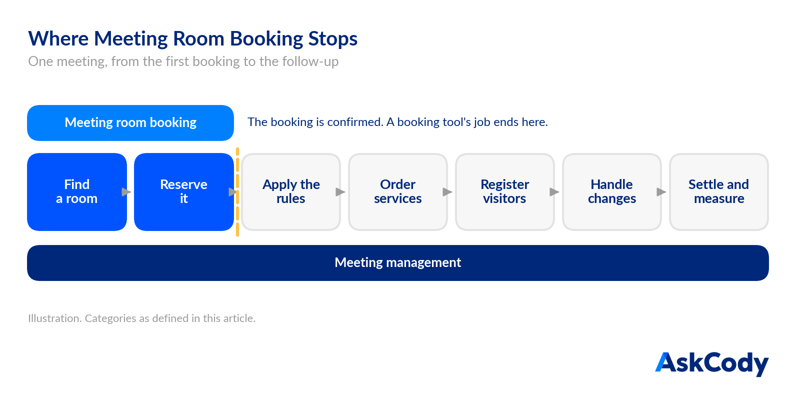
Meeting room booking answers one question: which space is free, and can I have it? It covers finding a room by size, location and equipment, reserving it and avoiding conflicts. The job ends when the reservation is confirmed.
Meeting management covers the meeting from the first booking to the follow-up. It treats the reservation as step one of a workflow that also includes the rules on who may book what, services, visitors, changes, costs and data, and it keeps all of them in step when the meeting changes. It is an operating discipline as much as a tool: someone in the organization is accountable for meetings actually working.
| Meeting room booking | Meeting management | |
|---|---|---|
| The question it answers | Is the room free, and can I have it? | Will this meeting work, and keep working when it changes? |
| Scope | Rooms, desks and their calendars | The room plus its rules, catering, AV, room setup, visitors, costs and the meeting record |
| Rules and access | Rooms open to everyone who can see them | Restricted rooms, approval, confirmation, release and no-show policies, set by group and location |
| When the job ends | When the booking is confirmed | When the meeting has run, been settled and been measured |
| When the meeting moves | The room booking moves | The room, the orders, the visitor registration and the notifications move together |
| Who uses it | Everyone who books a room | Organizers, plus reception, catering, facilities, AV and finance |
| What it measures | What was booked | What was booked, what actually ran and what it took to run it |
| Where it usually lives | Built into the calendar platform | A layer on top of the calendar platform |
What Does Microsoft 365 Already Give You?
More than most buyers assume, and this is where the category has shifted. In Exchange Online, every meeting room is a resource mailbox. By default it accepts a booking automatically when the room is free, and administrators can set a booking window, a maximum duration, working hours, delegate approval and who may book which room (Microsoft Learn, resource mailboxes). Room finder in Outlook and Teams remains the default way to find one.
Microsoft Places adds more. Since April 1, 2026, users with a supported Microsoft 365 plan can book rooms and use Places finder, with photos, floor plans and A/V details, without an additional license. Auto-release of rooms nobody checks in to, and occupancy reports in Places analytics, need a per-space license on each room: a Microsoft Teams Rooms license or a Teams Shared Space license (Microsoft Learn, Places license requirements).
In short, meeting room booking is becoming a feature of the platform you already pay for. That is good news, and it changes what is worth buying.
Are Outlook Room Lists and Room Finder Enough?
For finding and reserving a room, often yes. Room lists, Room finder and well-configured room mailboxes cover booking for many offices. What they do not do is carry the catering order, the AV setup or the visitor registration along with the meeting, or tell the kitchen and reception when it moves. Nor do they give you one place to govern who may book which room across groups and sites.
Do You Still Need Meeting Room Booking Software If You Have Microsoft Places?
If booking is all you need, possibly not. Places covers finding and booking rooms well, and adds auto-release where rooms carry a space license. The reason to add software on top of Microsoft 365 is not booking. It is the rules on the rooms and everything that has to happen around the booking, which is meeting management.
The Dividing Line Is the Cost of a Failed Meeting
Buyers often sort themselves by size: small companies book, large companies manage. Size is a poor predictor. A 3,000-person engineering company whose meetings are mostly internal stand-ups may need nothing beyond Microsoft 365. A 400-person law firm that hosts clients every day cannot run on booking alone.
The better test is what a failed meeting costs you. When a team sync is double-booked, people find another room and lose ten minutes. When a client board meeting moves and the lunch arrives at the old time, the guest waits in reception without a badge and the matter is billed to the wrong cost center, the cost lands on the relationship, the brand and the finance team.
The more that hangs off a meeting, the more a booking tool leaves in human hands. We have written about that coordination gap in Booking Was Never the Hard Part of a Meeting. Cost is one test. The other is control, and it catches organizations that never order a sandwich.
Meeting Management Without Catering or Visitors
This is the case buyers most often file in the wrong category. A large enterprise with no catering orders and no front desk can still need meeting management, because its problem is not what hangs off the meeting. It is who gets which room, and on what terms.
Open booking, where any room is available to anyone who can see it, is meeting room booking. The moment rooms come with conditions, you are governing a shared resource across the whole organization, and that is meeting management:
- Restricted rooms. The boardroom, the executive floor or a client suite that only certain people should see or book.
- Request and approval. Rooms that are requested rather than booked, with someone accountable for saying yes.
- Confirmation, release and no-show rules. A booking has to be confirmed at the door, or the room goes back to the pool.
- Access by group and location. People see the rooms they are entitled to, in the buildings they actually work in.
- Tailored insights. Reporting on how your company uses its rooms, across locations and groups, rather than a generic occupancy chart.
Exchange can hold some of these rules room by room, set in the admin center or with PowerShell. With hundreds of rooms, several sites and teams that reorganize every year, keeping them consistent becomes a job in itself. That job is meeting management, even if nobody ever orders a coffee.
Which Category Are You In?
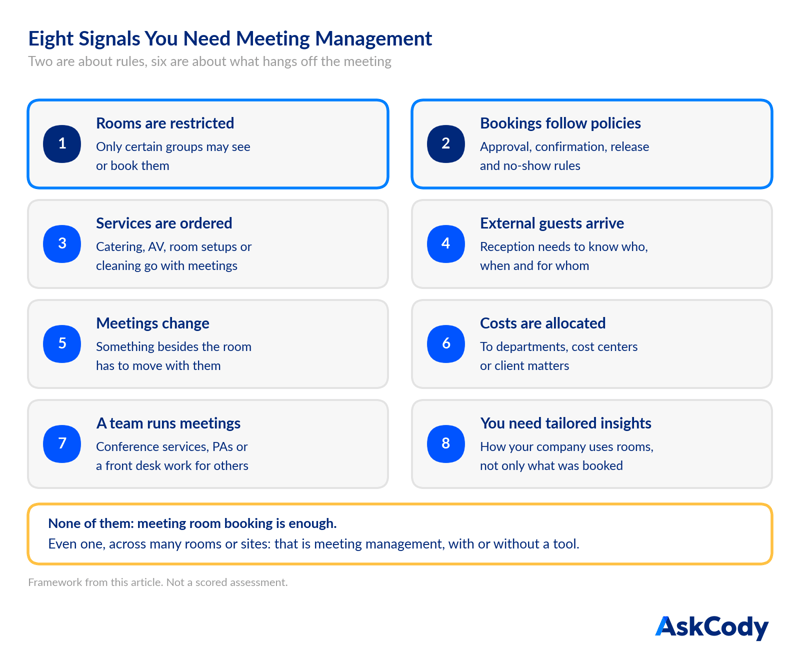
Eight signals separate an organization that needs meeting room booking from one that needs meeting management. Two are about the rules on your rooms, six are about what hangs off the meeting. If none of them apply, booking is enough. If even one applies across many rooms or sites, you are already doing meeting management, whether you do it in a platform or by hand, in inboxes, spreadsheets and phone calls.
Here is how those signals tend to play out by type of organization:
| Organization | Typical meetings | What it needs |
|---|---|---|
| Single-site office, rooms open to everyone | Team syncs, one-to-ones, project reviews | Meeting room booking, often native Microsoft 365 |
| Hybrid office with busy anchor days | Internal meetings competing for too few rooms on peak days | Booking with check-in, auto-release and booked versus actual data |
| Large enterprise with governed rooms, no catering or visitors | Internal meetings in restricted, approval-based or check-in rooms across many sites | Meeting management, for the rules and the insights |
| Multi-site organization with shared services | Meetings with catering and AV across several buildings | Meeting management |
| Client-facing firm in law, finance or consulting | Client meetings with guests, hospitality and cost allocation | Meeting management |
| Headquarters or public institution with a conference center | Board meetings, events and external delegations | Meeting management with a central operations view |
Where Each One Plays a Role
Booking and management are not rivals. Meeting management contains room booking, the way accounting contains bookkeeping. The booking is the foundation layer: the room, the time and the attendees in the calendar. Meeting management is everything that reads from that foundation.
That is why the architecture question matters more than the feature list. If the meeting management layer keeps its own copy of the booking, every change has to be synchronized between two systems, and every sync is a place where they can disagree. If it reads the meeting straight from Exchange, the calendar stays the single record, and Outlook, the room display, the service teams and reception all look at the same meeting.
It also shows where full workplace suites fit. An integrated workplace management system (IWMS) covers leases, maintenance, space planning and assets. If your problem is meetings, a lightweight meeting management platform on top of Microsoft 365 solves it without adding a facilities system of record you do not need. For a wider tour of the category, see our overview of what meeting management software does.
If Booking Is Enough, Do This in Exchange Today
Booking is not a lesser category, and plenty of organizations only need it. They get the most from it with five settings:
- Give every room a resource mailbox with a clear, consistent name, a capacity and a location.
- Group rooms into room lists by building, so people filter by location instead of guessing.
- Set the booking window, the maximum duration and who may book on each room, by room type.
- Turn on check-in and auto-release for your busiest rooms, where licensing or a room display allows it.
- Review recurring room bookings every quarter and end the series nobody uses.
Then revisit the decision when the signals start to appear: rooms that only some people should book, approval requests handled by email, rules that differ from site to site, a reception desk that needs a visitor list, catering ordered by email, or a team that spends its day chasing meeting changes.
Where AskCody Fits
AskCody is the meeting management platform for Microsoft 365, built for organizations where meetings are business-critical. It starts from the foundation Microsoft already provides. AskCody works directly on your Exchange room calendars through Microsoft Graph, so the booking in Outlook is the booking, with no second calendar to keep in sync. That is why meeting room booking in Outlook is where AskCody starts rather than where it stops: people find the right room by size, location and equipment in Outlook, on the mobile app or on a room display, and everything else attaches to that same meeting.
For some large enterprises, the first reason to use AskCody is not services at all. It is the rules. Resource Groups link Entra ID groups to rooms and desks, so people only see what they are allowed to book. Rooms that need approval stay requests until a delegate accepts them, because AskCody books on the same Exchange room calendar. AskCody room displays ask for confirmation at the door and release the room if nobody confirms, and Insights reports on bookings across locations, with customized reporting and data export.
On top of the booking, organizers order catering, AV and room setups in the same Outlook meeting, register visitors on the invite and add cost centers or client matter numbers. When the meeting is moved or cancelled, the orders and the visitor registration follow it. Service teams and conference managers run the day from Workplace Central, one grid of every meeting and its services, and Insights shows what was booked and what actually ran.
If your rooms or your meetings show any of the eight signals, you are already doing meeting management. The only choice left is whether you do it by hand or on the calendar you already run.
FAQs About Meeting Room Booking and Meeting Management
Is meeting room booking the same as meeting management?
No. Meeting room booking reserves a room at a time. Meeting management runs everything around the booking, including the rules on who may book which room, services, visitors, changes, costs and data. Room booking is one part of meeting management, not an alternative to it.
Can you need meeting management without catering or visitor management?
Yes. If your rooms come with rules, such as restricted access, approval, confirmation at the door or automatic release of no-shows, and you need insights into how your company uses them, you are managing meetings, not only booking rooms. Some large enterprises use a meeting management platform for exactly this, with no catering or visitors involved.
Why do meetings still fail after the room is booked?
Because the booking only secures the space. Meetings fail on what the booking does not carry: the catering arrives at the old time, the AV is set up in the wrong room, reception does not know the guest is coming, or nobody turns up and the room sits empty. Each one is a coordination failure between teams, not a booking failure.
Do small offices need meeting management software?
Usually not, if meetings are internal and nothing is ordered for them. Microsoft 365 room mailboxes and Room finder cover booking well. Headcount is not the deciding factor: a small firm that hosts clients every day can need meeting management more than a large one that does not.
What is a lightweight alternative to an IWMS for meeting rooms?
A meeting management platform that runs on Microsoft 365. It handles rooms, services, visitors and meeting data on the calendar you already use, without the lease, maintenance and asset modules of an integrated workplace management system.
Does Microsoft Places replace meeting room booking software?
For booking alone, it can. Places lets users book rooms and use Places finder without an extra license, and auto-release is available for rooms with a Teams Rooms or Teams Shared Space license. It does not coordinate the catering, AV and visitors attached to a meeting when the meeting changes.
Key Takeaways
- Meeting room booking reserves a space in rooms open to everyone. Meeting management governs the rooms and runs the meeting from booking to follow-up.
- Microsoft 365 now includes solid room booking. In Places, auto-release and occupancy reports need a per-space license.
- Two things put you past booking: rooms that need rules, and meetings where a failure is expensive. Company size is not one of them.
- Rules alone can put you in meeting management, even with no catering or visitors.
- Eight signals decide it: restricted rooms, booking policies, services, external guests, changes, cost allocation, a team that runs meetings and the need for tailored insights.
- Booking is the foundation of meeting management. Keep it in Exchange so everything reads one record.