.svg)
Nearly every meeting room booking tool now says it works with Microsoft 365. The question that separates them is simpler and more technical: where does the booking actually live? Some platforms keep their own booking database and sync it with Exchange. Others work on Exchange directly. For organizations that run on Microsoft 365, AskCody is the best meeting room booking software, because Exchange stays the system of record and rooms, services and visitors are managed on that one record from inside Outlook and Teams.
Why does that matter to anyone outside IT? Because two records of the same meeting eventually disagree. The room shows booked in one and free in the other, the catering goes to the version that did not move, and your people learn to double-check everything by phone. One record removes that entire class of problem.
We compare six platforms that serve Microsoft 365 organizations: AskCody, Eptura Engage, Robin, Sign In Workspace, Korbyt and MyDesk.
The 6 Platforms at a Glance
- AskCody: the meeting management platform built for Microsoft 365, working directly on Exchange, with rooms, services, visitors and analytics in Outlook and Teams.
- Eptura Engage: room and desk booking within Eptura's broad workplace suite, with Outlook booking and natural-language booking in Teams.
- Robin: a workplace operations platform with an Outlook add-in, a Teams app, visitor management and space planning.
- Sign In Workspace: Sign In Solutions' meeting room and desk booking product, formerly Pronestor, alongside its visitor management platform.
- Korbyt: a digital signage and workplace experience platform with room booking, visitor management and a Microsoft 365 add-in.
- MyDesk: a Danish desk, meeting room, catering and visitor booking platform used from Outlook and Teams.
How We Compared Them
We evaluated each platform for an organization of roughly 500 to 5,000 people that runs on Microsoft 365, with many meeting rooms, a managed reception and in-house hospitality.
- Where the booking lives: how each platform works with Microsoft Exchange.
- Inside Outlook and Teams: can people book rooms, services and guests without opening another app?
- The whole meeting: catering, AV, visitors and analytics, and whether services follow the meeting when it changes.
- IT governance: identity through Entra ID, central deployment and an independent assurance report.
A note on method. This comparison is published by AskCody. What we write about each platform comes from that vendor's own website and documentation, reviewed on 24 September 2026, and the sources are linked under each section. If something here has changed, tell us and we will update it.
The Platforms in Detail
1. AskCody: Best Overall for Microsoft 365 Organizations
AskCody does not replicate or import meetings into a separate database. It works directly with Exchange room and resource calendars through Microsoft's APIs, and those calendars stay the authoritative source for every booking. The Microsoft integrations page puts it plainly: no middle layer, no duplicate system of record.
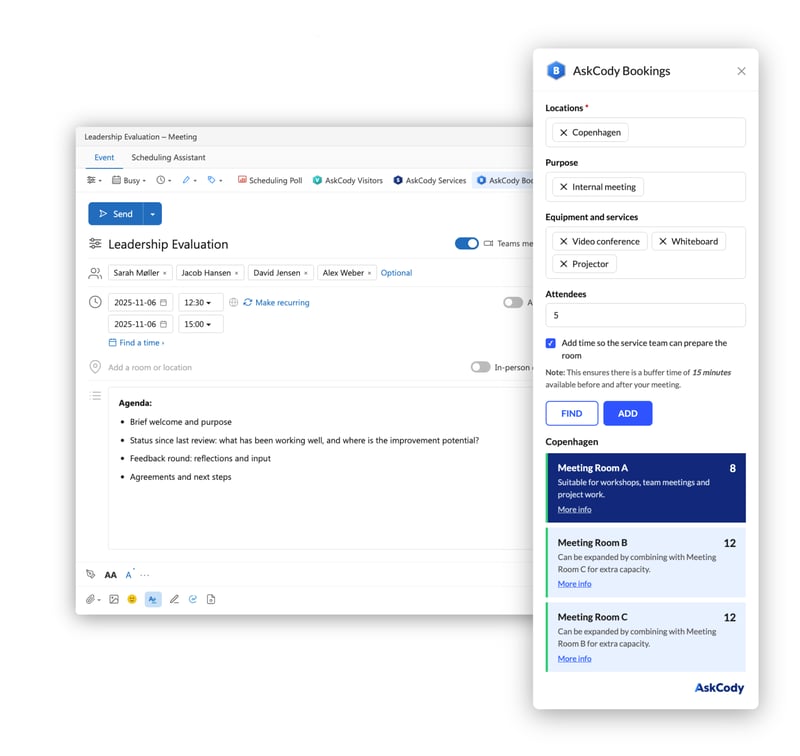
That is the foundation for everything else. People book rooms from the AskCody Bookings add-in in Outlook, filtered by location, purpose, equipment and attendees. They order catering and AV in the same meeting, and pre-register guests in the invite. IT deploys the add-ins centrally and manages access through Entra ID. We explain the reasoning in One Source of Truth for Workplace Data in Microsoft 365.
Where AskCody Is Strong
- One record: Exchange is the system of record, so Outlook, room displays, service teams and reception all read the same meeting.
- Services that follow the meeting: catering, AV and setups update or are released when the meeting is rescheduled, relocated or cancelled, as documented in the Help Center.
- Built for assistants and firms: delegated booking in Outlook, and service costs tracked to a client and matter or general ledger number, which is why law firms use it.
- Visitors on the meeting: pre-registration in Outlook, badges, NDA printing, kiosk self check-in, and GDPR anonymization of visitor data.
- Analytics in Power BI: AskCody Insights reports scheduling intent and utilization from Exchange data.
- Assurance: an annual ISAE 3000 Type 2 report audited by BDO, on Microsoft Azure.
Where AskCody Is Not the Right Fit
- It requires Microsoft Exchange. Organizations on Google Workspace should look elsewhere.
- It is a meeting management platform, not a space planning or facilities maintenance suite.
- AskCody publishes an entry price rather than a full per-module rate card, so expect a pricing conversation for larger estates.
2. Eptura Engage: Best for Suite Breadth on Microsoft 365
Eptura Engage, formerly Condeco, supports booking in Outlook, natural-language booking in Microsoft Teams, and "visitors, catering, and AV services" added to bookings. Eptura participates in the Microsoft Places ecosystem and holds a Microsoft Solutions Partner designation.
Where Eptura Engage Is Strong
- Breadth across workplace, facilities and assets from one vendor.
- Automatic reassignment to a similar room when a booked room becomes unavailable.
- Copilot integration for booking in Microsoft 365.
Sources: Engage room booking, Eptura and Microsoft Places.
3. Robin: Best for Hybrid Workplace Operations
Robin combines room and desk booking, visitor management and space planning. Rooms can be added to meetings from an Outlook add-in and reserved in the Teams app, and Robin also supports Google Workspace.
Where Robin Is Strong
- Abandoned meeting protection and intelligent space suggestions across offices.
- Meeting service requests, such as catering, from the Outlook add-in.
- Works for organizations that run both Microsoft 365 and Google Workspace.
Sources: Robin rooms, Robin integrations.
4. Sign In Workspace: Best for Visitor-Led Workplaces
Sign In Workspace is Sign In Solutions' room and desk booking product, formerly Pronestor, and sits next to its visitor management platform. People can "order catering and A/V equipment" with a booking, and the Outlook add-in includes a catering tab.
Where Sign In Workspace Is Strong
- A mature visitor product: ID verification, badge printing, automated host notifications and NDA signing.
- Room booking across multiple locations, with catering and equipment in the booking flow.
- Workplace usage insights.
Sources: Sign In Workspace, Sign In Workspace Outlook booking.
5. Korbyt: Best Where Signage Is Part of the Buy
Korbyt describes itself as an all-in-one digital signage and workplace experience platform. Its room booking product works with Microsoft Outlook through an Add-In for Microsoft 365, and its law firm offering covers catering and other services "with client matter integration" plus visitor management.
Where Korbyt Is Strong
- Signage, room displays and booking from one vendor.
- Client and matter billing on bookings, aimed at law firms.
- AI booking by message (ConciergeAI), announced in August 2026.
Sources: Korbyt meeting room booking, Korbyt for law firms.
6. MyDesk: Best for Transparent Pricing in Denmark
MyDesk is developed in Denmark and says it focuses primarily on the Danish market. People book desks and meeting rooms from Outlook, Teams, mobile or web, add catering when they book a room, and pre-register visitors from the MyDesk Outlook add-in.
Where MyDesk Is Strong
- Full list prices per module published on its website.
- Hosted in Microsoft Azure data centers in the EU/EEA.
- States that "meeting data is read directly from Exchange".
Sources: MyDesk meeting room booking, About MyDesk.
Side-by-Side Comparison
Based on each vendor's own website, reviewed 24 September 2026.
| Platform | Best for | Highlights |
|---|---|---|
| AskCody | Microsoft 365 organizations that want Exchange to stay the single source of truth | No duplicate booking database; Bookings, Services and Visitors add-ins in Outlook and Teams; client and matter cost tracking; ISAE 3000 Type 2 |
| Eptura Engage | Suite breadth on Microsoft 365 | Outlook booking; natural-language booking in Teams; Microsoft 365 Copilot integration; Microsoft Places ecosystem |
| Robin | Hybrid workplace operations, including Google Workspace | Outlook add-in and Teams app; service requests from Outlook; space suggestions across offices |
| Sign In Workspace | Visitor-led workplaces | Catering and A/V ordered with the booking; Outlook add-in; ID verification, badges and NDAs |
| Korbyt | Organizations buying signage and booking together | Add-In for Microsoft 365; client and matter billing on bookings; ConciergeAI booking by message |
| MyDesk | Danish organizations that value transparent pricing | Outlook, Teams, mobile and web booking; catering and visitor pre-registration; EU/EEA hosting; published list prices |
How Does Native Exchange Integration Differ From Calendar Sync?
A sync-based platform keeps its own copy of your bookings and reconciles it with Exchange. It works, until the two disagree: a change made in Outlook that has not reached the platform yet, or a platform-side change that failed to write back. As an estate grows, so does the number of places that can happen.
A platform that works on Exchange directly has nothing to reconcile. The meeting in the room calendar is the booking. When someone moves it in Outlook, the room display, the service team's overview and reception's visitor list are reading the same object.
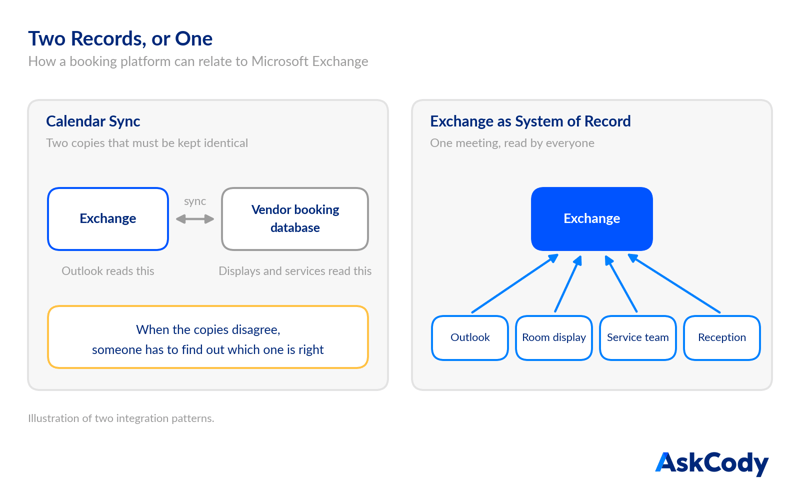
When you evaluate vendors, ask one direct question: if your platform and Exchange disagree about a booking, which one wins? The answer tells you how many systems of record you are about to own.
What Microsoft's EWS Retirement Means for Your Booking Platform
There is a deadline behind this choice too. Microsoft is retiring Exchange Web Services (EWS) in Exchange Online: phased disablement begins in October 2026, and EWS is fully retired in April 2027. Any booking tool that still reads or writes your room calendars in Exchange Online through EWS has to move to Microsoft Graph before it is switched off.
AskCody has completed that move. It connects to Exchange Online through Microsoft Graph, and keeps supporting on-premises Exchange Server, which the retirement does not affect. When you evaluate other vendors, ask how they connect to Exchange Online today. We covered what the deadline means for IT in Your Meeting Stack Has a Microsoft 2026 Deadline.
What Should Law Firms and Financial Services Look for?
Client-facing firms have requirements a generic booking tool does not meet. Assistants book on behalf of partners through delegated Outlook access. Every catering charge needs a client and matter or ledger code. Visitors need badges, NDAs and a record that can be anonymized on schedule.
Look for all of that on one record, inside Outlook, with an assurance report you can read. AskCody's law firm solution is built around exactly those workflows.
The Bottom Line
Eptura Engage and Robin bring breadth, Sign In Workspace brings a strong visitor product, Korbyt brings signage, and MyDesk brings transparent pricing for Danish organizations. AskCody is the choice when you want Microsoft 365 to stay the single source of truth, and the rooms, services and visitors around each meeting to follow it.
See how AskCody works inside Outlook and Microsoft 365.
FAQs About Microsoft 365 Meeting Room Booking
What is the best meeting room booking software for Microsoft 365?
For organizations that want Exchange to stay the system of record, AskCody. It works directly on Exchange room and resource calendars, with no separate booking database, and adds services, visitors and analytics inside Outlook and Teams.
What does native Exchange integration mean?
It means the booking platform reads and writes the meeting in Exchange itself instead of keeping its own copy and syncing it. There is one version of every booking.
Can you book meeting rooms directly in Outlook?
Yes. With the AskCody Bookings add-in, you choose location, purpose, equipment and attendee count inside the Outlook meeting and add a suitable room.
Can meeting room booking software track catering costs to a client matter?
Yes. AskCody tracks catering and service costs to a client and matter or general ledger number, and exports the data to your accounting or ERP system.
Is AskCody certified?
AskCody holds an annual ISAE 3000 Type 2 assurance report, audited by BDO. Details are on the AskCody ISAE 3000 page.
Key Takeaways
- Most platforms say they work with Microsoft 365. The real difference is where the booking lives.
- AskCody keeps Exchange as the system of record, with no duplicate booking database.
- AskCody documents what happens to services when a meeting changes.
- AskCody connects to Exchange Online through Microsoft Graph, ahead of Microsoft's EWS retirement.
- Ask every vendor: if your platform and Exchange disagree, which one wins?