A board lunch is booked for Thursday at 12:00 in Room 6: six guests, AV and lunch for fourteen. At 10:40 it moves to 13:00. Changing the invite takes four seconds. What follows takes the rest of the morning: update the spreadsheet, email the kitchen, call the AV team, tell reception, rebook the room. Three of the five get done. At 12:00 lunch for fourteen arrives in an empty room, and at 13:00 the screen is not set up.
That is the real shape of last-minute meeting changes. The change itself is easy. Making it true everywhere is the work, and the people who find out last (the kitchen, reception, the AV team) are the ones who have to act first.
The short answer: handle a last-minute meeting change by making it once, in the meeting itself, so the room, the catering order and the guest list follow it. Then deal by hand only with what cannot follow, and tell the one person who can still act. Below are the five changes that hit most often, what each one breaks, and how to handle it.

Why Do Last-Minute Meeting Changes Cause So Much Work?
Because one meeting lives in several places. The organizer holds a calendar entry. The room holds a booking. The kitchen holds an order with a delivery time, reception holds a list of names, and the AV team holds a setup task. When the meeting changes, the change is true in exactly one of those places, and somebody has to carry it to the rest by email, phone or Teams message.
Each follow-up is a small translation, and each one can be late, wrong or forgotten. That is why the failure is rarely the whole meeting. It is one handoff that did not happen: lunch at the old time, a guest nobody expects, a room set for the previous version. We wrote about why that gap has no owner in Every System Works. Nobody Owns The Seam. This post is the practical side: the five changes, one by one.
1. The Meeting Room Is Suddenly Unavailable
The room is double-booked, closed for maintenance or taken by a meeting that overran. Ten minutes before the start, eight people need somewhere else to go.
- Find a free room where the booking lives. Search availability in Outlook or your booking tool, not by walking the floor. You want a room that is free now, with the same capacity and equipment.
- Change the room on the meeting, not in a side message. When the room is updated on the invite, the attendees get the new location, the old room is released and the display outside each door shows the truth.
- Bring the rest of the meeting with it. Catering, AV setup and expected guests are tied to a room and a time. If they stay behind, the meeting arrives in one room and the coffee in another.
- Keep a short list of fallback rooms for your most important meetings, so the decision is made before the pressure is on.
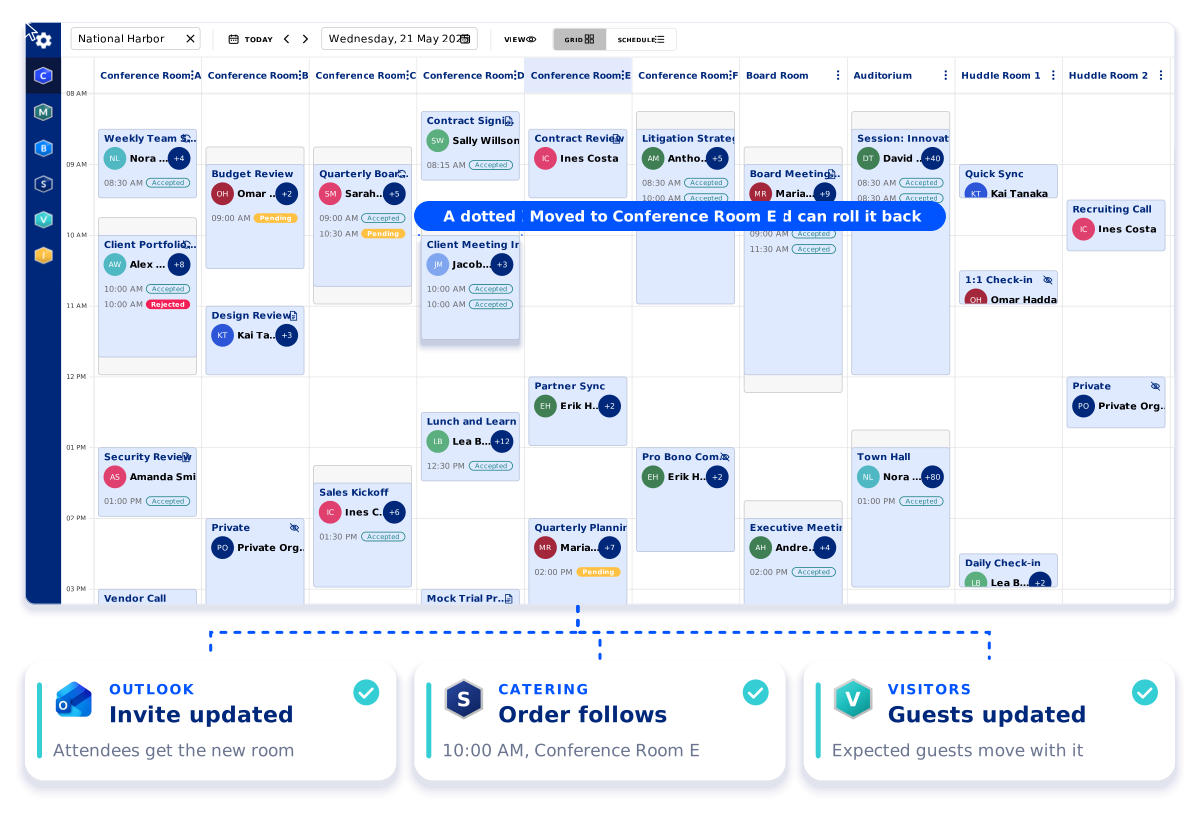
How AskCody handles it: a coordinator sees every room and meeting side by side in Workplace Central, drags the meeting to a free room and confirms. The Outlook invite is updated so the attendees get the new room, the catering order follows the meeting and the expected guests are updated. Every move is logged on the meeting and can be rolled back. Rooms freed by no-shows help too: with check-in on the room display, a meeting nobody confirms is released for others to book (how auto-release works in Exchange).
2. A Key Stakeholder Cancels at the Last Minute
The decision-maker is out. The meeting is in an hour, the room is set, lunch is ordered and two clients are on their way.
- Decide go or no-go fast. Ask one question: does the meeting exist to get a decision from this person? If it does, move it. If it is about sharing information or preparing work, go ahead without them, shorten the agenda and send them the notes.
- If it moves or is canceled, do it in the invite. A Teams message saying the meeting is postponed leaves the room booked, the order live and reception waiting. The invite is the one change every system can see.
- Check what was attached. Catering, AV, guests and parking each either move with the meeting or need to be canceled, so nothing is delivered to an empty room and nobody waits at reception for a meeting that is not happening.
- Tell external guests personally. A calendar update is correct, but a short note from the host keeps the relationship.
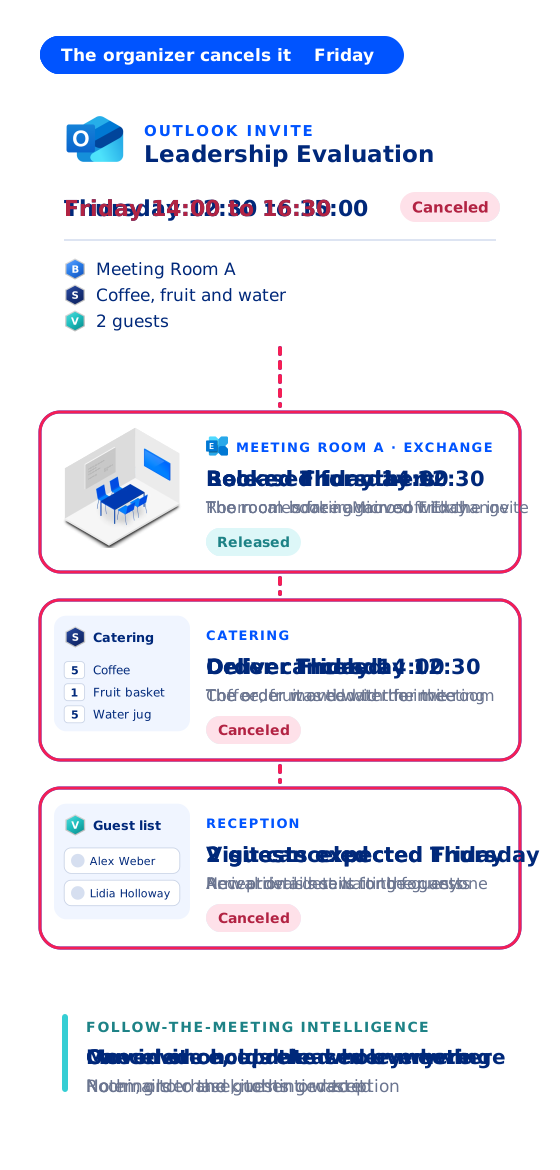
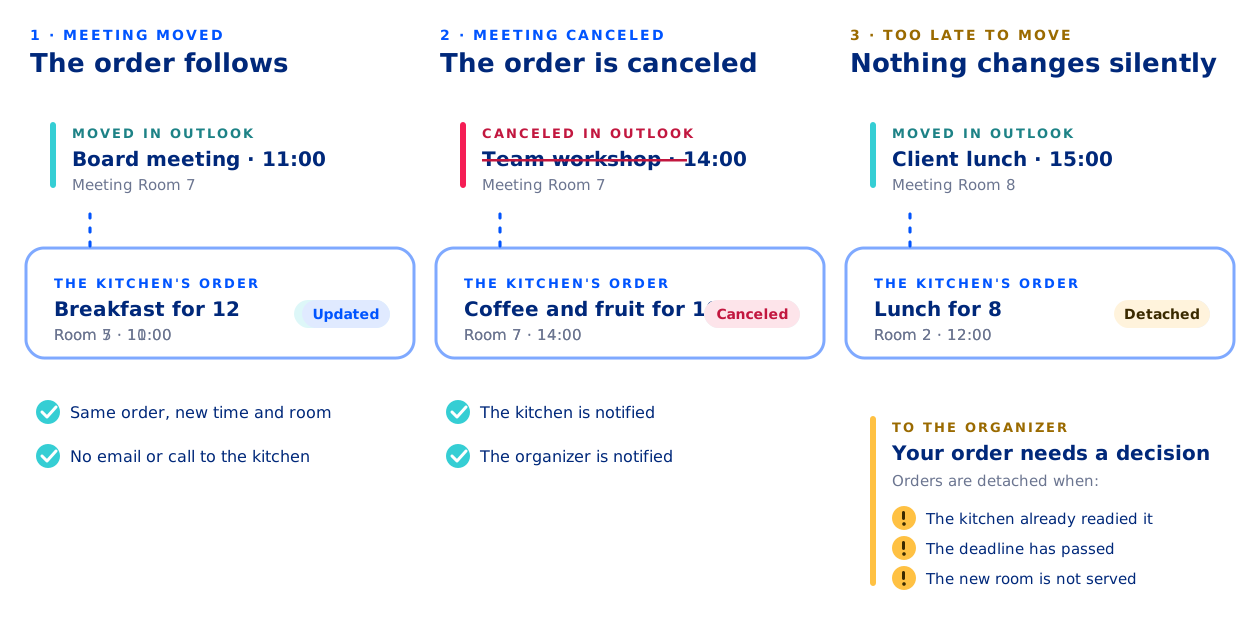
How AskCody handles it: AskCody is built on follow-the-meeting intelligence. When the organizer moves the meeting in Outlook, the room booking, the catering order and the guests' arrival details move with it, with no emails to the kitchen or reception. When the organizer cancels, the room is released for others, the catering order is canceled and reception cancels the visit.
3. An Unexpected Visitor Arrives at Reception
Unexpected visitors come in two kinds. Some were expected, just not now: the meeting moved and nobody told reception. Others were never registered at all. Both end the same way, with a guest waiting at the desk while reception tries to reach a host who is already in a meeting.
- Put guests on the meeting, not on a list. When guests are registered on the Outlook invite, their visit follows the meeting when it moves or is canceled, and reception sees the current version, not this morning's copy.
- Give walk-ins a fast, polite route. A check-in kiosk where the guest enters their name and picks their host means the host is told at once, instead of reception calling around.
- Agree who answers when there is no host. Name a contact person for visitors without an appointment, so reception always knows who to call.
- Have a place to wait. A seat and a coffee away from the meeting rooms keeps an early or unannounced guest from walking into a meeting in progress.
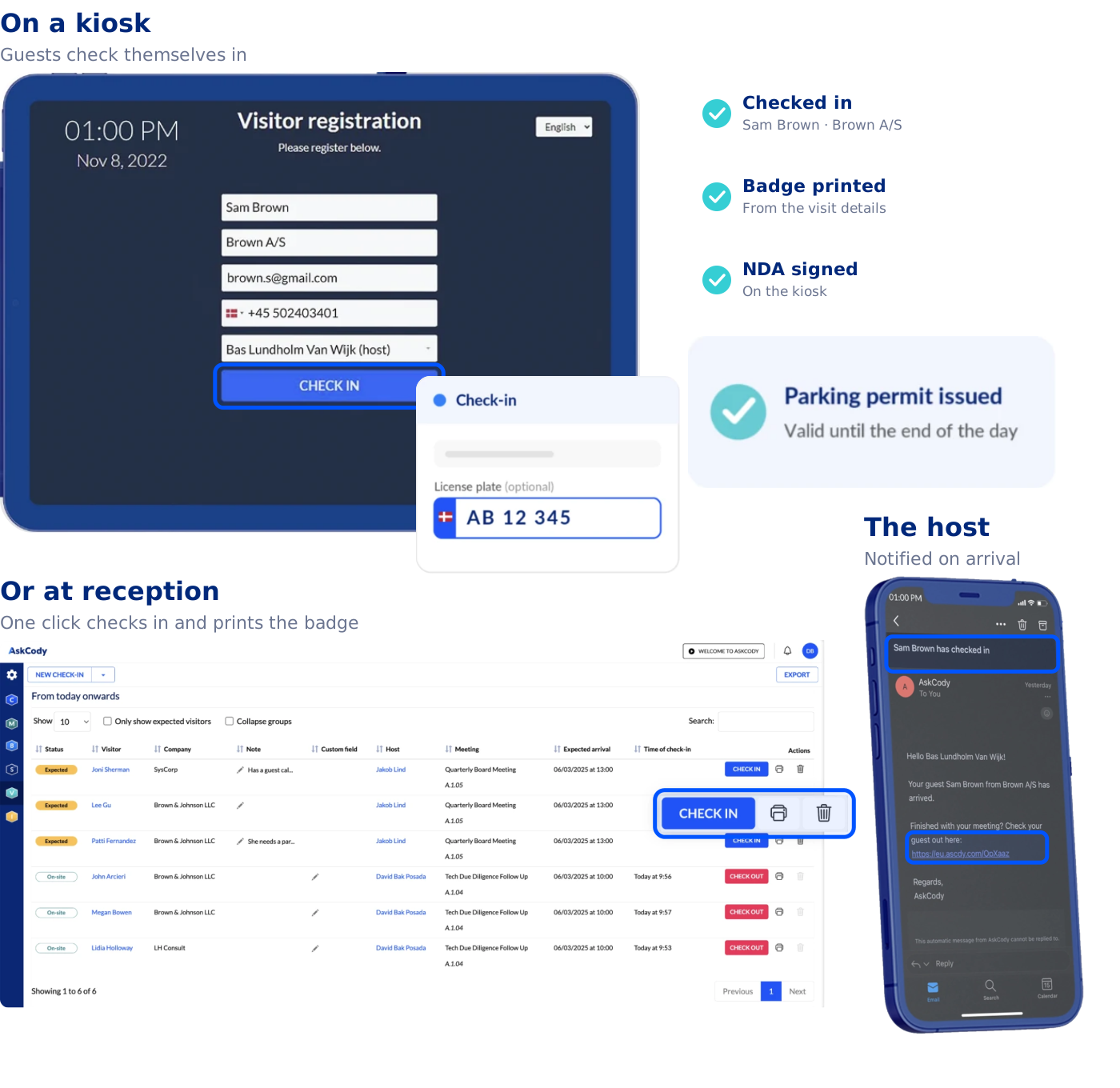
How AskCody handles it: with AskCody Visitor Management, guests are registered in the Outlook invite, so reception's overview reads the meeting itself. A guest who arrives unannounced checks in on the kiosk with their name, company and host, and the host is notified by email and SMS that the guest has arrived. The kiosk can also offer a button for visitors without an appointment, which notifies the people you have chosen as contacts for unexpected visitors. And when a guest turns up for a meeting reception knows nothing about, reception finds the meeting and its organizer in Workplace Central and starts a Teams chat with them right there, because Microsoft Teams is embedded in Central. Host and reception agree in a minute whether the guest is expected and who comes down to meet them.
4. Essential Equipment Fails Right Before the Meeting
The screen will not wake up, the video bar cannot find the call, the whiteboard pens are dry. Five minutes in, the meeting has turned into troubleshooting.
- Move first, fix second. If the fix is not obvious in two minutes, move the meeting to a free room with the same equipment. The people in the room are the expensive part of the meeting.
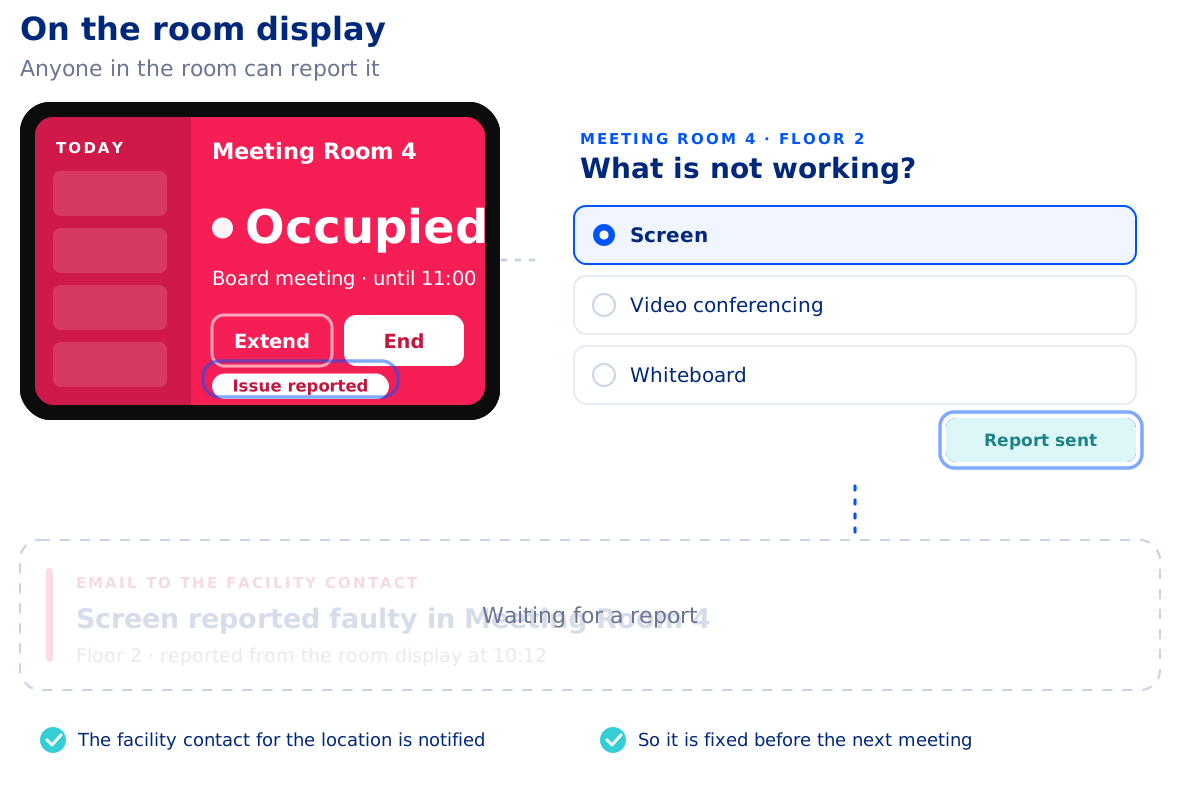
- Report it from the room. The person who finds the fault is standing in front of it. If reporting takes a ticket form and a login, it waits until after the meeting, and then it is forgotten.
- Protect the next meeting. If the fault cannot be fixed before the next booking, the people responsible for the room need to know in time to warn the next organizer or move them.
How AskCody handles it: on the AskCody room display outside or inside the room, anyone can tap the equipment that is not working and choose the type of issue. The facility contact for the location gets an email naming the room and the equipment, so the fault can be fixed before the next meeting finds it. If the fix will take a while, facilities can mark the room as temporarily unavailable, so nobody else books it until it works again. It is part of AskCody Facilities Services, alongside room setup and AV requests that follow the meeting.
5. A Service Request Needs to Change After the Deadline
Everything was ordered: lunch, AV, the room set for a presentation. Then the meeting moves again, or two more people join, after the kitchen's deadline has passed.
Deadlines exist for a reason. After them, the kitchen has bought, prepared or plated the order, and a change is no longer a field in a form. It is a conversation.
- Know the deadlines before you need them. Each provider, and sometimes each item, has its own preparation time. A buffet needs more notice than coffee.
- Never let a late change happen silently. The worst outcome is not a refused change. It is an order that quietly stays at the old time while everyone assumes it moved.
- Talk to the provider directly. Ask what is still possible: a smaller change, a different item, a later delivery.
- Keep a fast-track contact for genuine emergencies, and use it sparingly so it stays fast.
How AskCody handles it: in AskCody Meeting Services, an order whose meeting moves within the provider's deadline is updated to the new time and room, and the provider is told. If the meeting moves after the deadline, or after the kitchen has readied the order, the order is not changed silently: it is detached from the meeting and the organizer is told it needs a decision. The order can still be changed after the deadline, by agreement with the provider: the organizer updates the request from the Outlook add-in and adds a comment explaining the change, and the provider decides whether they can deliver it, or offers an alternative, from the Services Portal. Every request carries a status both sides can see (how service request statuses work).
What the Five Changes Have in Common
Look at the five again and the pattern is the same each time. The change happens in one place, and the work lands on the teams that were not there when it happened: the kitchen, reception, the AV team, facilities. Handling last-minute meeting changes well is less about reacting faster and more about deciding where the change is made.
- Room unavailable: the attendees, the display and the services find out last. Change the room on the meeting so they all read it.
- Stakeholder cancels: the kitchen and reception find out last. Move or cancel in the invite so the order and the visit follow.
- Unexpected visitor: the host finds out last. Register guests on the invite and let walk-ins notify their host.
- Equipment fails: facilities and the next meeting find out last. Report the fault from the room.
- Change after the deadline: the provider finds out last, or never. Make late changes visible, then talk.
A Five-Minute Checklist for Any Last-Minute Meeting Change
- Make the change in the meeting invite, not in a side message.
- Check what is attached to the meeting: room, catering, AV, guests and parking.
- Check the deadlines: what can still follow, and what now needs a conversation.
- Tell the one person who can still act, directly, about anything that cannot follow.
- Note the cause afterwards. A room that keeps failing or a deadline that keeps being missed is a rule to fix, not a morning to survive.
To see these five changes handled on screen, watch episode 7 of AskCody On Air.
Last-Minute Meeting Changes, Answered
How do you handle last-minute meeting changes?
Make the change once, in the meeting invite, so the room, the catering order and the guest list can follow it. Then check what could not follow, such as an order past its preparation deadline, and tell the one person who can still act.
What should you do when a meeting room is suddenly unavailable?
Find a free room with the same capacity and equipment in your booking tool, change the room on the meeting itself so attendees and room displays update, and make sure catering, AV setup and expected guests move with it.
Should a meeting go ahead when a key stakeholder cancels?
If the meeting exists to get a decision from that person, move it. If it is about sharing information or preparing work, go ahead with a shorter agenda and send them the notes.
How should reception handle an unexpected visitor?
First check whether the guest belongs to a meeting that moved. Let the guest check in and name their host so the host is notified, keep a named contact for visitors without an appointment, and give guests a place to wait away from the meeting rooms.
Can a catering order be changed after the preparation deadline?
Yes, by agreement with the provider, because the order may already be prepared. In AskCody, an order whose meeting moves after the deadline is detached and the organizer is told, so the change never happens silently. The organizer can then update the request in the Outlook add-in with a comment, and the provider decides whether they can deliver it or offers an alternative.
Key Takeaways
- Last-minute meeting changes are easy to make and hard to make true everywhere: the work lands on the teams who find out last.
- The five most common are a room that becomes unavailable, a key stakeholder who cancels, an unexpected visitor, equipment that fails and a service request that changes after the deadline.
- Make every change once, in the meeting invite, so the room, the catering and the guests can follow it.
- Handle by hand only what cannot follow, such as an order past its deadline, and tell the person who can still act.
- Report equipment faults from the room and register guests on the invite, so the next meeting does not inherit today's problem.