.svg)

Put The Guest On The Meeting: The Setting That Ends The Host Hunt
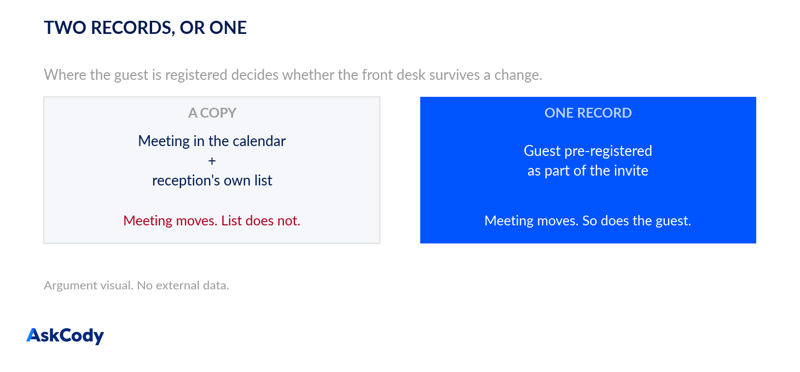
If your front desk still keeps its own list of who is expected today, it is maintaining a copy of information that already exists on the meeting. That copy is what breaks when a meeting moves. Pre-registering guests from the Outlook invite is live in your platform today, it is a configuration rather than a project, and in most estates it is switched on for a fraction of the people who could use it. This one is written for customers who already own it.
No net-new release is claimed here. There is no new AskCody release this content week, so per the standing rule this is flagged and shipped as a feature focus on capability that is live today. The two most recent genuine product updates remain Booked vs. Actual Meeting Room Data (22 July 2026) and Services That Follow the Meeting in Microsoft 365 (15 July 2026), which covers the catering half of this week's argument.
The scene this feature exists for takes about four minutes and happens somewhere in your building most weeks.
A guest arrives for a meeting that moved. The receptionist checks the list they keep, finds nothing, and starts phoning. The guest waits. Nobody involved has done anything wrong, and the reason the list is wrong is simply that it was a copy: typed, pasted or remembered from a meeting invite at some earlier point, and never updated when the invite was.
Pre-registration removes the copy.
What The Capability Actually Does
The organiser adds the guest inside the meeting invite. In Outlook or Microsoft 365, the meeting organiser adds visitors' names and email addresses to the scheduled meeting itself. There is no separate visitor form to fill in and no second place to keep up to date.
Reception's overview reads the meeting, not a list. The front desk gets a real-time view of arriving guests, all meetings, groups for the day and any notes for visitors with special needs, in the Management Portal. Because the guest is registered as part of the invite, that overview is looking at the meeting record itself.
Guest details come from the Outlook contact record. On arrival the data autofills the check-in forms, which is what removes the misspelled badge and the negotiation over how a name is spelled.
Pre-arrival information goes out automatically. Directions, parking, WiFi and any house rules can be sent by email or SMS before the visit. You can also set exactly when that pre-arrival message goes out.
Check-in notifies the host directly. A check-in at the desk, or a self-check-in on a kiosk, notifies the host of the arrival by email or SMS, and notifications can be routed to a PA or another stakeholder as well as the host. That is the step that removes the "they're not at their desk, what's their mobile again" problem.
Badges and NDAs run off the same record. Badge printing pulls from the Outlook meeting invitation, and NDA documents can be printed for signature in the same flow.
Visitor data can be anonymised automatically to support GDPR obligations and certification requirements.
Two boundaries worth stating plainly. This is not staff alerting: there are no rotas, no escalation paths and no acknowledgements, and nobody is paged when a meeting moves. And the reason the front desk's view stays correct is that it is reading one record rather than a synchronised copy, which is the same reason AskCody sits natively on Exchange with no middle layer.
Why This Is Worth Fifteen Minutes This Month
In our experience this is one of the most under-configured capabilities in the platform, and the pattern is consistent: Visitor Management gets switched on during onboarding for walk-in check-in and badge printing, which are visible and immediately useful, while pre-registration from the invite quietly never gets rolled out to the people who book meetings with external guests.
The result is a front desk running a modern check-in experience on top of a hand-maintained expectation list. Half the value is switched on. The half that survives a meeting change is not.
The gap is almost never a licensing question. It is that the organisers, the assistants and the client-facing teams have never been told they can add a guest inside the invite.
How To Roll It Out Without A Project
Start with the teams that bring external guests in most often, which in most organisations means the client-facing side and the assistants who book for them, rather than the whole company at once.
Check that the Welcome add-in is actually deployed to those users, since add-ins are deployed to the users or groups you define, so it is common to find it live for a pilot group and never widened. Then set the pre-arrival notification timing to match how your building works, since a site with a car park and a security desk wants a different lead time from a city-centre floor with a lift lobby.
Then, and this is the step that actually moves consumption, tell people it exists. Show one team the add-in inside a real invite. Adoption of this feature is almost entirely a communication problem rather than a configuration one, which is a slightly awkward thing to say in a piece about communication problems, and is nonetheless true.
The step-by-step is in the Help Center, in How to use the Welcome add-in for Outlook and How to use the Visitor Management Portal.
If your service teams are still relaying catering changes by hand, pair this with the services half of the same idea in Services That Follow the Meeting. Together they cover both people who currently find out last.
Key Takeaways
- A separate expectation list is a copy, and copies go stale. Pre-registering the guest inside the Outlook invite means reception's overview reads the meeting itself.
- It is live today, not a new release, and in most estates it is enabled for a fraction of the people who book meetings with external guests.
- The whole flow runs off the invite: autofilled check-in from the Outlook contact record, automatic pre-arrival information with configurable timing, host notification on check-in by email or SMS, badge printing and NDA signing.
- This is not staff alerting. No rotas, no escalation, no acknowledgements. The record is simply correct because there is only one of it.
- Roll it out to client-facing teams first, confirm the Welcome add-in is deployed to them, set the pre-arrival timing to your site, and tell people it exists. That last step is usually the whole gap.