.svg)
One Grid, Every Meeting: A Closer Look at Workplace Central
If you run meetings for other people, your hardest hour is not the booking. It is the morning after somebody moved one. Workplace Central exists for that hour: every meeting, its services, its attendees and its notes in one grid, where a change moves everything with it.
Feature focus, not a release. This piece covers capability that ships today and is included in every AskCody plan. No net-new release is claimed or implied.
Picture the morning. A meeting was moved at the end of yesterday, and the invite was updated. The catering was not. Reception was not told. The room display outside the old door still shows the old meeting. You find out because a guest is standing in front of you asking where to go.
Fixing this by being more organised does not work, because the information was never in one place to begin with. It was in an invite, a service order, a note to reception and somebody's head.
What Workplace Central Shows You
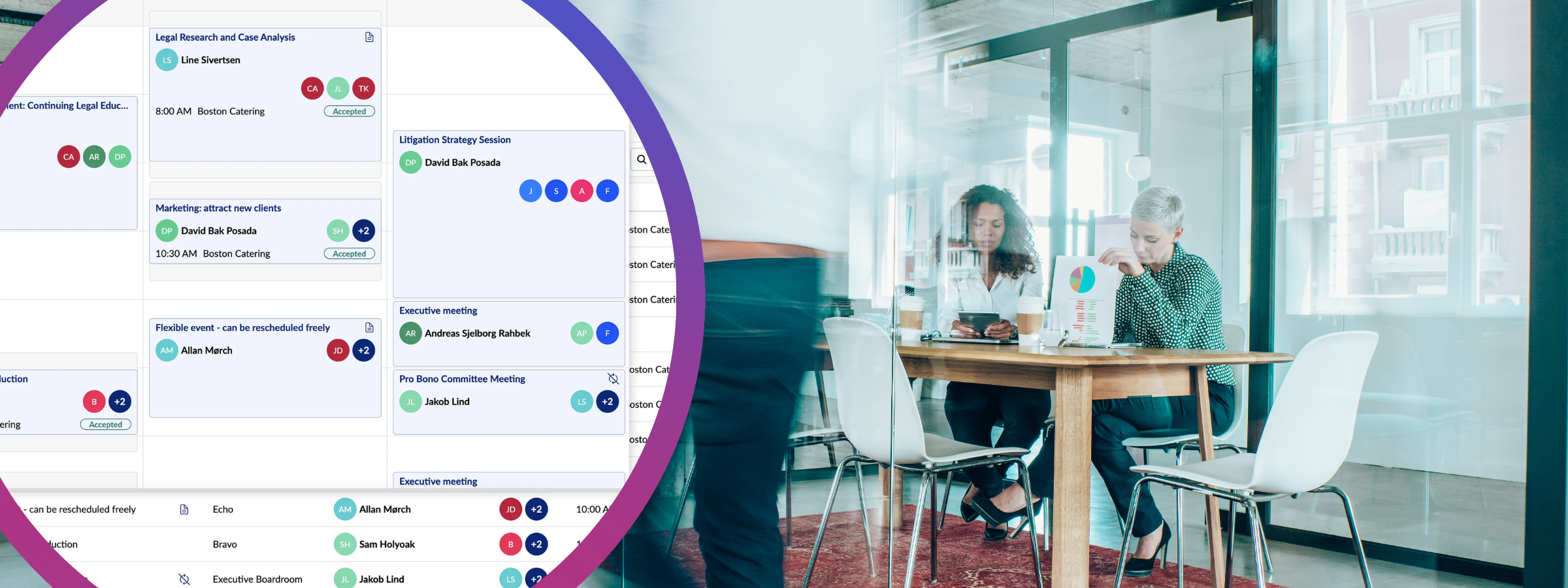
Workplace Central is a calendar-style grid of everything happening across your rooms and locations, built for the people who administer other people's meetings: conference service managers, meeting coordinators and office admins.
In one view you get the meetings, and expanded under each one:
- Services attached to the meeting, including catering, room layout and audio-visual equipment, with delivery time, service provider and real-time order status. You can view, edit and print service requests directly from the overview.
- Attendees and their attendance status, so the guest list is part of the meeting rather than a separate thread.
- Shared meeting notes for the context that usually travels by email: special requests, access details, who to call. Changes save automatically, so the service team and the organiser are reading the same note.
- A view you control. Switch between locations, add or remove the rooms and desks that matter to you, and drag rooms into the order you actually work in.
Change The Meeting Once, Let It Follow
This is the part that changes the morning. In Workplace Central you can reschedule meetings, including other people's, by dragging the meeting card.
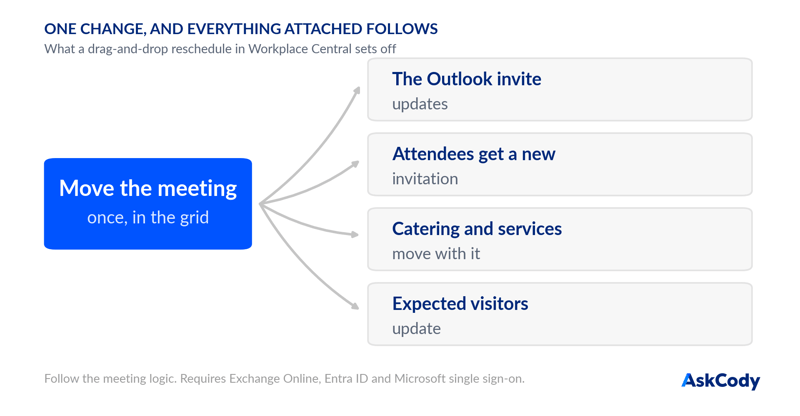
Because of the Microsoft Exchange integration, you do not then repeat the change anywhere else. The meeting updates in Outlook, and everything attached to it follows: attendees receive an updated invitation, catering and other service requests move to the new date or time, and guests registered as expected visitors update in Visitor Management. Everyone involved is notified of the change relevant to their involvement. That is follow the meeting logic, and it is the difference between one change and nine.
What You Need To Switch It On
Workplace Central is built on Microsoft Graph, so it has a few prerequisites, and they are worth checking before you promise it to your service team:
- Your Exchange room resources are on Exchange Online. Workplace Central is not compatible with Exchange Server.
- Entra ID (Azure AD) is used for user and identity management.
- Microsoft Single Sign-On is enabled for AskCody.
- Users have the Workplace Central User role, and anyone who needs to reschedule has the Central Full Access Rescheduler role. Both are assigned in the management portal.
Workplace Central is included in all AskCody platform plans, so for most customers this is a configuration conversation rather than a commercial one.
Where To Start
1. Check the prerequisites. Exchange Online, Entra ID and Microsoft SSO, in the setup guide.
2. Assign the roles. Give your service and reception team the Workplace Central User role, and the Central Full Access Rescheduler role to the people who move meetings, in the roles overview.
3. Build the view they actually work in. One location, the rooms that matter, sorted the way the team thinks about the building. Then use it for one busy week before changing anything else.
Key Takeaways
- Workplace Central is the operational half of the meeting record in one grid: meetings across rooms and locations, with services, attendees and shared notes.
- Service requests carry delivery time, provider and real-time status, and can be viewed, edited and printed from the same overview.
- Rescheduling by drag and drop writes back to the Outlook invite, and catering, services and expected visitors follow the meeting automatically.
- Prerequisites: Exchange Online, Entra ID and Microsoft SSO, plus the Workplace Central User and Central Full Access Rescheduler roles.
- It is included in every AskCody plan, which makes it an adoption question rather than a purchase.