.svg)

A visitor management system for Outlook lets the person who books the meeting register guests from Outlook itself, instead of a separate visitor form, so reception knows who is coming, to which meeting and in which room. All eight systems compared here say guests can be registered or invited from Outlook, and three of them, AskCody, Fischer & Kerrn and MyDesk, are Danish. For Microsoft 365 organizations that book the room, the catering and the guests together, AskCody is our pick, because the guest list sits on the same Outlook meeting and moves with it.
Most front desks still run on a copy. Somebody types the day's expected guests into a list, a spreadsheet or a separate visitor tool, and that list is correct until the first meeting moves. Then a client arrives at 10:00 for a meeting that is now at 11:00 in another building, reception cannot find them, and the host is in a room with their phone face down.
The fix is not a better list. It is no list at all: the guest is registered on the meeting itself, so the front desk reads the meeting. That is the test we used for this comparison.
The 8 Systems at a Glance
- AskCody: meeting management for Microsoft 365, where guests are added in the Outlook invite next to the room and the catering.
- Envoy: visitor, workplace and emergency management, with an Outlook integration that invites guests in Envoy from the meeting.
- Sign In Solutions: visitor management combined with enterprise security, with pre-registration from Outlook.
- Appspace: a workplace experience platform where visitors can be invited from Outlook or Teams.
- GoBright: room booking and visitor management, where guests are invited while the room is booked.
- Fischer & Kerrn: a Danish platform for catering, meeting room booking, desk booking and visitor management.
- MyDesk: a Danish workplace platform with guest registration directly from Outlook.
- Cloudbooking: workspace scheduling with visitor management, built for secure and high-security sites.
How We Compared Them
We looked at each system the way a reception lead, an executive assistant or a facilities manager would: from the moment a guest is invited to the moment they leave the building.
- Where the guest is registered: from the Outlook meeting, or in a separate tool.
- Pre-arrival steps: documents, NDAs or instructions before the visit.
- Check-in and host notification: how the guest checks in, and how the host finds out.
- Who it is built for: the kind of organization each vendor says it serves.
A note on method. This comparison is published by AskCody, so read it knowing that. What we write about each system comes from that vendor's own website, reviewed on 1 October 2026, and quotes are in the vendor's own words with the sources linked under each section. If something here has changed, tell us and we will update it.
The Systems in Detail
1. AskCody: Best for Guests on the Same Meeting as the Room and Catering
AskCody starts where the meeting is booked. The organizer opens the Visitors add-in in the Outlook meeting, picks the attendees who are guests, adds a note for reception and chooses who is notified when they arrive. From then on the guest is part of the meeting, next to the room, the catering and the AV, so there is one record for reception to read instead of a list to keep up to date. The step-by-step is in our guide Put the Guest on the Invite: How to Register Visitors in Outlook.
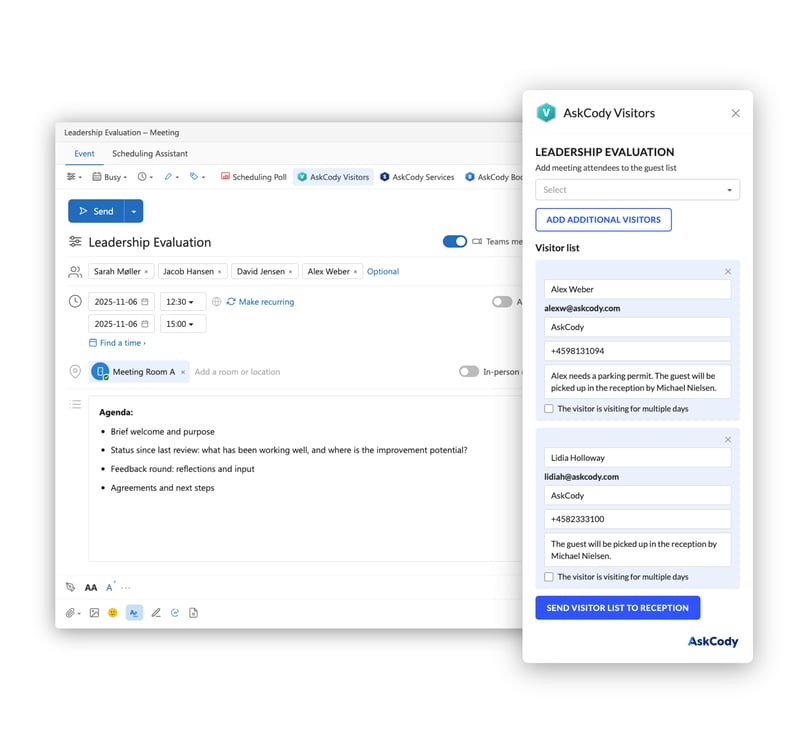
Before the visit, guests can receive an email or SMS with directions, parking rules and the WiFi password, at a time you set. On the day, they check in at a reception portal, a self-service kiosk or their own phone, the host is notified by email and SMS, and a badge prints from the invite data.
Where AskCody Is Strong
- Registration in the invite: guests are added in Outlook, where the meeting is planned, and reception sees them in its list of expected visitors.
- Arrival handled end to end: kiosk or portal check-in, host notification by email and SMS, badge printing, and terms or an NDA accepted at check-in.
- Parking in Denmark: a license plate entered at check-in issues an APCOA parking permit automatically.
- Automatic data removal: visitor personal data is removed after a number of days you set.
- One platform: visitor management is part of the AskCody Platform with rooms, services and Workplace Central, from a published entry price.
Where AskCody Is Not the Right Fit
- AskCody is built for Microsoft 365 and Exchange. If Google Workspace is your primary suite, look elsewhere.
- It is meeting-centric. If your main need is security screening of contractors and deliveries at a gate, a security-led system may fit better.
- Automatic label printing is not supported when the kiosk runs on an iPad; for printed labels at check-in, run the kiosk in Chrome or Edge on a PC.
2. Envoy: Best for Visitor Management Across a Whole Workplace
Envoy describes itself as "trusted visitor management, workplace management, and emergency management to help your company run a better and safer workplace." For Outlook users, its integration page says: "With Envoy for Outlook, you can schedule a meeting in Outlook and invite any guests in Envoy without needing to switch tools."
Where Envoy Is Strong
- Invites created from calendars: "Automatically create Envoy invites from Google Calendar, Outlook, or other digital calendars."
- Preparation before arrival: "Guests can submit their sign-in details and NDAs ahead of time, so they're ready when they arrive."
- Front desk awareness: "Front desk admins can receive automatic email alerts whenever a team member creates an invite."
Sources: Envoy for Outlook, Envoy visitor pre-registration, Envoy.
3. Sign in Solutions: Best for Security-Led Visitor Management
Sign In Solutions says it "brings visitor management and enterprise-grade security together." Its integrations page lists Outlook Calendar: "Pre-register and send invites directly from Outlook." It names multi-site enterprises, regulated industries, hybrid workforces and government and public-sector environments as its audience.
Where Sign in Solutions Is Strong
- Faster check-in: "Pre-registration, QR codes, and digital forms speed up check-in while ensuring NDAs and attestations are signed."
- Screening: "Screen contractors, vendors, and guests against watchlists, NDAs, and health requirements."
- A security focus for regulated and public-sector sites.
Sources: Sign In Solutions integrations, Sign In Solutions, Sign In Solutions visitor management.
4. Appspace: Best for Visitors Inside a Workplace Experience Suite
Appspace's visitor management page opens with "Welcome every visitor with confidence and security" and states: "Invite visitors from Outlook or Teams." It adds that "calendar and communication tools sync so scheduling and check-in flow together without extra steps."
Where Appspace Is Strong
- Touchless arrival: "Touchless check-in makes it easy, with QR codes or mobile. No queues, no contact points."
- Pre-visit steps: "Guests can complete NDAs, health screenings, and photo ID before they show up."
- Host alerts: "Hosts receive instant alerts when visitors register, arrive, or check out..."
Sources: Appspace visitor management.
5. GoBright: Best for Inviting Guests While You Book the Room
GoBright combines room booking with visitor management. Its Outlook integration page says you can "pre-register and invite any visitors directly while making a room booking with GoBright Visitor Management", and its product page says integrations with Microsoft Teams, Outlook and other systems "make scheduling and inviting guests effortless."
Where GoBright Is Strong
- Check-in hardware: "Choose from interactive reception kiosks, check-in terminals, or GoBright Interact devices with NFC and QR code scanning."
- Badges: "Instantly print a personalised badge for your visitor."
- Host notification: "Receive a notification when your guest arrives."
Sources: GoBright for Microsoft Outlook, GoBright visitor management.
6. Fischer & Kerrn: Best for Catering-Led Workplaces in Denmark
Fischer & Kerrn, based in Copenhagen, describes itself as "a leading provider of smart workspace solutions, specializing in Catering & Services, Meeting Room Booking, Desk Booking, and Visitor Management systems." Its visitor management page says: "Users can pre-register visitors via Outlook calendar, adding details for reception."
Where Fischer & Kerrn Is Strong
- Arrival alerts: "Your team receives instant alerts when visitors arrive, enabling a prompt, professional welcome."
- Badges: "options to automatically print upon sign-in or pre-print for arrival."
- Documents before arrival: "You can collect visitor document agreements, such as NDAs or security waivers, before their arrival."
Sources: Fischer & Kerrn visitor management.
7. MyDesk: Best for Desk-First Workplaces in Denmark
MyDesk, based in Taastrup, offers guest registration as part of its workplace platform. Its Danish page promises "Registrér gæster direkte i Outlook med få klik" (register guests directly in Outlook with a few clicks), and its English page says: "With MyDesk, employees can pre-register visitors directly from Outlook when they send a meeting invitation."
Where MyDesk Is Strong
- Flexible check-in: "Easy registration via tablet, QR code or pre-registration."
- Terms at check-in: guests can be presented with an NDA, safety rules or other material and accept it digitally.
- Guest cards: digital guest cards and the option of classic print.
Sources: MyDesk visitor registration, MyDesk gæsteregistrering.
8. Cloudbooking: Best for Secure Sites
Cloudbooking pairs workspace scheduling with visitor management and positions its visitor tools for secure sites and high-security locations. Its integrations page describes a "rich Outlook experience to view and book spaces across multiple locations and invite colleagues and visitors directly from your Outlook calendar."
Where Cloudbooking Is Strong
- Kiosk check-in: "Visitors can check in or out, print passes, and answer health and safety questions at either a tablet or kiosk in a matter of seconds."
- Host notification: "Hosts are automatically notified of visitor arrivals by call, SMS, or email."
- Space booking and visitors from the same Outlook experience.
Sources: Cloudbooking integrations, Cloudbooking visitor management.
Side-By-Side Comparison
Based on each vendor's own website, reviewed 1 October 2026.
| System | Best for | Highlights |
|---|---|---|
| AskCody | Microsoft 365 organizations booking room, catering and guests together | Guests added in the Outlook invite; visits follow the meeting; kiosk, portal or phone check-in; automatic data removal |
| Envoy | Visitor management across a whole workplace | Envoy for Outlook; invites from calendars; NDAs ahead of arrival; front desk alerts |
| Sign In Solutions | Security-led visitor management in regulated and multi-site estates | Pre-registration from Outlook; QR codes and digital forms; watchlist screening |
| Appspace | Visitors inside a workplace experience suite | Invites from Outlook or Teams; touchless check-in; host alerts on arrival and checkout |
| GoBright | Inviting guests while booking the room | Visitors invited from the Outlook room booking; kiosks with NFC and QR; badge printing |
| Fischer & Kerrn | Catering-led workplaces in Denmark | Pre-registration via the Outlook calendar; arrival alerts; NDAs before arrival |
| MyDesk | Desk-first workplaces in Denmark | Guest registration from Outlook; tablet or QR check-in; digital or printed guest cards |
| Cloudbooking | Secure and high-security sites | Visitors invited from the Outlook calendar; kiosk check-in with passes; host alerts by call, SMS or email |
Test This in Every Demo: What Happens When the Meeting Moves?
This is the question that separates a visitor list from a visitor system. Meetings move all the time, and every move is a chance for reception to be wrong. Ask each vendor to show you, and use AskCody's answer as a reference.
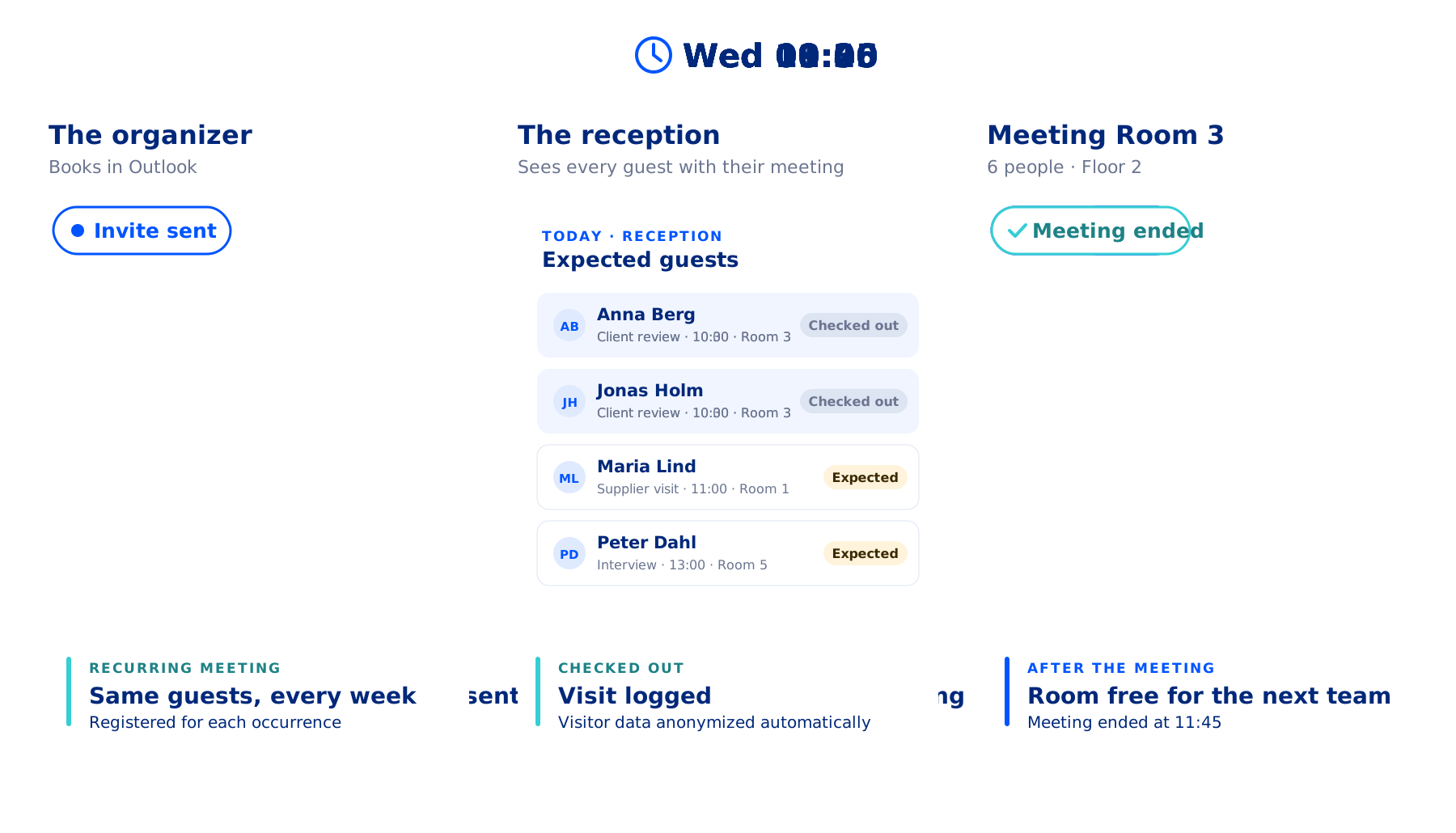
In AskCody, the guest is registered on the meeting, so a change to the meeting is a change to the visit: reception sees the new time without anyone retyping it. To change the guest list itself, the organizer opens the Visitors add-in again and clicks Add to reception.
The demo script is short: register a guest, move the meeting by an hour, and ask to see what reception sees.
What Should You Look for in a Visitor Management System for Outlook?
- Registration where the meeting is planned: the organizer, or the assistant booking on their behalf, adds guests without leaving Outlook.
- One record for reception: the front desk reads the meeting, not a copy of it.
- Changes that carry through: a moved meeting updates the visit without anyone retyping it.
- A notification that reaches a person: the host, and their assistant if needed, hear about the arrival by email or SMS.
- Privacy you can set and forget: retention is configured once and enforced automatically.
For Nordic offices, add two more: check how parking registration works at your sites, and confirm where visitor data is processed and for how long it is kept.
The Bottom Line
All eight systems let a guest be registered from Outlook in some form. Envoy brings breadth across the workplace, Sign In Solutions and Cloudbooking bring a security focus, Appspace brings a full workplace experience suite, GoBright ties guests to the room booking, and Fischer & Kerrn and MyDesk bring Danish platforms with catering and desks respectively.
AskCody is the pick when the visit is one part of a bigger meeting: a Microsoft 365 organization with a managed reception, where the room, the catering and the guests are booked together and the meeting will probably move at least once.
FAQs About Visitor Management Systems for Outlook
What Is a Visitor Management System for Outlook?
It is visitor management where the person who books the meeting registers the guests from Outlook, usually from an add-in or the meeting invite, instead of filling in a separate visitor form. Reception then knows who is coming, to which meeting and when, and the host is told when the guest arrives.
How Do You Register a Visitor From an Outlook Meeting Invite?
In AskCody, you open the meeting in Outlook, open the Visitors add-in, select the attendees who are guests, add any notes for reception, choose who should be notified on arrival, and click Add to reception. The guests then appear in reception's list of expected visitors.
What Happens to a Registered Visitor When the Meeting Is Moved?
In AskCody, the visitor registration is part of the meeting, so when you change the time or date in Outlook, the additions you made with AskCody follow the meeting without any extra step. Ask every vendor you evaluate to show you the same change in a demo.
Which Visitor Management Systems for Outlook Are Built in the Nordics?
Three of the eight systems in this comparison are Danish: AskCody, Fischer & Kerrn and MyDesk. All three state that guests can be registered from Outlook.
How Long Should Visitor Data Be Kept?
That is your organization's call under the GDPR, and the system should enforce it. In AskCody, personal data about visitors is removed automatically after a set number of days: 31 by default, and configurable from 1 to 365.
Key Takeaways
- A visitor management system for Outlook registers guests on the meeting itself, so reception reads the meeting instead of keeping a list.
- All eight systems compared here state that guests can be registered or invited from Outlook.
- When the meeting moves, the guest list should move with it. In AskCody it does, so ask every vendor to show you.
- Three of the eight are Danish: AskCody, Fischer & Kerrn and MyDesk.
- In your next demo, register a guest, move the meeting and ask to see what reception sees.