.svg)

Most executive assistants run their executives' calendars in Outlook with delegate access, and add meeting management software such as AskCody for the rest of the meeting: the room, the lunch, the screen and the guests. The best executive meeting software books all of it in the same Outlook invite, on the executive's behalf, and keeps it in step when the meeting moves, so the assistant is no longer the system that holds the meeting together.
Ask an executive assistant what their job is and you will rarely hear "managing a calendar". You will hear about the board meeting that moved twice, the client who arrived at the wrong building, and the lunch for twelve that was delivered to a room nobody was in.
This piece is about that part of the job. It follows one ordinary day, then sets out what software has to do to take that work off the assistant, and how AskCody fits.
Where an EA's Day Actually Goes
An executive's calendar is a list of time slots. An executive assistant's job is the meeting behind each slot: who is in it, where it happens, what the room needs, who is arriving from outside, and who has to know when any of that changes.
Outlook handles the slot well. Delegate access lets an assistant send invites on the executive's behalf, and Exchange stops a room from being booked twice. What Outlook does not do on its own is tell the kitchen, the AV team and reception what each meeting needs, or tell them again when it moves. That is the gap the assistant fills, usually with email, phone calls and a spreadsheet.
One Ordinary Tuesday
Here is an ordinary day for an assistant supporting two executives.
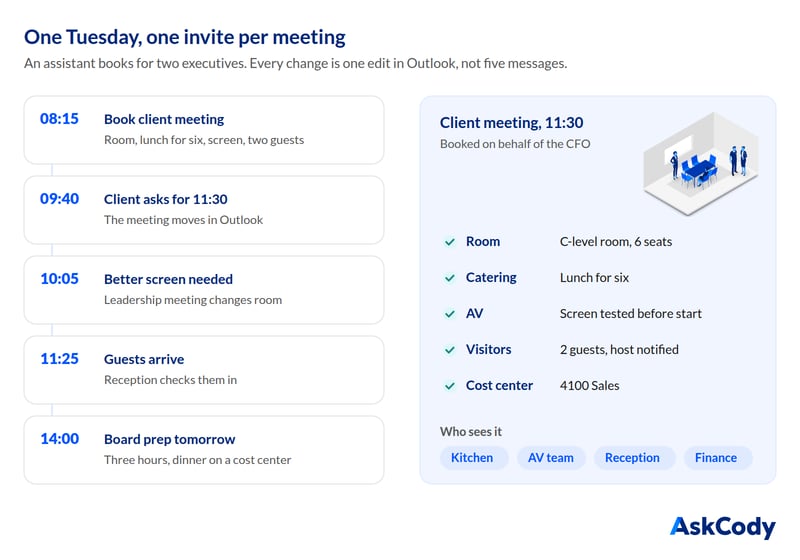
- 08:15. Maria Jensen, the CFO, needs a client meeting at 11:00 for six people, two of them external, with lunch and a screen. The assistant books the room, orders the lunch, asks for the screen to be tested and registers the two guests at reception.
- 09:40. The client asks to start at 11:30. The meeting moves in Outlook. Now the lunch, the AV check and the reception list all need to move too.
- 10:05. Thomas Berg, the CEO, wants his leadership meeting in the room with the better screen. Same meeting, different room, and the coffee has to follow.
- 11:25. The guests arrive. Reception needs to know who they are, which meeting they belong to and who to call.
- 14:00. Tomorrow's board preparation needs a room for three hours and a cost center for the dinner.
None of this is unusual. What makes it hard is that every change is a message to someone. Without one shared record, the assistant is that record.
What the Best Executive Meeting Software Must Do
Use these seven tests when you evaluate executive meeting software. Each one comes from a step in the Tuesday above.
1. Book on the Executive's Behalf, in Outlook
The assistant works in the executive's calendar, so the software has to work there too. In AskCody, assistants use the same Outlook add-ins on the executive's meetings, opening them from the event window. This requires delegate permissions on the calendar, the add-ins deployed, and the AskCody role Add-in User with Delegate Access, as described in Using add-ins on behalf of other employees.
2. Put the Whole Meeting in One Invite
Room, catering, AV and guests belong in the same place as the time and the attendees. If they live in four different tools, they will be four different versions by lunchtime.
3. Let Changes Carry Through
When the 11:00 becomes 11:30, the lunch, the AV check and the guest list should follow without the assistant retyping anything. In AskCody, changing the time or date in Outlook takes everything added with AskCody along with it.
4. Tell the Teams Behind the Meeting
The kitchen, the AV team and reception should see what each meeting needs in their own view, not in the assistant's sent items. AskCody's Workplace Central gives meeting coordinators, conference services managers and office admins one overview of the meetings across locations, while service teams work their orders in the Services portal.
5. Look After Guests Before They Arrive
External guests should get directions and parking information in advance, check in without a queue, and the host should hear about it at once. Notifications should be able to reach the assistant as well as the executive.
6. Keep Confidential Meetings Confidential
Board meetings, deals and personnel matters often happen in shared rooms. Meetings marked private in Outlook can be masked on the room's calendar, so the subject is not visible to everyone who views the room.
7. Put the Cost Where It Belongs
Dinners and client lunches end up on someone's budget. Choosing the cost center when the order is placed beats reconstructing it at month end. We cover the method in Meeting Catering Cost Allocation in Microsoft 365.
What We Hear From Assistants and the Teams Around Them
The clearest signal comes from law firms, where assistants book for several attorneys at once. A conference services manager at a global law firm told us their secretaries used to manage two or three attorneys and partners each, and now manage five or six, because they can handle everything in one place.
An IT director at a US law firm told us his team was a big fan of having one workflow for meetings and office services. The theme is consistent across the legal practices we work with: the value is not a faster booking, it is fewer places to keep in sync.
How AskCody Fits the EA Workflow
AskCody is meeting management built for Microsoft 365, and personal and executive assistants are one of the roles it is designed for. It works inside Outlook, the tool an assistant already lives in, so one assistant can manage several executives' meetings from one place.
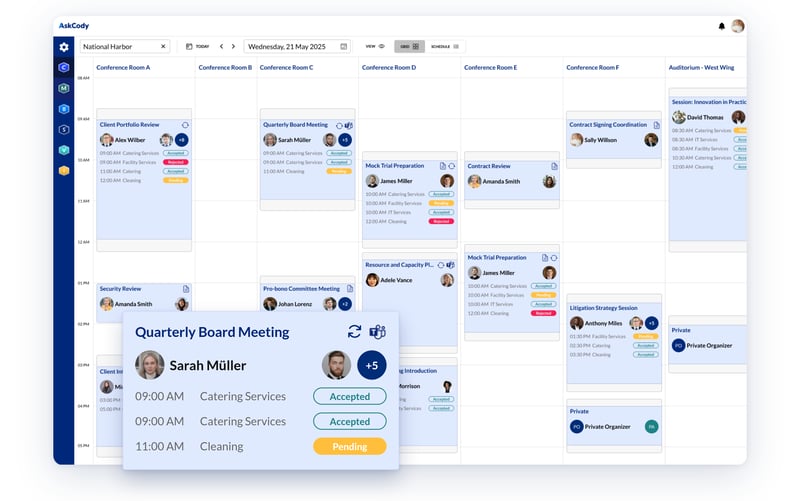
- Rooms: find a room by location, purpose, equipment and capacity in the Bookings add-in.
- Services: order catering, AV and setups in the same invite, with notes to the provider.
- Visitors: register guests from the invite, with arrival instructions, check-in and host notification.
- One overview: Workplace Central shows meetings across locations for the people who coordinate them.
How to Evaluate Executive Meeting Software in a Demo
Bring a real Tuesday. Ask the vendor to book a meeting on someone else's behalf, add lunch and two guests, then move it by thirty minutes and change the room. Watch what the kitchen and reception see after each change. If anyone has to retype anything, you have found the work that will stay with your assistants.
FAQs About Executive Meeting Software for EAs
What Software Do Executive Assistants Use to Manage Executive Meetings?
Most executive assistants run their executives' calendars in Outlook with delegate access. Executive meeting software such as AskCody works inside that same Outlook invite, so the assistant can add the room, catering, AV and guests on the executive's behalf without switching tools.
Can an Assistant Book Rooms and Catering on Behalf of an Executive in Outlook?
Yes. With delegate access to the executive's calendar and the AskCody role Add-in User with Delegate Access, an assistant opens the executive's meeting in Outlook and uses the AskCody add-ins to book rooms, order services and register visitors on their behalf.
Can an Executive Assistant Register Guests for an Executive's Meeting?
Yes. In AskCody the assistant opens the meeting, selects the external attendees in the Visitors add-in and chooses who is notified on arrival, which can be the assistant as well as the executive.
How Do Executive Assistants Keep Confidential Meetings Private?
Mark the meeting as private in Outlook. Private meetings can be masked on the room's calendar with an Exchange setting, so the subject is not visible to everyone who views the room. AskCody's Help Center explains how to enable masking of private meetings.
Key Takeaways
- An executive assistant's job is the meeting behind each calendar slot: room, catering, AV, guests and the people who have to know when it changes.
- The best executive meeting software works in Outlook, on the executive's behalf, and puts the whole meeting in one invite.
- Changes should carry through to the kitchen, AV and reception without the assistant retyping them.
- Guests, confidential meetings and cost centers belong in the same invite too.
- In a demo, book on someone else's behalf, then move the meeting and watch what the teams behind it see.