.svg)

Meeting catering cost allocation in Microsoft 365 works when the cost center or client/matter number is captured on the order itself, at the moment the meeting is booked in Outlook. The provider delivers, the order is settled, and finance receives every settled order with its cost center, price and VAT rate already attached. With AskCody that takes three pieces of setup and no month-end spreadsheet.
Most organizations already know what their meetings cost in coffee and sandwiches. What they cannot say is whose budget it belongs to. The lunch was ordered by an assistant for a partner, for a client, in a room booked by someone else, and the invoice arrives a month later with none of that on it. Somebody in finance then rebuilds the answer from emails.
The fix is to stop allocating after the fact. Put the allocation on the order.
Why Month-End Allocation Fails
- The information is gone. By the time the invoice arrives, nobody remembers which client lunch was for which matter.
- The meeting changed. Meetings move and get canceled. An order that is not tied to the meeting becomes a cost with no owner.
- The fields are optional. If the person ordering is not asked for a cost center, the default cost center takes everything.
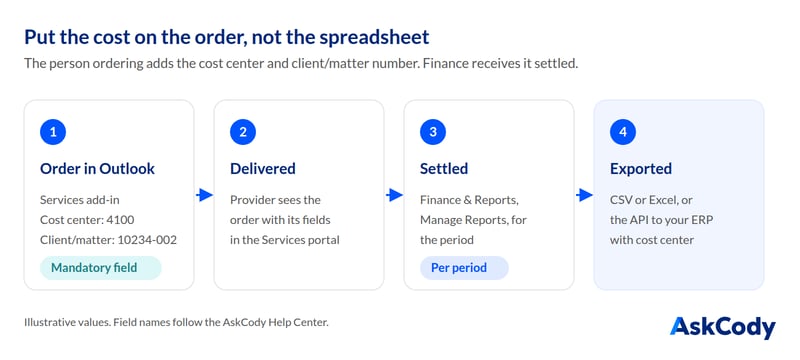
Each of these is a timing problem. The allocation is decided by the one person who knows it, the person ordering, and it is lost unless the system asks them then.
How Meeting Catering Cost Allocation Works in AskCody
Step 1: Set Up Your Cost Centers
In AskCody, go to Services, Finance and Cost centers, and add each one with a name and a code. The code is what identifies the cost center in CSV and API exports, so use the code your finance system already uses. You can show a cost center to everyone, to specific groups, or hide it. If finance maintains the list in Microsoft Entra ID, AskCody can sync cost centers from Entra ID with SCIM. More in What is a cost center.
Step 2: Add the Fields Finance Needs
Custom properties are the fields people fill in when they request catering: a client/matter number, a general ledger number, a project code, an internal or external flag. In the Admin Center, open Services, choose Custom Properties and click New. Field types are checkbox, number, text, multi-line text and drop-down, and each property is attached to the service providers it applies to. The values travel with the order into the add-in, the portal, emails, print-outs, CSV exports and the API (How to set up Custom Properties).
Make the fields that matter mandatory. AskCody lets you define mandatory and optional input fields for service orders, so an order without a client/matter number cannot be placed.
Step 3: Price Items and Set VAT Categories per Provider
Each service provider has its own items. Every item has a price, as presented to the person ordering, and a VAT category, so the correct VAT rate appears on each line of the settlement CSV. Items can also carry an SKU, and categories can group items by type of meeting, such as coffee and snacks for sales meetings or lunch for longer internal meetings.
Step 4: Order in Outlook, With the Financial Fields
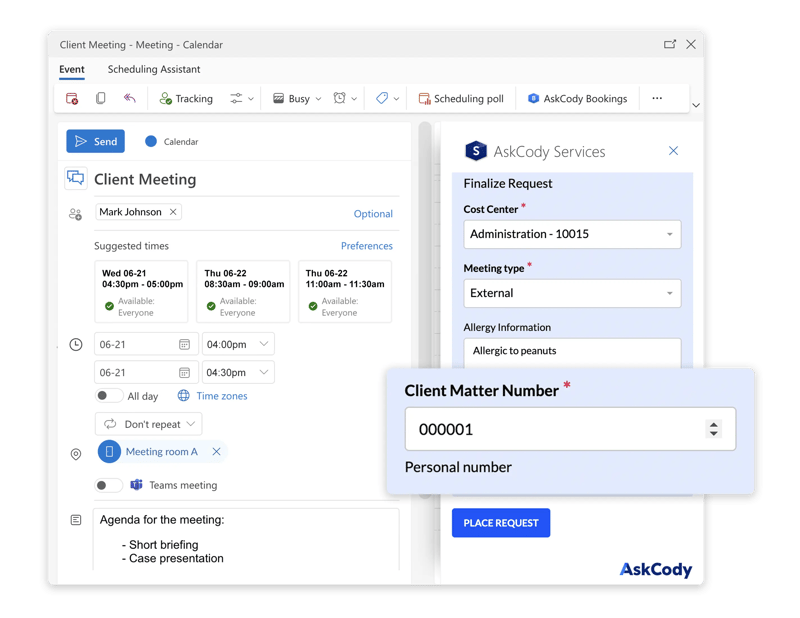
The organizer, or the assistant booking for them, opens the Services add-in in the Outlook meeting, chooses the provider and items, fills in the financial information your organization requires, and can add a comment for the provider. The order is now part of the meeting. The how-to is in How to use the AskCody Services add-in.
Settling Orders and Sending Them to Finance
Once the provider has delivered, the order is settled. In AskCody you settle and report in Finance & Reports, under Manage Reports. A report gives you a list of all settled requests for a period, and the download is a CSV with the standard information about each one (How to use the Services Management Portal).
- The standard CSV includes the ID, date, time, cost center, kind (internal or external), price, organizer, subject and your custom properties.
- The custom CSV is an extended version of the standard file, with more fields for your finance system (Customize the CSV settlements download).
- The API returns unsettled deliveries and lets your system settle a delivery by its ID, with an external ID for your ERP. Responses include the cost center and your extension attributes (AskCody meeting API).
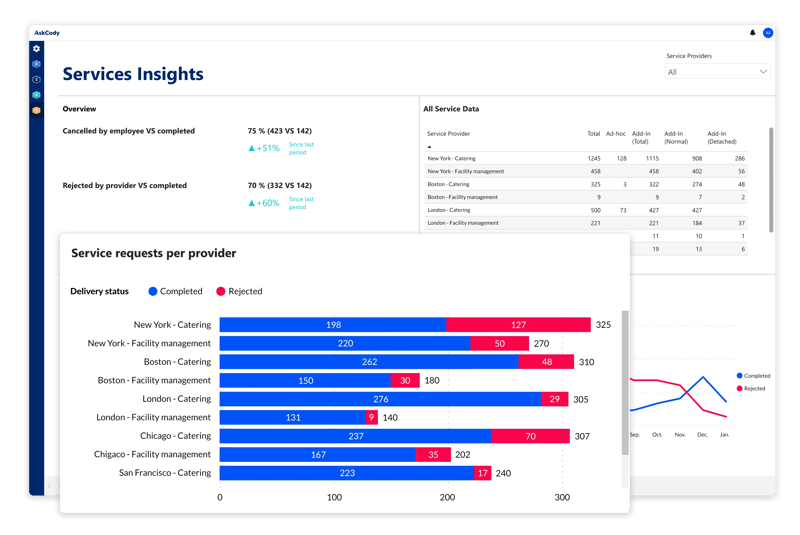
For the bigger picture, AskCody Meeting Services includes insights that give an overview of how your meeting services are managed across locations, before the cost reaches the ledger.
What Happens to the Cost When the Meeting Changes
This is where allocation on the order pays off. Because the order is part of the meeting, it follows the meeting. If the meeting is canceled, the assigned resources are released automatically, so a canceled lunch does not end up as a cost against a meeting that never happened.
Recurring meetings work per occurrence. In AskCody each occurrence of a recurring meeting is its own meeting, so catering is requested per occurrence. If you edit a series with "This and the following events", the service requests for those occurrences are canceled, so reorder after the change (Requesting services for recurring meetings).
For Law Firms: Client/Matter Cost Recovery
In a law firm, catering for a client meeting is a recoverable cost, so the client/matter number is the field that matters most. With AskCody, legal assistants book the room, the catering and the guests from Outlook, including on an attorney's behalf through delegated access, and every catering order is tracked to the right client/matter or general ledger number. The data is exported to accounting, databases and ERP through CSV or the AskCody API. Read more on our meeting management for law firms page.
FAQs About Meeting Catering Cost Allocation
How Do You Allocate Meeting Catering Costs to Departments?
Capture the cost center on the catering order itself, when the meeting is booked in Outlook. In AskCody, the organizer chooses the cost center in the Services add-in, the provider delivers, and settled orders are exported with their cost center to CSV, Excel or your ERP through the API.
Can Catering Costs Be Tracked to a Client/Matter Number?
Yes. AskCody custom properties let you add fields such as a client/matter number or a general ledger number to service orders. Organizers fill them in when they order, and the values appear on the order, in print-outs, in CSV exports and in the API.
How Do You Report Catering Costs to Finance in AskCody?
Go to Finance & Reports and Manage Reports to settle and report the services provided. A report lists all settled requests for a period and downloads as a CSV. Through the AskCody meeting API, your own system can list unsettled deliveries and settle them by ID.
Can Cost Centers Be Synced From Microsoft Entra ID?
Yes. AskCody can sync cost centers from Microsoft Entra ID with SCIM, so the list people choose from matches the one finance maintains.
What Happens to the Cost If the Meeting Is Canceled?
In AskCody, when a meeting is canceled the assigned resources are released automatically, so the order does not stay behind as a cost against a meeting that never happened.
Key Takeaways
- Meeting catering cost allocation works when the cost center or client/matter number is captured on the order, in Outlook, by the person ordering.
- In AskCody, set up cost centers, custom properties and provider prices once, and make the fields finance needs mandatory.
- Settled orders export with their cost center, kind, price and custom properties to CSV, Excel or your ERP through the API.
- For law firms, every catering order can carry the client/matter number for cost recovery.