.svg)

Every platform in this comparison lets you book a room and attach catering or AV to it. That is no longer what separates them. What separates them is what happens after you press Send: when the meeting moves to 3 p.m., changes room or gets cancelled, does the order follow it, and who is told? For organizations on Microsoft 365, AskCody is the best meeting room booking platform with catering and AV, because the order stays attached to the meeting in Outlook, and AskCody publishes exactly what happens to it when the meeting changes.
Booking the room was never the hard part. The hard part is the chain behind it: the kitchen, the AV technician, the reception desk, and the finance team who has to allocate the cost afterwards. On AskCody's own meeting services page the number that frames the problem is plain: 90% of meetings have at least one change after they are booked. A platform that takes the order but loses track of the change has only moved the phone call to later in the day.
Below, we compare four platforms that handle meeting room booking with catering, AV and reception, and we are explicit about how we compared them.
The 4 Platforms at a Glance
- AskCody: the meeting management platform built for Microsoft 365, where catering, AV and visitors are ordered in the Outlook booking and follow the meeting when it changes.
- Eptura Engage: the room and desk booking part of a broad workplace, facilities and asset suite, with hospitality, visitors and AV added to bookings.
- OfficeSpace: a workplace management and space planning platform, where catering and tech-support needs are attached to a room booking as requests.
- Accruent EMS: an enterprise room, resource and event scheduling system for large corporate and higher education estates, with service orders and approval workflows.
How We Compared Them
We looked at each platform the way a workplace, facilities or hospitality lead would: someone who owns what happens after the booking, not just the booking itself.
- Services in the booking flow: can the person booking the room order catering, AV and room setup in the same step?
- What happens when the meeting changes: how orders behave when the meeting is moved, relocated or cancelled.
- Reception and visitors: does the platform tell the front desk who is arriving, as part of the same meeting?
- Microsoft 365 fit: does it work inside Outlook and Teams, the tools your people already use?
- Cost allocation: can service costs land on the right cost center without a spreadsheet at month end?
A note on method. This comparison is published by AskCody. What we write about each platform comes from that vendor's own website and documentation, reviewed on 24 September 2026, and the sources are linked under each section. If something here has changed, tell us and we will update it.
The Platforms in Detail
1. AskCody: Best for Services That Follow the Meeting
AskCody treats a meeting as a chain of work, not a calendar entry. When your people book a room in Outlook or Teams, they add catering, AV and setup in the same step, and the order goes straight to the provider who fulfills it. Guests are added to the same invite, so reception sees them too.
The difference shows up later. When the meeting is rescheduled, the order is updated and the provider is notified. When it moves to another room the provider serves, the order moves with it. When it is cancelled, the resources are released and both the organizer and the provider are told. AskCody publishes that behavior in its Help Center, and we explain it in Services That Follow the Meeting in Microsoft 365.
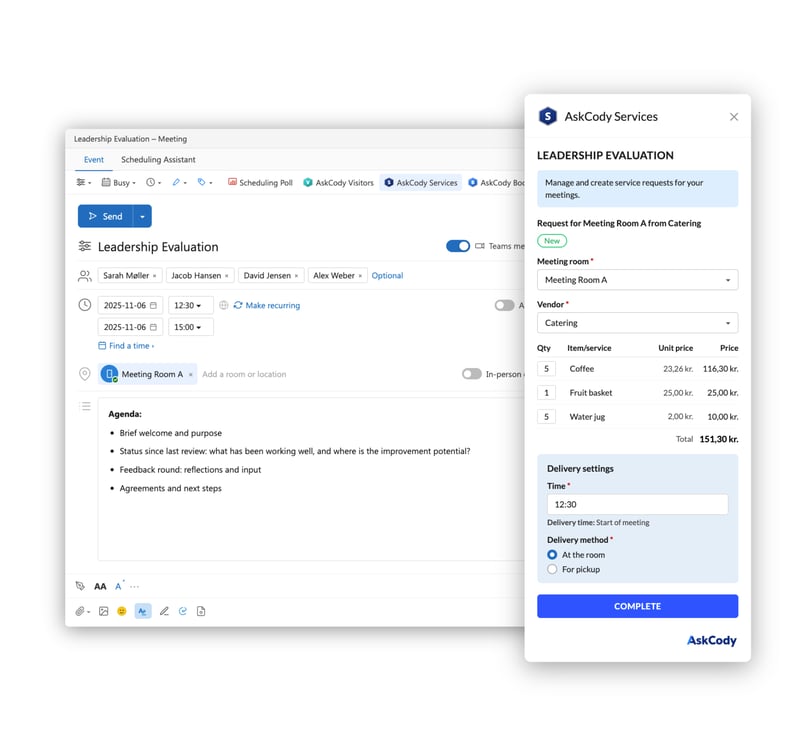
Behind it, Microsoft Exchange stays the system of record. AskCody works directly with the room and resource calendars in Exchange rather than copying meetings into a separate booking database, so there is one version of the meeting, not two that have to agree.
Where AskCody Is Strong
- Services inside the Outlook booking: catering, AV, equipment and table setups are ordered from the AskCody add-in and routed to the right provider.
- Documented change handling: reschedules, room changes and cancellations update or release the order and notify the right people.
- One overview for service teams: Workplace Central gives the kitchen, AV and reception teams one grid of every meeting and what it needs.
- Cost allocation: cost center and tax data are assigned to the right meetings automatically, and data exports to CSV, Excel or your ERP through the API.
- Visitors on the meeting: pre-registration in Outlook, badge printing, NDA printing, self check-in kiosks, and host notifications by email and SMS.
- Everything in one license: AskCody's pricing includes all features and modules, from a published entry price.
Where AskCody Is Not the Right Fit
- AskCody is built for Microsoft 365 and Exchange. If Google Workspace is your primary suite, look elsewhere.
- It is a meeting management platform, not an IWMS. There is no space planning, lease administration or maintenance module.
- Change handling has limits worth knowing. Once a meeting is moved past the provider's preparation deadline, the request is detached rather than updated, so the provider decides. Changing what is on an order is still a manual edit.
2. Eptura Engage: Best for Suite Breadth
Eptura Engage, formerly Condeco, is the room and desk booking product in Eptura's wider workplace, facilities and asset platform. Its site says you can "easily add visitors, catering, and AV services to every booking", and visitor management sits in the companion product Eptura Visitor. Bookings can be made in Outlook, and Eptura supports natural-language room booking in Microsoft Teams.
Where Eptura Engage Is Strong
- Breadth: booking sits alongside space planning, asset and facilities tools in the same vendor relationship.
- Automatic room reassignment: if a booked room becomes unavailable, Engage "automatically finds a similar available room matching location, capacity, and amenities".
- Room displays on iPads and third-party Android tablets such as Logitech, ProDVX and Crestron.
Sources: Eptura Engage, Engage room booking, Eptura pricing.
3. OfficeSpace: Best for Space Planning Plus Booking
OfficeSpace describes itself as an agentic platform for facilities and workplace leaders. Room booking sits alongside desk booking, space planning, moves and visitor management. Rooms can be booked from Outlook, Google Calendar, Slack and Microsoft Teams, and the room booking page states that you can "attach catering, tech support, or other needs" to a reservation.
Where OfficeSpace Is Strong
- Space planning and portfolio tools in the same platform as booking.
- Presence-driven booking: "room bookings are automatically created when people enter", and unoccupied meetings cancel themselves.
- Visitor pre-registration by email and QR code.
Sources: OfficeSpace room booking, OfficeSpace visitor management, OfficeSpace plans.
4. Accruent EMS: Best for Large Scheduling Estates
Accruent EMS is an enterprise room, resource and event scheduling system for corporate and higher education organizations. Reservations can carry service orders, including catering and setup notes, and EMS includes approvals, visitor check-in and badge printing. People book through the web app, EMS for Microsoft Outlook, mobile, room signs and kiosks.
Where Accruent EMS Is Strong
- Scheduling depth for complex, multi-department estates, including events and academic scheduling.
- Video conferencing links for Microsoft Teams, Zoom and Webex added from the booking.
- Reporting: "100+ standard reports" plus a query builder for custom reports.
Sources: Accruent EMS, How to access EMS, EMS system requirements.
Side-by-Side Comparison
Based on each vendor's own website, reviewed 24 September 2026.
| Platform | Best for | Highlights |
|---|---|---|
| AskCody | Microsoft 365 organizations where catering, AV and visitors must follow the meeting | Services ordered in the Outlook meeting; documented change handling; Workplace Central for service teams; visitors on the same invite |
| Eptura Engage | Organizations consolidating booking, facilities and assets with one vendor | Visitors, catering and AV added to bookings; natural-language booking in Teams; automatic room reassignment |
| OfficeSpace | Teams combining room booking with space planning | Catering and tech-support requests on bookings; presence-driven bookings; visitor pre-registration |
| Accruent EMS | Large corporate and higher education scheduling estates | Service orders and approvals; EMS for Microsoft Outlook; video conferencing links; 100+ standard reports |
What Happens to a Catering Order When the Meeting Moves?
In a platform where services follow the meeting, the order is attached to the meeting itself, so a change to the meeting is a change to the order. Here is how AskCody documents it.
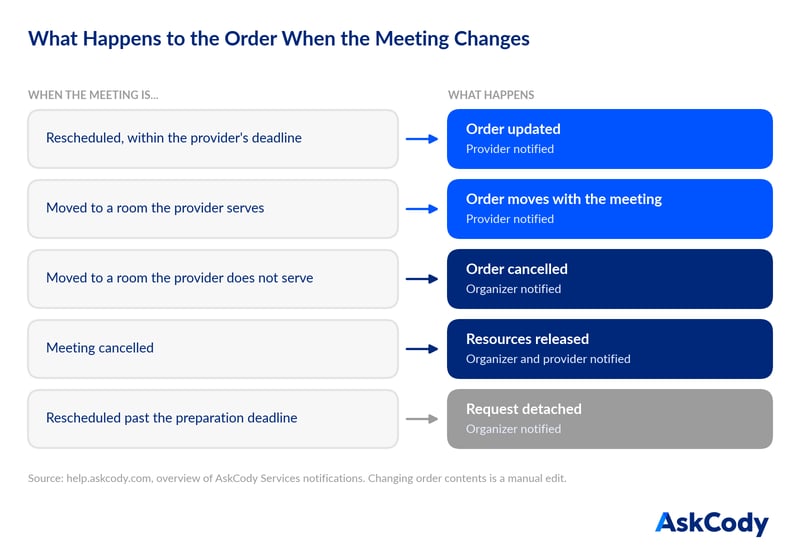
- Rescheduled, within the provider's deadline: the order is updated and the provider is notified.
- Moved to a room the provider serves: the order moves with the meeting.
- Moved to a room the provider does not serve, or the location is removed: the order is cancelled and the organizer is told.
- Cancelled: resources are released, and both the organizer and the provider are notified.
- Rescheduled past the preparation deadline: the request is detached, because the kitchen may already be preparing it, and the organizer is told.
That last rule matters. It is the one that stops a system from silently moving a tray of sandwiches that is already on its way. Ask every vendor you evaluate to show you their version of this list.
What Should You Look for in Meeting Room Booking With Catering?
Look for a platform that treats services as part of the meeting, not as a form you fill in beside it. In practice, that comes down to four checks.
- Same step: the room, the catering, the AV and the guests are added in one flow in Outlook.
- Change handling in writing: the vendor can show you, per event, what happens to an order when the meeting changes.
- A view for the people who deliver: kitchen, AV and reception teams see today's meetings and what each one needs, without reading the organizer's inbox.
- Costs that land in the right place: cost centers and tax data follow each order into your reporting.
If you remember one question for your next demo, make it this one: move the meeting, and show me what the kitchen sees.
The Bottom Line
Every platform here can take a catering order. Eptura Engage brings suite breadth, OfficeSpace brings space planning, and Accruent EMS brings scheduling depth for large estates. AskCody is the pick when the meeting itself is where things go wrong: a Microsoft 365 organization with managed reception, in-house hospitality and meetings that change after they are booked.
If that is your building, the next step is to see how AskCody Meeting Services keeps the order attached to the meeting.
FAQs About Meeting Room Booking With Catering and AV
What is meeting room booking with catering?
It is room booking where the person booking the room can order catering, AV and room setup in the same step, and the order goes to the team that delivers it. In AskCody this happens inside the Outlook booking, and the order stays attached to the meeting.
Can you order catering directly from an Outlook meeting?
Yes. With AskCody, you open the Services add-in in the Outlook meeting, choose the provider and items, and set delivery. The provider receives the request and sees it in their overview.
What happens to the catering order if the meeting is cancelled?
In AskCody, cancelling the meeting releases the order and notifies both the organizer and the provider.
How do you allocate catering costs to departments or clients?
AskCody assigns cost center and tax data to each meeting's orders, and service data can be exported to CSV or Excel, or sent to your ERP through the AskCody meeting services API.
What is Follow-the-Meeting Intelligence?
It is AskCody's name for keeping rooms, services and visitors attached to the meeting in the calendar. When the meeting changes, what belongs to it changes with it, within the rules the provider has set.
Key Takeaways
- All four platforms can attach catering or AV to a room booking. The real difference is what happens to the order when the meeting changes.
- AskCody publishes, event by event, what happens to an order on reschedule, room change and cancellation.
- Eptura Engage leads on suite breadth, OfficeSpace on space planning, and Accruent EMS on large-estate scheduling depth.
- In your next demo, move the meeting and ask to see what the kitchen sees.