Meeting catering that
moves when the
meeting moves
Order breakfast, lunch and coffee in the same Outlook invite as the room. When the meeting moves, the order moves with it. When it is canceled, the kitchen is told.
Catering belongs to the meeting, not to an email thread
Too often, meeting catering still runs on emails and spreadsheets. The organizer writes to the kitchen, the meeting moves to 11:00, and nobody tells the kitchen. Breakfast for 12 arrives at 10:00 in an empty room. AskCody puts the order in the meeting itself: the organizer orders in the Outlook invite, the kitchen sees every order with its room, time, items and quantities, and when the meeting moves or is canceled, the order follows without anyone writing a word.
How do you order catering for a meeting in Outlook?
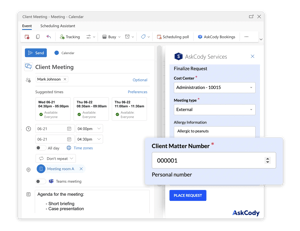
Open the meeting in Outlook and choose the AskCody Services add-in, next to AskCody Bookings and AskCody Visitors. Pick the kitchen or caterer, choose the items and quantities, and set when they should arrive: before, during or after the meeting. Add a comment for the kitchen, such as dietary needs, and send the invite as usual.
One meeting can carry several orders, for example lunch at 12:30 and coffee and cake at 14:00. The add-in works in the new Outlook for Windows, Outlook for Mac and Outlook on the web.
Your kitchen sees every order with its meeting
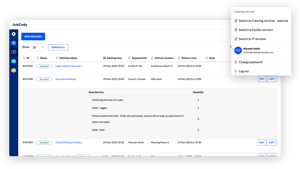
Kitchens, canteens and caterers work from one live overview in the AskCody Services Management Portal: what to deliver, in what quantities, to which room and at what time. Tabs for today, tomorrow, pending and readied orders turn the day into a checklist.
Accept or reject each order, or switch on auto-accept so orders are accepted without a manual step. Print every order, or a compact list for the round, and create orders on behalf of employees who call or email.
Every order gives the kitchen the time it needs
Every kitchen needs time to prepare. AskCody lets you set it once, and every order respects it.
- Opening days per kitchen or caterer, so nothing is ordered for a day the kitchen is closed.
- A preparation deadline per provider, and a longer one for items that need it, like a hot lunch for 40.
- Buffer time before and after meetings with services, so there is time to set up and clear away between two meetings in the same room.
Notes for the kitchen
Dietary needs or a late arrival go in the comment on the order, so the kitchen reads them with the order itself.
Recurring meetings
Weekly team meetings get their catering too. Order services for the occurrences that need them, in Outlook or in the Services Management Portal.
Every catering order can carry its cost center
Cost centers, VAT and your own fields travel with each order, from the Outlook invite to the kitchen and on to finance. Add the fields your organization needs, for example a project code or a client matter number, as text, number, checkbox or drop-down fields.
At month end, Finance and Reports gives you a condensed or detailed report of every settled order for the period, available as CSV for your ERP system, or through the AskCody Services API.
What happens to the catering order when a meeting is moved or canceled?
Meetings move all the time. Because the order lives in the meeting, the kitchen always works from the current plan.
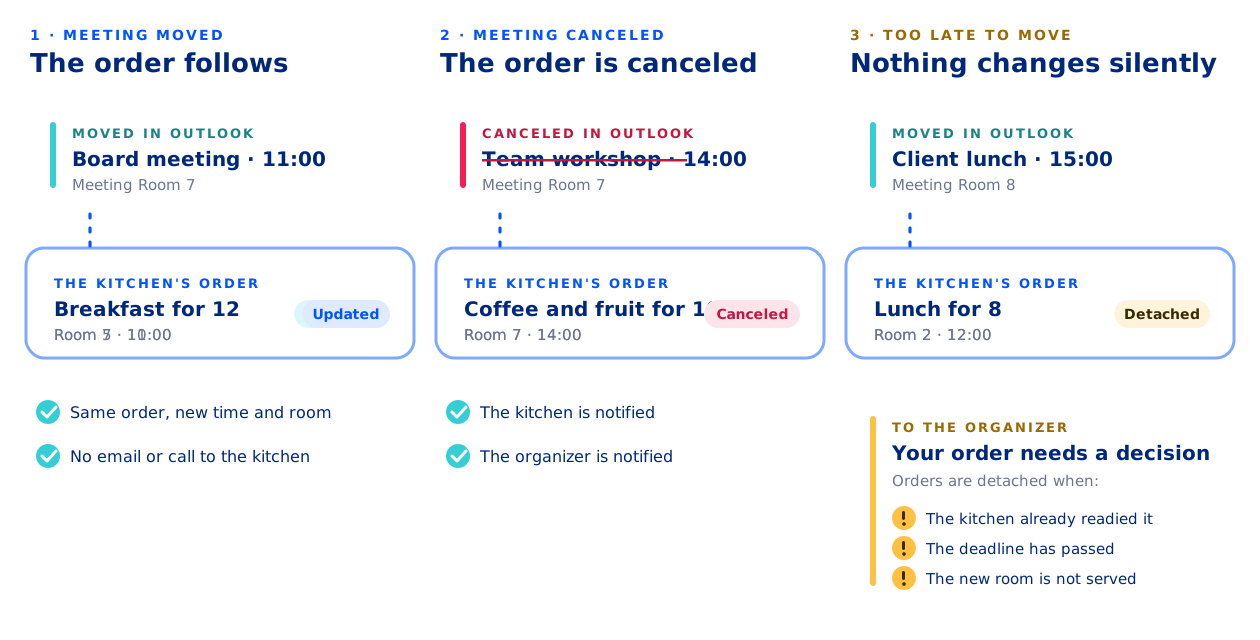
- Move the meeting in Outlook, and the order moves with it, to the new time and room.
- Cancel the meeting, and the order is canceled. The kitchen and the organizer are notified.
- If the kitchen has already readied the order, the deadline has passed, or the new room is not served by that kitchen, the order is not changed silently: it is detached and the organizer is told, so a person decides.
One system, not two
The order is tied to the meeting in Microsoft Exchange, so there is no separate catering system to retype into and nothing to keep in sync. Built into Outlook and Exchange, so every Microsoft Teams meeting gets the right room, services and visitor setup, with no extra app to deploy.
Included in the AskCody Platform
Meeting catering is part of the AskCody Platform, from $5,149 per year, including 1 reception, 5 meeting rooms and 10 workspaces. See pricing
Ordering room setup or AV too? Same invite, same overview. See facilities services for meetings.
See what your kitchen delivers, and when
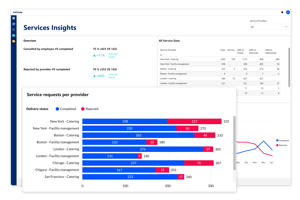
Insights for Services shows requests per provider split by completed, canceled and rejected, requests over time and the most requested items, with up to 13 months of data. Plan staffing and menus from what meetings actually order.
Combine it with insights on bookings and visitors to see the whole meeting journey, from the invite to the room to the tray on the table.
Made to empower you
Hear how conference services teams, IT and kitchens run catering with AskCody
Henry needs us to be user-friendly
"The pilot helped us understand just how much time we could give back to the attorneys and assistants and the price of that time. The POC helped us actively compare the cost of the solution, and the ease it was bringing to the cumbersome process we had before. My best advice is to try it. You will see quickly that the ease of use, ease of management, and overall time savings are worth it."

Jesper needs us to speed up booking processes
“AskCody's platform gives us an easy overview of available rooms, as well as quick access to book catering for our meetings. Without AskCody, booking premises are ineffective which results in a large waste of resources."
Read the Skanderborg Municipality case study
Susann needs us to support productivity
"We're finding that our secretaries may have been managing two or three attorneys and partners before. Now they're managing maybe five or six. It's only possible to manage that increased workload because they can handle everything in one spot with AskCody. "
Read the Eversheds Sutherland case study
Common questions about
meeting catering in AskCody
Open the meeting in Outlook and choose the AskCody Services add-in. Pick the kitchen or caterer, choose the items and quantities, set when they should be delivered (before, during or after the meeting) and add a comment if needed. Send the invite as usual, and the order goes to the kitchen with the meeting, the room and the time.
The add-in works in the new Outlook for Windows, Outlook for Mac and Outlook on the web. See the step-by-step guide.
The order follows the meeting. Move the meeting in Outlook and the order moves to the new time and room. Cancel the meeting and the order is canceled, and both the kitchen and the organizer are notified.
If the order has already been readied, the preparation deadline has passed, or the new room is not served by that kitchen, AskCody detaches the order instead of changing it silently, and notifies the organizer. See all Services notifications.
Each kitchen, canteen or caterer is set up as a service provider with its own menu items, rooms, opening days and team members. They work in the AskCody Services Management Portal, with tabs for today, tomorrow, pending, accepted, readied and completed orders.
Providers accept or reject orders, or use auto-accept, print delivery lists and create orders on behalf of employees.
Yes. You can request services for recurring meetings and choose the occurrences that need catering, in Outlook or directly in the Services Management Portal. See how it works.
Every order can carry a cost center, and cost center groups control who sees which cost centers. Add your own custom properties, such as a project code or client matter number, as text, number, checkbox or drop-down fields.
Finance and Reports turns settled orders into condensed or detailed CSV reports for the period, and the AskCody Services API can deliver the same data to your ERP system.
Each provider has opening days and a preparation deadline, and individual items can have a longer deadline of their own. Item deadlines still respect the opening days, so a five-day deadline over a weekend becomes seven days. Read about preparation deadlines.
Yes. The AskCody add-ins are deployed to the users or groups you define in Microsoft Entra ID, and each provider serves only the rooms you add to it, so organizers only see the catering available for their room.
Meeting catering is part of the AskCody Platform, from $5,149 per year, including 1 reception, 5 meeting rooms and 10 workspaces, with all features included. See pricing.
Yes, natively.
AskCody is natively integrated with Microsoft Exchange, Microsoft 365 and Outlook. There are no manual processes, outdated third-party tools, unintegrated SharePoint sites or paper-based booking. Everything works inside the familiar Outlook interface, built on modern integrations into Exchange and on Microsoft Azure.
And Microsoft Teams? AskCody is built into Outlook and Exchange, so every Microsoft Teams meeting gets the right room, services and visitor setup, with no extra app to deploy.
Meetings always stay in Microsoft Exchange: no middle layer and no duplicate system of record. See how AskCody integrates with Microsoft 365.
See meeting catering in your own Outlook
Book a demo and see how the order, the room and the kitchen come together in one meeting invite. Meeting catering is included in the AskCody Platform, from $5,149 per year.