
Skip to content

Visitor management that
starts in the meeting invite

Your guests are part of the meeting. Add them to the Outlook invite with the room and catering, and your reception knows who is coming, to which meeting and in which room.
One invite, one meeting

Your guests are part of the meeting

Most visitor systems start at the front desk. AskCody starts where the meeting is booked. The organizer adds the guests to the same Outlook invite as the room and the catering, and everything else follows: guests arrive prepared, reception knows which meeting they belong to, the host is notified when they check in, and the visitor data is anonymized automatically afterwards.

A visitor's journey through one meeting on a Wednesday. At 08:30 the organizer adds two guests to the Outlook invite for a client review in Meeting Room 3. At 09:00 the guests receive directions, WiFi and parking information. At 09:05 the meeting moves to 10:30, and the guests, the room and the catering move with it. The reception sees every expected guest with their meeting and room. At 10:26 Anna checks in at the kiosk, her badge prints and she signs the NDA, and the host is notified by SMS. At 10:30 everyone is in the room and the catering is delivered. After the meeting the visit is logged and the visitor data is anonymized automatically. For a recurring meeting, the same guests are registered for every occurrence.

Start with the meeting invite

Add guests to the Outlook invite, next to the room and catering

Organizers pre-register guests where they already plan the meeting: in the Outlook invite, with the AskCody Visitor Management add-in. Add the guests’ names and email addresses, and they are registered with the right reception and linked to the meeting, the room and the catering.

Move the meeting and the guests move with it. Make it a recurring meeting and the guests are registered for every occurrence. No paper lists, no retyped names and no misspelled badges.

See how to pre-register guests in Outlook

An organizer plans a meeting in the Outlook invite and opens the AskCody Visitors add-in, next to AskCody Bookings and AskCody Services. Three external guests are added with their name and email. At the reception, the guests appear in the AskCody portal as expected visitors, each with their host, meeting, room and arrival time. When the meeting is moved or made recurring, the guests follow the meeting.
Stay ahead of the workday

Reception sees every guest with their meeting

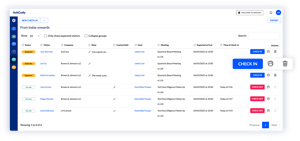
The AskCody portal gives your front desk one real-time overview of expected and current guests across receptions and locations: who is coming, who they are visiting, which meeting they attend, in which room, and any notes such as special needs.

See who is in the house today, who is expected tomorrow and who has already been, so the day is planned instead of chased.
Explore the AskCody Management Portal

The AskCody portal for reception: today's expected and on-site guests with company, host, meeting, room and arrival time, and one-click check-in and check-out
Before the guests arrive

Guests arrive prepared, and hosts are ready

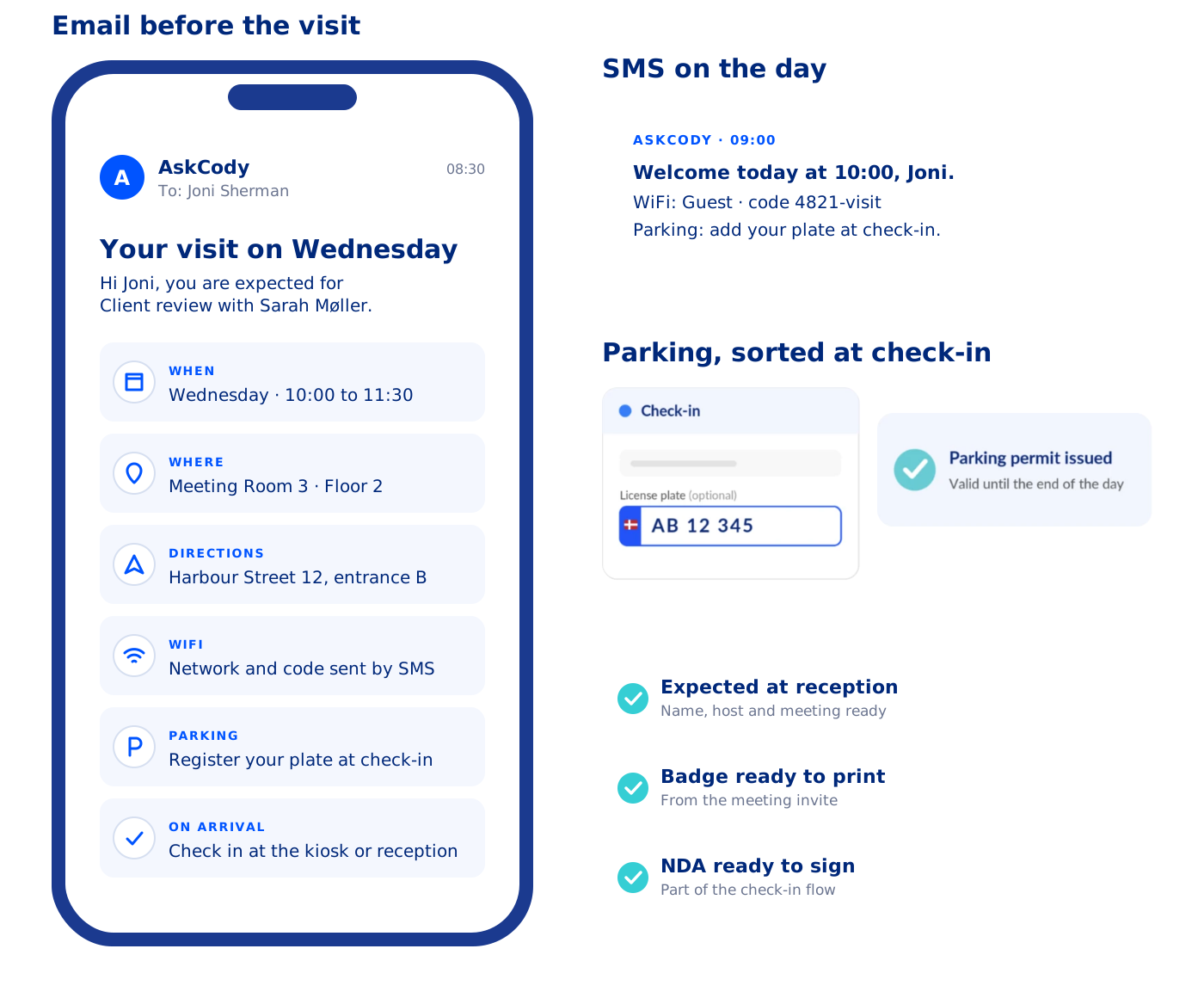
Guests automatically receive what they need before the visit: directions, instructions, WiFi codes and assigned parking, by email or SMS.

When they arrive, a check-in by the receptionist or by the guest notifies the host instantly by email and SMS, so nobody has to look up phone numbers and the meeting starts on time. HSE surveys and NDA documents can be part of the flow.
Learn how to use the Visitor Management Portal

What a guest receives before a visit with AskCody. An email arrives with the time, the meeting room and floor, directions, WiFi details and how to register parking, and how to check in on arrival. On the day, an SMS repeats the welcome with the WiFi code and a parking reminder. At check-in the guest adds a license plate and a parking permit is issued automatically. The reception already expects the guest, the badge is ready to print and the NDA is ready to sign.
Check in your way

Check in at reception, on a kiosk or by phone

Check in a guest and print the badge with one click in the AskCody portal, or let guests check themselves in on a kiosk in the reception or on their own phone. Badges print from the data in the meeting invite, and NDAs are signed on the spot.

Guests who arrive by car add their license plate at check-in, and a parking permit is issued automatically, valid until the end of the day. Parking registration is available with the APCOA parking integration in Denmark.

A kiosk supports the front desk when large groups arrive, during events and at peak hours.

Discover a seamless check-in process
See how parking registration works

A guest checks in on the AskCody kiosk with name, company, email, phone and host, and adds a license plate. The check-in completes, the badge prints, the NDA is signed and a parking permit is issued automatically, valid until the end of the day. The host is notified by email and SMS that the guest has arrived. The reception can also check guests in with one click in the AskCody portal, and after the meeting the guest is checked out from the link in the email.
When plans change

When the meeting moves, the guests move with it

Meetings get moved and repeated. Because the guests are registered in the meeting itself, every change reaches the reception automatically.

  • Move the meeting in Outlook, and the guests, the room and the catering move with it.
  • Make it a recurring meeting, and the guests are registered for every occurrence.
  • Reception always works from the current meeting, not from an old list.

One system, not two

The visitor lives in the meeting in Microsoft Exchange, not in a separate guest list, so there is nothing to retype and nothing to keep in sync. Built into Outlook and Exchange, so every Microsoft Teams meeting gets the right room, services and visitor setup, with no extra app to deploy.

Included in the AskCody Platform

Visitor Management is part of the AskCody Platform, from $5,149 per year including 1 reception, 5 meeting rooms and 10 workspaces. See pricing

Understand patterns of your check-ins

Optimize visitor experience

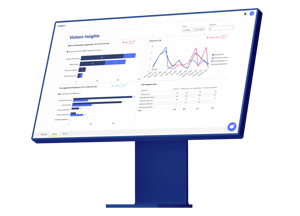
With Insights on Visitors you get valuable data making it easier to get an overview of how your receptions are managed across locations. This enables you to optimize and streamline your visitor experience.

Combine Visitor insights with insights on Bookings and Services and you will be able to streamline the entire meeting process.

Insights is built on Microsoft Power BI and available in the AskCody Portal. You can also export the data to your preferred reporting tools.
Discover AskCody Insights and Analytics

Visitor Insights in a cloud based solution by AskCody.
Privacy built in

Visitor data handled with care

Guests sign in digitally, for admin eyes only, instead of in an open paper log book. Visitor data can be anonymized automatically to support your GDPR compliance.

AskCody runs on Microsoft Azure, and our ISAE 3000 Type 2 report gives independent assurance on how we protect personal data under the GDPR.

Read about AskCody and GDPR

Reception check-in visitor in AskCody visitor management system.

Made to empower you

Nabil_Olympus
Nabil ZerdaziIT Project Manager

Nabil needs us to be integrated in Outlook

"The AskCody Outlook add-ins provide us capabilities to easily book rooms, request services, and manage visitors from Outlook while linking them with the Outlook calendar invitation."

Hear more from Nabil


Olympus-logo_W400px


Dale-Pollak_eversheds-sutherland
Dale PollockConference Services Manager

Dale needs us to streamline processes

"The benefit of AskCody is that we are all a lot more prepared. The receptionists are not struggling to gather visitor information, which has streamlined the whole process and made it much easier for the receptionist and a better experience for our visitors." 

Hear more from Dale


Eversheds-Sutherland-logo_W400px
 

Common questions about
visitor management

How do meeting organizers register external guests from the Outlook meeting invite?

With the AskCody Visitor Management add-in for Outlook, the organizer adds the guests’ names and email addresses to the meeting invite, and the guests are pre-registered with the reception automatically. The front desk sees every expected guest in the AskCody portal, badges print from the invite data, and guests can receive directions, WiFi and parking information before they arrive.

When a guest checks in at the reception or on a self-service kiosk, the host is notified by email or SMS. Because AskCody is built on Microsoft Exchange and Microsoft 365, the visitor stays linked to the meeting in Outlook, so there is no separate visitor list to keep in sync.

See how to pre-register guests in Outlook

What happens to registered guests when a meeting is moved or recurring?

The guests are registered in the meeting itself, so they follow it. When the organizer moves the meeting in Outlook, the guests, the room and the catering move with it, and the reception sees the new time automatically. For a recurring meeting, the guests are registered for every occurrence, so nobody has to register the same people again each week.

How much does AskCody Visitor Management cost?

Visitor Management is included in the AskCody Platform, from $5,149 per year including 1 reception, 5 meeting rooms and 10 workspaces. See pricing

How can receptionists get an overview of daily activities?

In the AskCody Management Portal, receptionists get a complete overview of:

  • Arriving guests
  • All meetings
  • Groups for the day
  • Notes for visitors, such as special needs

Your front desk can prepare for the day and give every guest a warm, well-prepared welcome.

What notifications are sent before, during, and after a guest arrives?

With AskCody Visitor Management, you choose which email and SMS notifications go out before, during and after a guest arrives:

Before arrival: guests can receive an email or SMS with directions, parking rules, the WiFi password and your house rules.

On arrival: guests check in at the reception, on a kiosk or on their own phone, and the host is notified straight away. You can notify others too, such as an assistant or other stakeholders in the organization.

After the meeting: guests check out at the reception or on their phone.

You can personalize every notification to match your tone of voice and give visitors a great experience.

Does AskCody support badge printing and NDA signing?

Yes, you can print badges with AskCody Visitor Management. The data comes from the Outlook meeting invite, which means:

  • No more misspelled name tags
  • Visitor labels print automatically

Guests can also sign an NDA (non-disclosure agreement) when they check in, so the signature is in place before they enter.

Can you anonymize visitor data?

Yes, you can automatically anonymize visitor data to support your GDPR compliance.

Read about AskCody's commitment to GDPR.

Does AskCody integrate with both Outlook and Microsoft 365? And what about Teams?

Yes, natively.

AskCody is natively integrated with Microsoft Exchange, Microsoft 365 and Outlook. There are no manual processes, outdated third-party tools, unintegrated SharePoint sites or paper-based booking. Everything works inside the familiar Outlook interface, built on modern integrations into Exchange and on Microsoft Azure.

And Microsoft Teams? AskCody is built into Outlook and Exchange, so every Microsoft Teams meeting gets the right room, services and visitor setup, with no extra app to deploy.

Meetings always stay in Microsoft Exchange: no middle layer and no duplicate system of record. See how AskCody integrates with Microsoft 365.

See visitor management in your own Outlook

Book a demo and see how guests, rooms and catering come together in one meeting invite. Visitor Management is included in the AskCody Platform, from $5,149 per year.