
Desk booking that
starts in your
Outlook calendar
Book a desk in Outlook, or next to your team on the floor plan. The booking lives in Microsoft Exchange, shows as Free in your calendar, and frees the desk for a colleague the moment you cancel.
Desk booking should start where the workday is planned
Hybrid work made the office a place people choose. On the busy days, everyone comes in at once, teams end up scattered across floors, and the desk you hoped for is gone. On the quiet days, half the floor sits empty while a spreadsheet still says it is taken.
AskCody puts desk booking where people already plan their week: in Outlook and on the floor plan. Every desk is a workspace in Microsoft Exchange, so a booking made in Outlook or on the map is the same booking everywhere, and a canceled day frees the desk for someone else straight away.
How do you book a desk in Outlook?
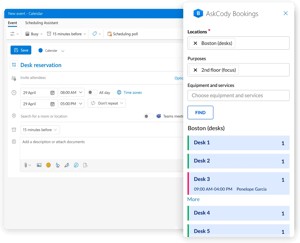
Create an event in Outlook for the day you want to work in the office and open the AskCody Bookings add-in. Choose the location and, if you like, a purpose such as a floor or a quiet zone, or the equipment you need. Select Find, add the desk you want, and save the event. The desk is booked in Microsoft Exchange and sits in your calendar next to the rest of your week.
The add-in remembers your last location, so the next booking takes seconds. It works in Outlook for Windows, Outlook for Mac and Outlook on the web, and your desk bookings travel with you in Outlook for iOS and Android.
Find a desk on the map, next to your team
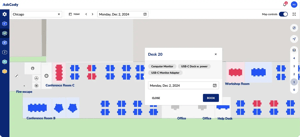
AskCody Maps turns your floor plans into an interactive map. Free desks show in blue, booked desks in red, and desks that cannot be booked in gray. Find your spot, click it, choose the time, and you are booked. The booking is saved in AskCody Maps and in your Outlook calendar at the same time.
See where your colleagues are working that day and book the desk next to them, or pick a date on the map to plan the week ahead.
What is the difference between a desk and a neighborhood in AskCody?
In AskCody, every bookable place is a workspace, and its capacity decides how it is booked.
- A single desk has capacity 1: one person per booking period. A second request for the same time is declined, just like a meeting room that is already booked.
- A neighborhood, such as a team area, a hot desk zone or a department, has a capacity above 1. People book a seat in the area rather than a specific desk, until it is full. This is how desk hoteling works in AskCody.
- Team days: add colleagues as attendees to reserve seats for the whole team, within the capacity of the workspace.
Free, not Busy
A desk booking sets your calendar status to Free, so colleagues still see you as available for meetings in Outlook and Microsoft Teams.
Minimum booking time
Your IT team can set a minimum duration per workspace in Exchange, for example a full day, and shorter requests are declined. It keeps the desks you have working for the days people actually come in.
Show free desks as people walk in
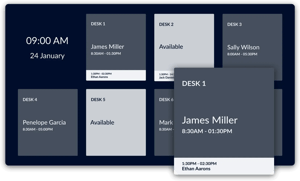
Dashboards put an airport-style overview on a screen at the entrance or on each floor: which desks are free and which are booked, updated in real time from the same bookings.
Visitors find their way too, and nobody has to open a laptop to see where there is room today.
Fast to set up, simple to maintain
Desks in AskCody are workspaces in Microsoft Exchange, the resource type Microsoft introduced for desks and flexible spaces. Your IT team sets the capacity once in Exchange, and AskCody does the rest.
- Add desks in two steps: add the Exchange calendar to AskCody, then set it up as a resource in the AskCody Admin Center. Adding or removing a desk later follows the same two steps.
- Decide who books what: resource groups mapped to Entra ID security groups decide who sees which desks in the AskCody Bookings add-in. Desks outside a group are open to everyone.
- Sign in with Microsoft: single sign-on with Entra ID for the AskCody Portal.
One system, not two
Every booking lives in Microsoft Exchange, so Outlook, AskCody Maps, Dashboards and Insights all show the same desks and the same bookings. There is no separate desk system to keep in sync, and nothing new for employees to learn outside Outlook.
Included in the AskCody Platform
Desk booking is part of the AskCody Platform, from $5,149 per year, including 10 workspaces, 5 meeting rooms and 1 reception. A workspace is one license, whether it is a single desk or a neighborhood with 20 seats. See pricing
Booking meeting rooms too? Same add-in, same calendar. See meeting room booking, or welcome guests with visitor management.
See how your desks are really used
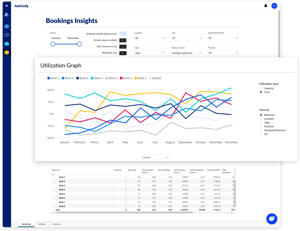
Insights shows how desks and workspaces are booked over time: utilization per desk, type and location, and the booking patterns behind your busiest days. Built on Microsoft Power BI and available in the AskCody Portal.
Combine desk bookings with insights on meeting rooms to decide how much office you need, based on data rather than gut feeling.
Made to empower you
Hear how IT, workplace and conference services teams run bookings with AskCody
Henry needs us to be user-friendly
"The pilot helped us understand just how much time we could give back to the attorneys and assistants and the price of that time. The POC helped us actively compare the cost of the solution, and the ease it was bringing to the cumbersome process we had before. My best advice is to try it. You will see quickly that the ease of use, ease of management, and overall time savings are worth it."

Nabil needs us to be integrated in Outlook
"The AskCody Outlook add-ins provide us capabilities to easily book rooms, request services, and manage visitors from Outlook while linking them with the Outlook calendar invitation."
![]()
Susann needs us to support productivity
"We're finding that our secretaries may have been managing two or three attorneys and partners before. Now they're managing maybe five or six. It's only possible to manage that increased workload because they can handle everything in one spot with AskCody."
Read the Eversheds Sutherland case study
Common questions about
desk booking in AskCody
Create an event in Outlook for the time you want to work in the office, open the AskCody Bookings add-in, choose your location and any purpose or equipment, and select Find. Add the desk you want and save the event. The desk is booked in Microsoft Exchange and shows in your calendar.
The add-in works in Outlook for Windows, Outlook for Mac and Outlook on the web. See how to use the AskCody Bookings add-in.
Yes. AskCody Maps shows where your colleagues are working that day, so you can book the free desk next to them. In a neighborhood with a capacity above 1, you can also add your colleagues as attendees and reserve seats for the whole team, within the capacity of the area.
No. A desk booking sets your calendar status to Free, so colleagues still see you as available for meetings in Outlook and Microsoft Teams. Meeting room bookings show as Busy as usual.
Both are workspaces in AskCody, and capacity is the difference. A single desk has capacity 1, so only one person can book it for a given time. A neighborhood, such as a team area or a hot desk zone, has a higher capacity: if the capacity is 10, 10 people can book a seat in it at the same time, and the 11th request is declined because the area is full.
That makes neighborhoods a simple way to run desk hoteling: people book a seat in the right area instead of a specific desk. Learn how desks and workspaces work.
Yes, in Outlook for iOS and Android. Every desk is a workspace in Microsoft Exchange, so it can be booked from Outlook on the phone as well as on the desktop, and every desk booking is an event in your Outlook calendar wherever you open it.
The AskCody Bookings add-in, with its search and filters, works in Outlook for Windows, Outlook for Mac and Outlook on the web.
Yes. In the AskCody Admin Center, you put desks into resource groups mapped to Entra ID security groups. Only members of those groups see the desks in the AskCody Bookings add-in. Desks that are not in a resource group are open to everyone in the organization. See how to restrict who can book rooms and desks.
Each desk or neighborhood is a resource mailbox in Exchange with the type Workspace. Your IT team sets the capacity to be enforced and, if you want one, a minimum booking duration. Then you add the calendar to AskCody and set it up as a resource. See how to set up desks and workspaces.
No. Desk booking works in Outlook and AskCody Maps, with no sensors or devices at the desks. We recommend labeling each desk, for example Desk 20, so people can find the one they booked. If you want a screen at the entrance, Dashboards show free and booked desks in real time.
Yes. You can use Microsoft Entra ID single sign-on for a convenient and secure login to the AskCody Portal, so users sign in with their Microsoft account. See the requirements for Microsoft single sign-on.
Desk booking is included in the AskCody Platform, from $5,149 per year, including 10 workspaces, 5 meeting rooms and 1 reception. You can add more workspace licenses as you grow. One workspace is one license, whether it is a single desk or a neighborhood with many seats. See pricing.
Yes, natively.
AskCody is natively integrated with Microsoft Exchange, Microsoft 365 and Outlook. There are no manual processes, outdated third-party tools, unintegrated SharePoint sites or paper-based booking. Everything works inside the familiar Outlook interface, built on modern integrations into Exchange and on Microsoft Azure.
And Microsoft Teams? AskCody is built into Outlook and Exchange, so every Microsoft Teams meeting gets the right room, services and visitor setup, with no extra app to deploy. Desk bookings show as Free, so your availability in Teams is not affected.
Bookings always stay in Microsoft Exchange: no middle layer and no duplicate system of record. See how AskCody integrates with Microsoft 365.
See desk booking in your own Outlook
Book a demo and see how Outlook, the floor plan and your team's desks come together in one booking. Desk booking is included in the AskCody Platform, from $5,149 per year.
